Tony Stark - Animatronics Face

We created an animatronic face of Tony Stark for our ME411 class at UIC. The animatronic face is interactive and reacts to both motion and touch stimuli. When the ultrasonic sensor detects motion, Tony Stark's eyes and mouth move, and a dialogue starts playing. When the touch sensor is activated, Tony Stark's heart lights up and the Iron Man mask drops down. As the heart is lighting up and the mask is coming down, a dialogue between Jarvis and Tony plays, followed by a dialogue between Captain America and Tony.
Supplies

Most of the sensors, actuators, and wires were included in the Arduino kit. The touch sensor was purchased from an online vendor. Kit used: Elegoo UNO R3 Super Starter Kit
Frame(Supporting Structure)


The face, the electronics, and the joints were housed inside a frame made from a cardboard box. This provides a sturdy structure that does not shake or disturb the wiring when the motors and joints move. Holes were carved into the box for the eyes and mouth. The frame is open from the back to provide easy access to the Arduino. Inside the frame, there is an L-shaped polystyrene block that supports the servo motors for the mouth and eye movements. There is also a flat piece of cardboard on which both Arduino boards are placed. The breadboards are placed below this sheet or cardboard.
Actuators


To minimize costs, the actuators provided in the Arduino kit were preferred. Two servo motors and one stepper motor were utilized. Since the project uses two Arduinos, one of which controls the two servo motors and the other controls the stepper motor. The motors are mounted directly onto the frame and sub-frame structures (as shown in the images, which indicate their respective mounting locations). The servo motor for the eyes was coded to sweep between 0 and 5 degrees. The servo motor for the mouth was coded to sweep between 0 and 10 degrees. The stepper motor was programmed to move from 0 to 90 degrees and back to 0 degrees.
Joint Design


Once we confirmed our actuators, we had to design joints to move the cutouts of the eyes and mouth. The joints were designed in SolidWorks and were 3D printed. A T-shaped joint was created to allow the eyes to move horizontally. The mouth cutout was attached to a joint with a thin, rectangular stem and a larger, rectangular slab. A long bar with a hole for the stepper motor pin was created to support the mask that drops down. The joints were secured onto the motors using strong tape.
Note: All units in the Solidworks image are in MMGS.
Sensors


The project's challenge was to integrate two interactions into the animatronics. Based on our actuator choice, we decided to use an ultrasonic distance sensor and a touch sensor. The ultrasonic sensor triggers the code when the distance between it and a human (hands, fingers, or any object in front) is less than 5cm. The touch sensor, as the name suggests, gets triggered when it is touched. The ultrasonic sensor is located on the left-hand side of the frame, and the touch sensor is on the right-hand side. They are controlled by 2 separate Arduinos.
Power and Circuit

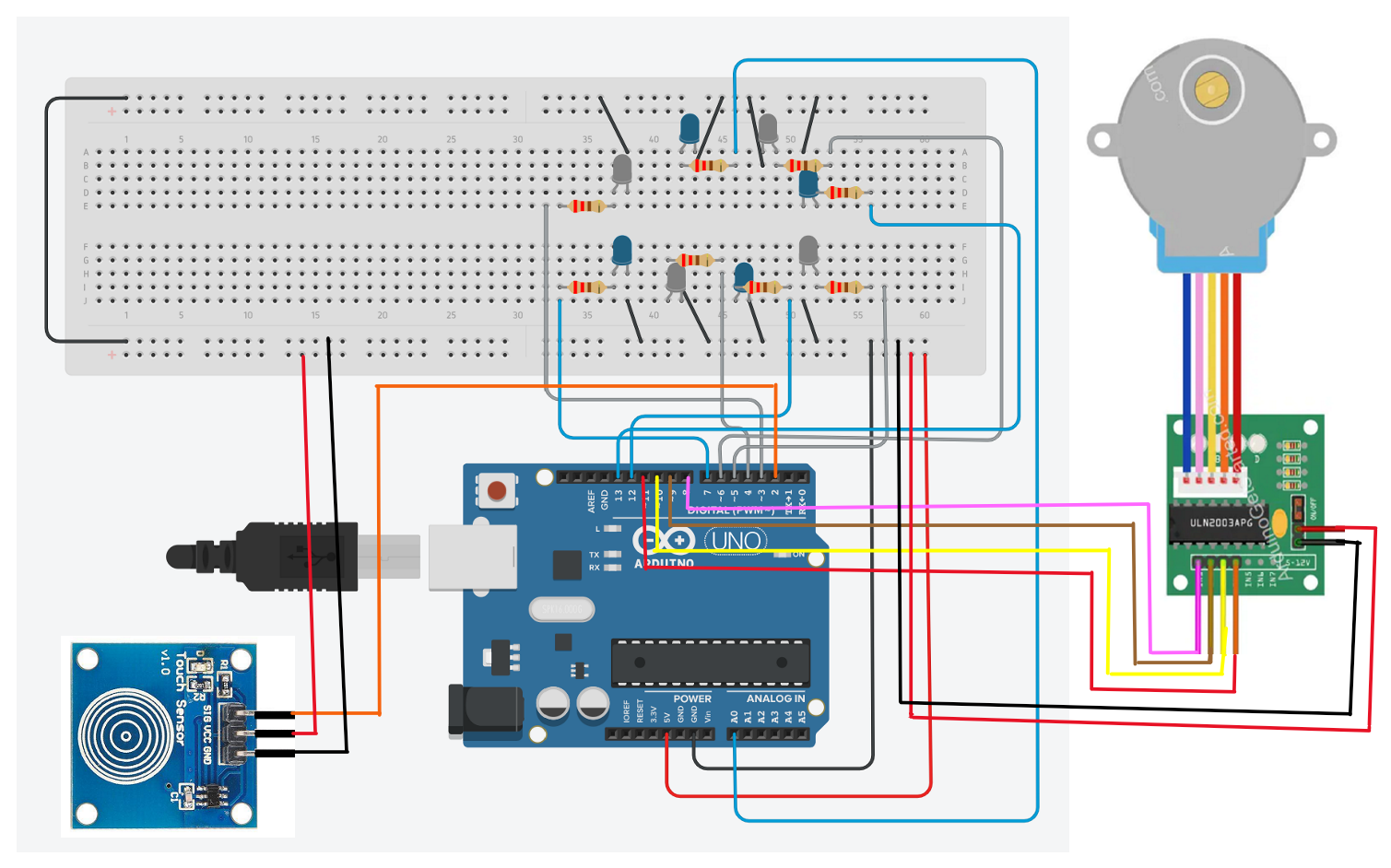
The circuit diagram for both the Arduinos can be seen above. The Arduinos were connected and powered by laptops. The laptop speakers were used to play the respective audios.
Programming and Algorithm Overview
The code for the Arduinos can be viewed using the attached GitHub link
GitHub: https://github.com/ani-vish-ME411/ME411_Fall2025_Tony_Stark
Overview:
1) When the ultrasonic sensor detects your hand within 5 cm:
a. The Arduino sends a trigger signal to the Python script, which then plays the corresponding audio dialogue.
b. The servo motors controlling the eyes and mouth begin their movement sequence.
2) When the touch sensor detects your touch:
a. The Arduino sends a trigger signal to the Python script, which then plays the appropriate audio dialogue.
b. The LEDs beneath Tony Stark’s arc reactor (heart) illuminate.
c. The stepper motor activates and lowers the Iron Man mask.
Lessons Learnt
Lessons:
- The alignment of the servo motors is crucial. A misalignment causes the cutouts to go out of view.
- Using separate Arduinos helps distribute tasks, but this results in the use of two laptops.
- Using lightweight materials reduces the load on the motors.
Future Improvements:
- Combine both sensor interactions into one Arduino.
- Make a structure similar to the face of Tony Stark using 3D printed parts.
- Integrate a speaker into the circuit using an audio amplifier module to remove the dependence on the laptop speaker.
Final Product


Working Demo: https://youtu.be/D60zMX0ezAE
Instructables Link: https://www.instructables.com/Tony-Stark-Animatronics-Face/