The World State - a Living Portrait of Planet Earth
by mondal3011 in Design > Art
72 Views, 3 Favorites, 0 Comments
The World State - a Living Portrait of Planet Earth
.png)


I’ve always been fascinated by the intersection of the physical world and the digital one. We live in this massive, world, but most of the time, we only see our little corner of it. I wanted to build something that could zoom out and capture the whole picture as a piece of art that makes you feel the current state of the world.
This idea hit me when I was thinking about how much data is constantly flowing around us. Planes are taking off, markets are moving, the atmosphere is shifting, and millions of news stories are breaking every second. What if I could take all that chaotic energy and freeze it into a single image?
I didn't want to just type a prompt into an AI generator. I wanted the art to be real. I wanted the colors to come from the actual season, the turbulence to come from market volatility, and the texture to come from the atmosphere itself. This is no AI generated art. Just pure data and math.
So, I created this website where you can press this giant button and the live state of the earth with all the chaos and things happening will be instantly captured into this beautiful looking piece of art. Every single line, every color and every grain of paint is from data from Earth. Nothing is random, all the data is in the artwork. Imagine capturing the state of the world when a new member of the family is born, when you proposed a loved one, when you get your first job, etc. And have it framed on your wall as a memory. That would be so cool!
Check it out here: The World State Project
Supplies
Software
A python editor (Visual Studio code)
Somewhere to host the site (Github) - Optional
Hardware
Scissors/Xacto Knife
A picture frame (A4/A3) - I used IKEA ones
Other stuff
Cellophane tape
Glue
You also need to get the art printed in matte poster paper
Making Art From Code Look Like Nature
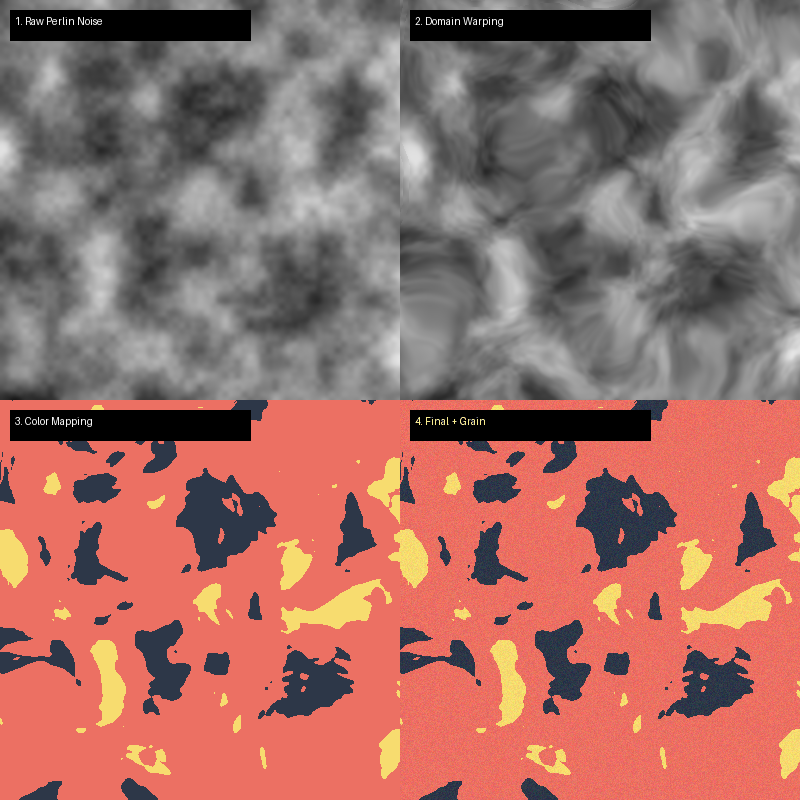


One of the biggest struggles in creative coding is fighting the "digital" look. Computers love perfection. They love straight lines, exact coordinates, and solid colors. Nature, on the other hand, is messy. It flows, it has texture, and nothing is ever perfectly straight.
When I started this project, my first attempts like screensavers from the 90s. They were too clean, too mathematical.
Perlin Noise & Flow Fields
To get that organic feel, I turned to an algorithm invented in the 80s for the movie Tron: Perlin Noise.
Unlike random noise (which looks like TV static), Perlin noise is "smoothly" random. If you pick a point on a noise map, the point next to it will be similar, but slightly different. It creates smooth hills and valleys instead of jagged spikes.
I used this to create a Flow Field. Imagine dropping thousands of leaves into a river. The water currents push them along specific paths. In my code, Perlin noise acts as the "current."
- The Grid: I divide the canvas into a grid.
- The Angle: For every point on that grid, I ask Perlin noise for an angle.
- The Flow: When I draw a line, it follows these angles, twisting and turning just like a river or a gust of wind.
This creates those beautiful, liquid distortions that look like marbled paper or oil on water. I also added grain from atmospheric data to give it a more natural feel.
Here's a nice video explaining Perlin Noise.
Choosing the Earth's Parameters
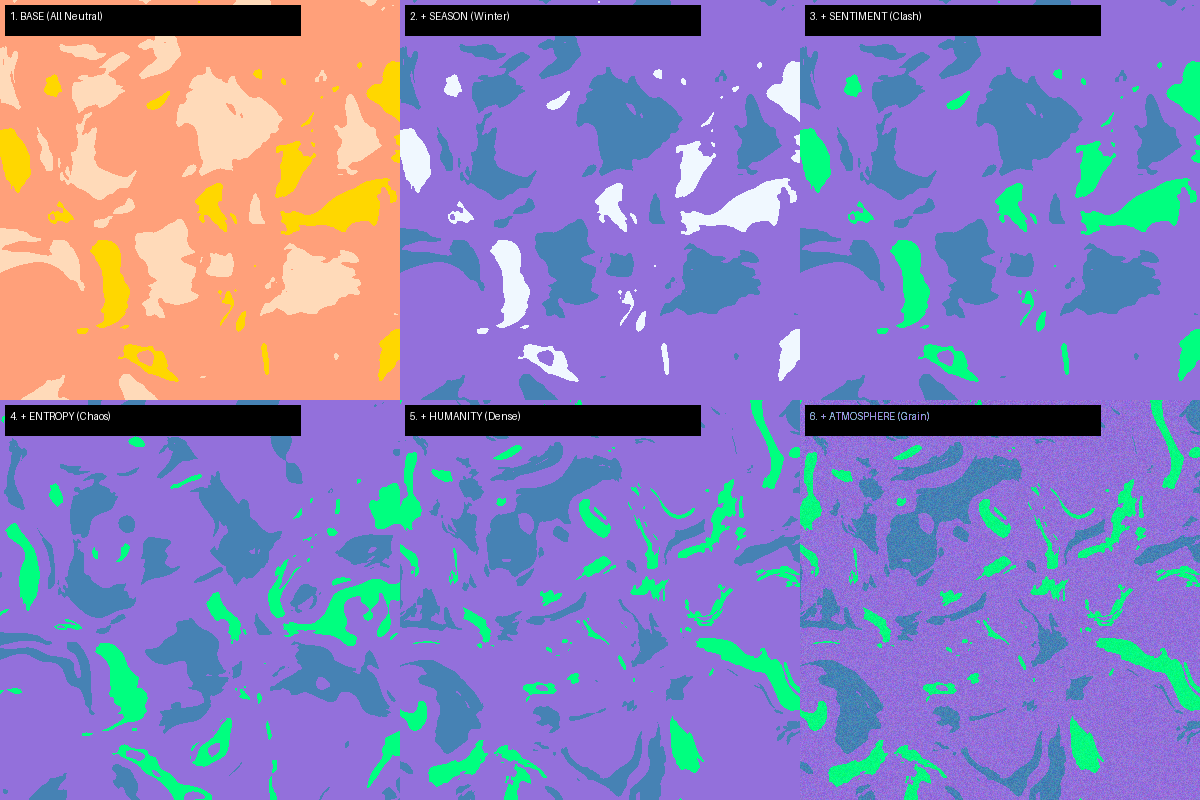

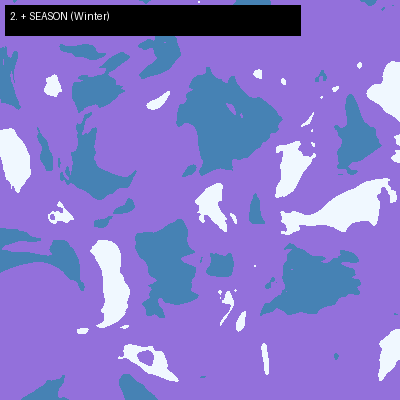
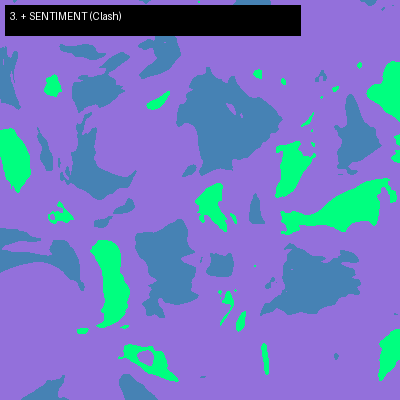
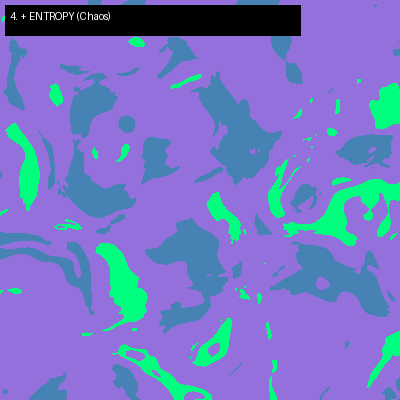


This was the hardest part of the project. There are millions of data points about our world—weather, traffic, tweets, earthquakes, ocean tides. I had to narrow it down to a few key "vitals" that truly represent the state of the planet.
I decided on 7 Core Parameters. Each one maps to a specific visual element of the art.
- SEASON
- The Data: The current day of the year (0.0 to 1.0).
- The Effect: This sets the Background Color.
- Winter: Deep blues and cool tones.
- Summer: Warm oranges and golds.
- Spring: Fresh greens and teals.
- SENTIMENT
- The Data: A sentiment analysis of the top 10 global news headlines. Is the world feeling hopeful (1.0) or anxious (0.0)?
- The Effect: This controls the Color Palette.
- High Sentiment: Harmonious, analogous colors (e.g., Blue & Teal).
- Low Sentiment: High-contrast, clashing "Neon" colors (e.g., Black & Acid Green).
- ENTROPY
- The Data: A weighted score of Market Volatility (VIX Index) and Crypto fluctuations.
- The Effect: This controls the Distortion.
- Calm Markets: Smooth, gentle curves.
- High Volatility: Twisted, knotted, turbulent swirls.
- HUMANITY
- The Data: Live estimated global population growth.
- The Effect: This controls the Zoom Level.
- More People: The camera zooms out, showing more intricate, dense bands of color (a crowded world).
- Less People: The camera zooms in, showing large, abstract shapes.
- ATMOSPHERE
- The Data: Global CO2 levels and average temperature
- The Effect: This controls the Grain.
- Cleaner Air: Crisp, sharp vector-like edges.
- Higher CO2: Heavier, grittier noise texture, making the image look "fuzzier" or polluted.
- ASCENSION
- The Data: The number of people in space (ISS) + the number of planes in the sky right now.
- The Effect: This subtly influences the Brightness of the highlight colors.
- COSMIC
- The Data: The relative position of the Sun and Moon (Moon Phase).
- The Effect: This acts as a random seed modifier, ensuring the base geometry shifts with the lunar cycle.
By mapping these parameters to visual rules, we make sure the art isn't just random. If the art looks "angry" (dark, twisted, gritty), it's because the world is angry (volatile markets, bad news, high pollution). If it looks "peaceful" (smooth, pastel, clean), the world is having a good day.
Capturing the World State Data


Now that we know what data we want, we need a way to get it. I wrote a Python script (update_world_state.py) that acts as a "World State Sensor." It wakes up, "scans the Earth", and saves the results.
1. The Strategy: Normalization
The biggest technical challenge was that every data source speaks a different language:
- CO2 levels are in ppm (e.g., 420.5)
- Population is in billions (e.g., 8,000,000,000)
- Market volatility is an index (e.g., 15.4)
To make these usable for generative art, I had to normalize everything. The script converts every single value into a floating-point number between 0.0 and 1.0.
- 0.0 = Minimum / Calm / Low
- 1.0 = Maximum / Chaos / High
This means my art engine doesn't need to know about stocks or carbon ppm—it just sees p_entropy: 0.8 and knows to draw chaotic lines.
2. The Code Breakdown
Here are the key functions from the script:
A. Cosmic Alignment (get_cosmic_value)
I used the ephem library to calculate the moon's phase.
B. Market Entropy (get_entropy_value)
This function combines two volatility metrics: the VIX (Stock Market Fear Index) and Bitcoin's 24h change.
- It fetches the data using yfinance.
- It weighs them: 70% Stocks, 30% Crypto.
- If the markets are crashing, this value spikes towards 1.0.
C. Global Sentiment (get_sentiment_value)
This is the "AI Judge."
- The script scrapes headlines from BBC World and Al Jazeera RSS feeds.
- It sends these headlines to Google's Gemini 1.5 Flash API with a prompt: "Analyze the collective sentiment... on a scale of 0.0 (Apocalyptic) to 1.0 (Utopian)."
- The AI returns a single score, which becomes our p_sentiment.
D. Atmosphere & Humanity (Math Models)
Since real-time sensors for global CO2 and population don't have free public APIs, I built mathematical models based on historical data.
- CO2: Uses the Keeling Curve formula (base level + linear yearly trend + seasonal sine wave).
- Population: Uses a Linear Growth Model starting from a 2023 baseline (adding ~2.2 people per second).
3. The Output
Finally, the script packages all these normalized values into a single JSON file: world_data.json.
Turning Numbers Into Art


Once we have the data, we need to visualize it. This is where JavaScript takes over. I built a custom rendering engine using the HTML5 Canvas API to draw the art directly in the browser.
1. The "Master Pool" Color System
Instead of randomly picking colors (which often creates ugly, muddy results), I built a Curated Color Draft System.
- I defined three pools of high-quality colors: Dark (Midnight Blue, Deep Purple), Vibrant (Neon Orange, Cyber Green), and Light (Cream, Mint).
- Based on the data, the code "drafts" a unique 5-color palette for each session.
- Winter Season? It forces a Dark background.
- High Entropy? It picks two extra Vibrant accent colors.
- High Sentiment? It picks complementary Light colors for balance.
2. The Rendering Loop
The script iterates over every single pixel on the canvas (over 2 million pixels for a high-res print). For each pixel (x, y), it performs three steps:
A. Domain Warping (The Shape)
It feeds the coordinates into a Simplex Noise function. But before getting the value, it "pushes" the coordinates based on p_entropy.
This creates the liquid, swirling geometry. High entropy means stronger warping.
B. The "Analog" Grain (The Texture)
To avoid the flat look of digital art, I add a tiny random offset to every calculation based on p_atmosphere.
This acts like "dithering" in printing. At the edge where Blue meets Orange, the pixels don't switch instantly—they mix and scatter, creating a soft, grainy transition that looks like ink on paper.
C. Color Mapping
Finally, the noise value (0.0 to 1.0) determines which color from our drafted palette is used.
- 0.0 - 0.3 -> Background Color
- 0.3 - 0.5 -> Main Color
- 0.5 - 1.0 -> Highlight Color
This logic runs instantly when you press the button, generating a completely unique, high-resolution image that reflects the exact state of the world at that moment.
You can find all the files in my github repo
Putting It All Together


The final puzzle piece was automation. I didn't want to manually run scripts every day; I wanted this art to be alive, breathing on its own.
I hosted the project on GitHub Pages, which is free and perfect for static sites. But GitHub Pages only hosts HTML/JS—it can't run Python scripts. So, how do we update the data?
The Solution: GitHub Actions
I set up a GitHub Action (a cloud automation tool) that acts as the heartbeat of the project.
- The Trigger: Every 30 minutes, a "cron job" wakes up a virtual machine in GitHub's cloud.
- The Task: It installs Python, runs my update_world_state.py script, and fetches the fresh data.
- The Save: It commits the new world_data.json file back to the repository.
- The Update: The website automatically detects the file change and serves the new data to the next visitor.
This architecture is powerful because it is 100% free and highly scalable. By updating every 30 minutes instead of "on-click," I avoid hitting API rate limits, ensuring the project stays online and stable forever.
Here's the hosted site: The World State Project
Printing and Framing


1. The Frame: IKEA RODALM
I chose the classic IKEA RODALM frame. It's affordable, minimalist, and deep-set. The depth gives the artwork shadow and presence on the wall.
2. The Paper
For generative art, especially art with noise/grain, paper choice is important. Avoid Glossy. Glossy paper reflects light (glare) and makes the art look like a cheap photo poster. It kills the subtle "grain" texture we worked so hard to code. Choose Matte. I printed on 230 GSM Archival Matte Paper.
3. The Print Settings
I exported the image from my website and printed
When framed, the "digital" origin disappears. The grain looks like physical texture. The colors look like silk-screen ink. It hangs on my wall not just as a pretty picture, but as a frozen memory of exactly what the Earth was feeling at 14:02 UTC on December 8th, 2025.
Final Thoughts


Building "The World State" changed how I look at data. We usually treat data as something cold, numbers on a spreadsheet, stock tickers, temperature graphs. But when you weave those numbers together, they tell a story.
This project isn't just about Python scripts or JavaScript flow fields. It's about connection. It connects the cold vacuum of space (astronauts) to the heat of the markets (volatility). It connects the movement of the moon to the movement of global news. It proves that our world is a single, interconnected system, and that system is constantly creating its own abstract art, if we just build the tools to see it.
I hope this project inspires you to look at APIs not just as sources of information, but as sources of inspiration. What does your local traffic look like? What is the color of your city's air quality?
The code is open source. The data is live. The rest is up to you :)