TempGun Pro


Greetings, everyone, and welcome back. Meet TempGun Pro, a handheld open-source infrared temperature capture gun powered by ESP32 C6 1.47 display, and a custom circuit.
The aim behind this project was straightforward. I needed a temperature meter to measure different things while working with electronics and 3D printing. I already had a Fluke temperature gun, but when it stopped working, I needed an urgent alternative, something cheaper that could still perform almost as well.
The best part was how easy it was to build. I reused my earlier Medic Mini project, an ESP32‑C6 dev board with a screen, buttons, and battery circuit. I just added an MLX90614 infrared temperature sensor to the GPIO pins, wrote up a quick code, made an enclosure, and the project was ready.
This Instructables walks you through the process in a few easy steps.
Supplies
These were the materials used in this project:
- Medic Mini Custom PCB (provided by PCBWAY)
- Waveshare ESP32-C6 1.47-Inch LCD Dev Module
- MLX90614 Infrared Temperature Sensor
- IP5306
- 10 uF Capacitors
- Push Buttons 4x4 Size
- Push Buttons 6x6 Size
- Connecting wires
- 3D-Printed Parts
- 1uH SMD Inductor
- 10K Resistors
- 3.7V 600mAh LiPo Cell
- M2 Screws
Medic Mini Mainboard


We built TempGun Pro by reusing the Medic Mini main board with just a few small modifications and add‑ons. To recap, Medic Mini was a handheld self‑diagnostic tool powered by an ESP32‑C6 and a 1.47" Waveshare display, all packed into a custom PCB and 3D‑printed enclosure. It featured three tactile buttons to guide users through symptom checks and offered quick suggestions without needing apps or internet.
The interface was straightforward: one symptom at a time, answered with Yes, No, or Not Sure. Based on those inputs, the device provided a basic diagnostic suggestion, making health checks fast and accessible.
I designed Medic Mini as a compact, standalone tool that is easy to use and built entirely from scratch, combining hardware, logic, and design into one project.
You can check out more about Medic Mini from its Instructables page.
MLX90614


The MLX90614 is a digital infrared thermometer sensor developed by Melexis. Unlike traditional sensors that require physical contact, it detects infrared radiation emitted by objects and converts it into temperature readings. This makes it ideal for applications like handheld thermometers, industrial monitoring, and even medical devices.
It's a 3.3V device and uses I2C for communication.
The MLX90614 uses the principle of black‑body radiation. Every object emits infrared energy proportional to its temperature. The sensor’s thermopile detector captures this radiation, and an internal signal processor converts it into a digital temperature value.
You can check out the MLX90614 from below link
PCB Design


This is a schematic of the Medic Mini PCB design, which is split into two main sections. First, we built the schematic around the Waveshare ESP32-C6 Dev Board, which connects to three tactile buttons for user input. These buttons are wired to GPIO9, GPIO18, and GPIO19, with each switch also tied to GND. When a button is pressed, the corresponding GPIO pin is pulled low, registering a valid input. We will be later using GPIO18 as a temperature reading button! and will be using GPIO4 and GPIO5 as I2C pins.
The second section handles power delivery. We use the IP5306 power management IC, which boosts the 3.7V from a lithium-ion cell to a stable 5V at 2A, enough to reliably power the ESP32 board and display. The module also includes a charging status LED; it blinks while charging and stays solid once the battery is full. Built-in features like overcharge protection, low battery cutoff, and full charge cutoff help extend battery life and prevent damage from unsafe voltage levels.
Using the dimensions from the CAD model, we prepared the PCB outline and then placed the buttons in their mounting positions as specified in the design. We did the same for the Waveshare ESP32 board, the Type-C port, and the mounting holes. The rest of the components were placed wherever we found adequate space, and then we connected the tracks and finalized the board.
After completing the PCB design, we exported the Gerber data and shared it with a PCB manufacturer to get samples made.
PCBWAY


Once the board design was finalized, I opted for a purple solder mask with white silkscreen and uploaded the Gerber files to PCBWay’s quote page for fabrication.
While I typically go with a white or black solder mask for most of my builds, this time I decided to try out PCBWay’s Purple option just for a change. The order was placed smoothly, and the PCBs arrived within a week.
The quality was excellent—clean finish, sharp silkscreen, and everything matched the design perfectly.
Over the past ten years, PCBWay has distinguished themselves by providing outstanding PCB manufacturing and assembly services, becoming a trusted partner for countless engineers and designers worldwide.
Also, PCBWay is organizing the PCBWay 8th Project Design Contest, a global event that invites makers, engineers, and innovators to showcase their most creative builds. With categories in Electronics, Mechanical, and AIoT, it’s a great opportunity to share your work, connect with the community, and compete for exciting prizes.
You guys can check out PCBWAY if you want great PCB service at an affordable rate.
Medic Mini PCB Edit


For this build, we reused the Medic Mini circuit but modified the button layout.
- The tactile push buttons connected to GPIO9 and GPIO19 were removed, since they weren’t needed.
- The center button, wired to GPIO18, was kept and repurposed as the temperature trigger button.
TEMPERATURE SENSOR WIRING


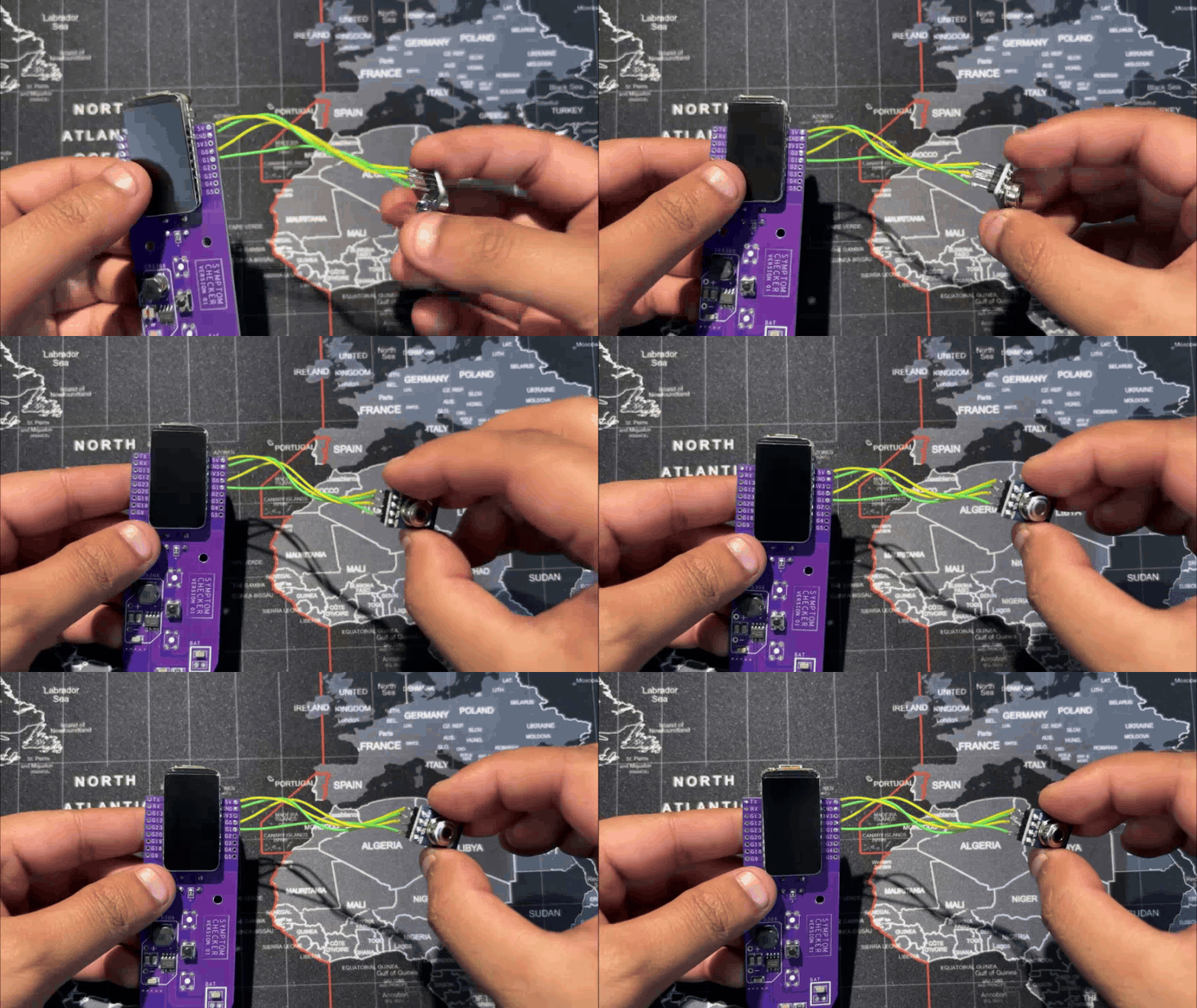
For wiring, we use four connecting wires.
- GPIO4 and GPIO5 of the ESP32‑C6 (SDA and SCL) are linked to the I2C pins of the MLX90614 sensor.
- VCC is connected to the 3.3V pin, and GND goes to ground.
This completes the basic four‑wire setup needed to power the sensor and enable communication with the Medic Mini board.
CODE

This is the code we prepared for our TempGun Pro, and it's a simple one; let me explain.
First, we are utilizing the below three libraries.
The Arduino GFX handles drawing graphics on the Waveshare ST7789 display; the Wire library handles the I2C communication, and Adafruit MLX90614 provides functions to handle the temperature sensor.
We now added the pin definitions.
This section defines pins for the Waveshare Display, the MLX Sensor I2C Pins, and the Button Pin.
Using the above section, we basically create global objects, which include the MLX90614 sensor object, the SPI bus, and the ST7789 display object.
This section defines three states: READY, MEASURING, and DISPLAY RESULT. This keeps the code organized and avoids messy logic.
Because we are using a button in this project, we had to use debouncing logic, which prevents false triggers and ensures only one clean button press.
We next added a few drawing functions; these functions include drawReadyScreen(), drawMeasuringScreen(), drawResultScreen(), and drawSensorErrorScreen().
In the setup function, Serial is initialized along with I2C, Sensor, Display, and Button.
If the sensor isn't found, an error will be seen on screen, and the temp gun will stop working.
The loop does three things. It checks if the button is pressed, and if pressed, it goes from Ready to Measuring. In measuring, it waits 500ms, then reads the temperature and shows it. In Display Result, the reading stays on screen for 5 seconds, then it goes back to Ready and repeats.
Enclosure Design


Using the design of our original Medic Mini, we kept the overall idea but simplified the front. The three buttons were removed and replaced with a single elliptical‑shaped button with an actuator that presses the switch connected to GPIO18. The front enclosure remains almost the same, while the back enclosure was completely redesigned. A circular section was added to hold the temperature sensor securely and give the device a temperature gun‑like design.
Overall, the build consists of a front and back enclosure, along with two switch actuators, one for taking temperature readings and one for power ON/OFF.
Both enclosures were printed in high‑speed PLA on the Anycubic Kobra S1, while the switch actuators were printed in transparent PLA.
ASSEMBLY PROCESS


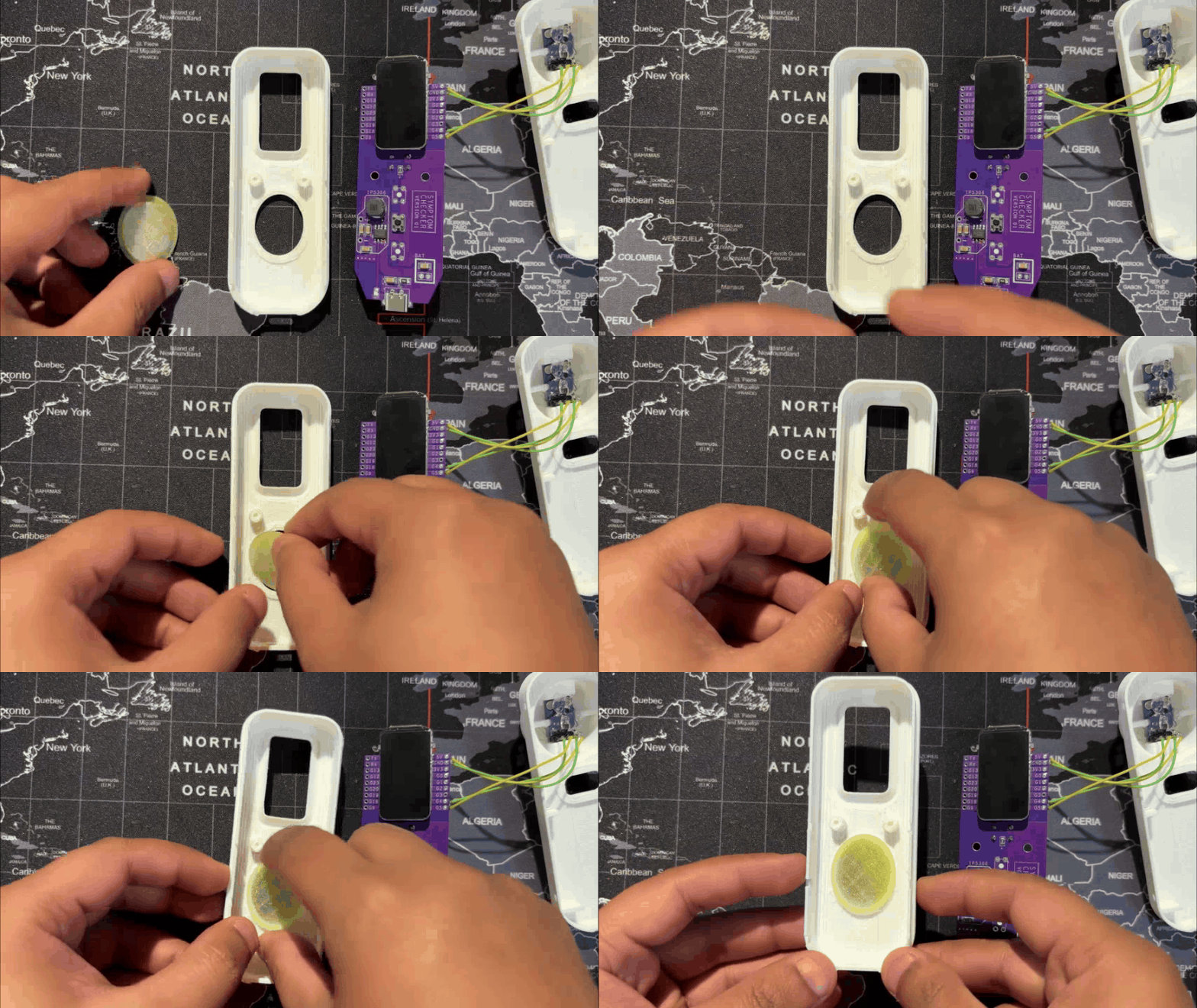


- We start the assembly process by adding the MLX90614 sensor in its location in the back enclosure, then use hot glue to secure it in place.
- Next, in the front enclosure, we add the switch actuator in position.
- The main circuit is then flipped over and placed in its slot in the front enclosure, secured with two M2 screws.
- The switch actuator for the power ON/OFF button is placed in its position in the back enclosure, after which the front and back enclosures are joined together to close the device.
- Finally, using the four mounting holes provided around the perimeter of the design, we insert M2 screws to secure the front and back enclosures, completing the assembly process.
TESTING


For testing, we started with a cold glass of Coke and measured the outer surface; it read 15.1°C.
Next, for a hot test, we brewed some black coffee and measured the mug’s outer surface from the same distance, which came out to 44.2°C.
With TempGun Pro, we can measure all kinds of everyday items. The MLX90614 sensor works best at close range, with an ideal measuring distance of 2–5 cm.
For longer‑range measurements, the setup can be upgraded to the MLX90640, which offers a wider capability for thermal detection.
Conclusion

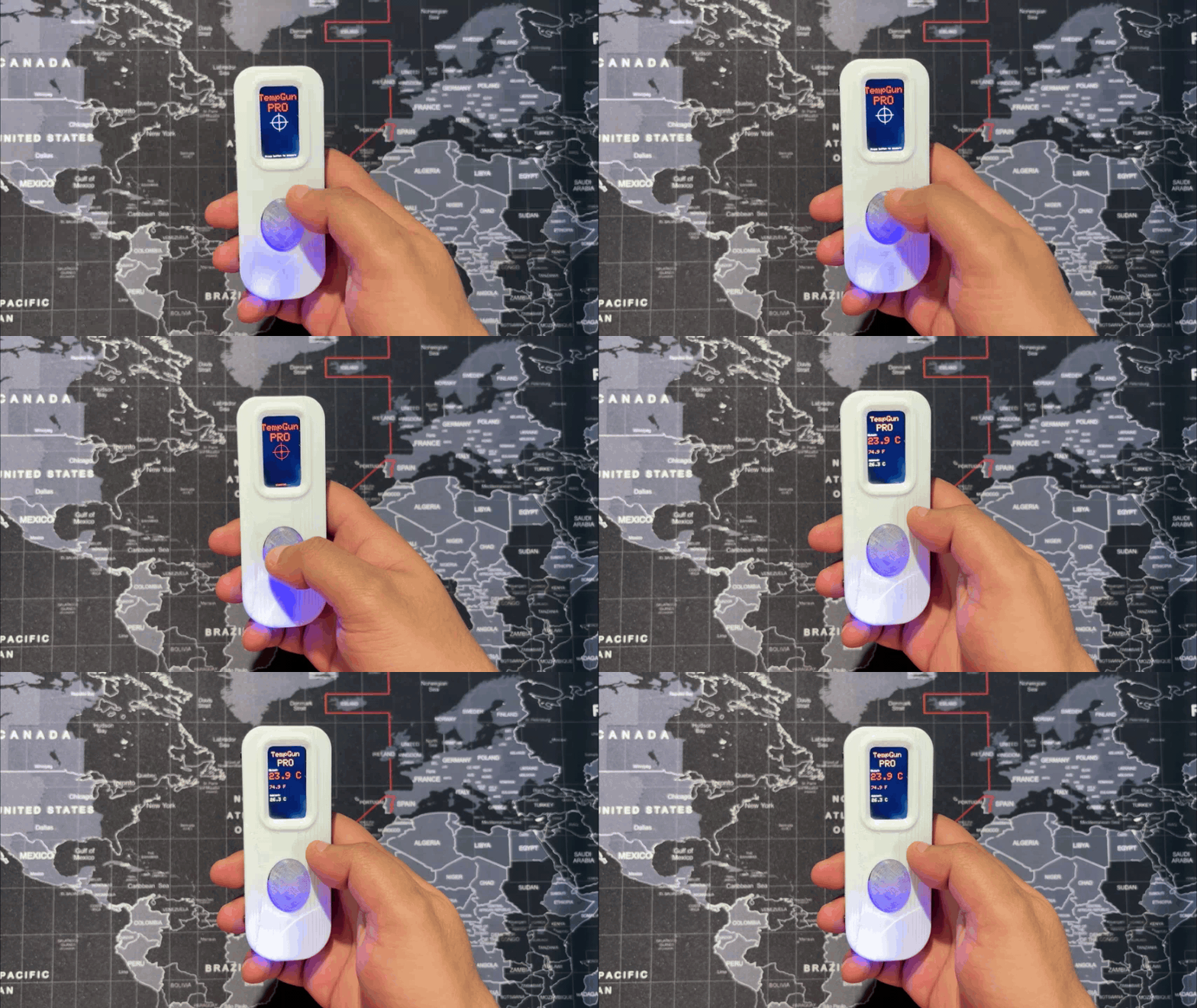


TempGun Pro is a portable, battery‑powered temperature gun that’s easy to carry and delivers accurate close‑range readings. It covers a wide range from –70°C to +380°C with about ±0.5°C tolerance, making it reliable for everyday use.
I now use it to check electronics, 3D printer beds, and other components during work, a perfect alternative while my Fluke is out for repair.
Overall, the project has been a success, and I’ve shared all related files so you can replicate it too. Just remember to give credit.
Thanks for reaching this far, and I will be back with a new project pretty soon.
Peace.