SnakeBoy – an Arduino-Powered Snake Game Console
by hamza18 in Circuits > Arduino
1358 Views, 9 Favorites, 0 Comments
SnakeBoy – an Arduino-Powered Snake Game Console


An Arduino-powered handheld console that brings the classic Snake game to life on a custom 32x8 LED matrix display.
This project has been created by the students Hamza and Andreea for the Creative Electronics course in the Beng Electronics Engineering module at the University of Málaga, School of Telecommunications.
For this project, we took inspiration from the work of For this project, we took inspiration from the work of Max Nelson, Luke Van Scherrenburg, and Sean Nussdorfer from the California State University Maritime Academy (View their Instructable here).
Supplies


Electronics:
- 1× Save Maker I (Arduino Leonardo-compatible)
- 1× MAX7219 32x8 LED matrices (cascaded)
- 1× joystick (with L3 push button)
- 4× tactile push buttons (for directional input)
- 1× red 5mm LED (status indicator)
- 1× buzzer
- Jumper wires
- 1x caoutchouc conductive button Pad (optional)
Power:
- 5V / 1A wire
Enclosure & Assembly:
- 3D printer + PLA filament (~150 g)
- Electronical tape (for securing all internal components)
- Silicone Gun Glue gun with glue sticks
3D Printing the Case


The case was designed in OpenSCAD for full parametric control.
Front Panel Includes:
- Precise window for 4×8×8 LED matrices (132×32 mm)
- Joystick hole (20 mm diameter) + L3 hole
- Four button holes (11.5 mm)
- LED indicator hole (5 mm)
- Buzzer opening (23 mm)
- USB Mini-B cutout on the left edge
- Cable exit on the right
Back Panel Includes:
- “SNAKE BOY” engraved text
- Four holes (3.2 mm)
- One vertical support for the Save Maker I board
You can download the OpenSCAD source file from my GitHub repository if you want to customize the enclosure
Arduino Code

SnakeBoy runs on an Arduino Leonardo with only 2.5KB of RAM, requiring extreme optimization. The snake can grow up to 256 segments (the full 32×8 grid), stored in uint8_t arrays to save every byte. All game logic uses bytes instead of ints, halving memory usage.
The code is structured in separate modules: snake logic, LED matrix display, input handling, sound, and status LED. A state machine manages the 8 game phases without delay(), keeping the interface responsive. The 4 MAX7219 matrices are controlled via the MD_MAX72XX library, with pixel-by-pixel rendering based on an in-memory virtual grid.
Key Optimizations
- Compressed grid: uint8_t grid[8][32] (only 256 bytes)
- Software debouncing for buttons and joystick
- Directional input buffer for precise controls
- EEPROM storage for high scores without memory wear
- Differential rendering: only changed pixels are updated
Modular Architecture
Each component has its own file:
- snake.cpp: Movement, collisions, food generation
- display.cpp: Animations, menus, scores (custom 7×5 font)
- inputs.cpp: Analog reading with low-pass filtering
- sound.cpp: 6 PWM melodies with volume control
- led.cpp: Non-blocking LED state machine
The result is a complete game in <15KB of flash, proving that with good architecture, even a limited microcontroller can deliver a rich, responsive gaming experience.
Electronics & Wiring


This phase is critical for the console's stability and performance. We use the Save Maker I (Leonardo compatible) as our core microcontroller. The assembly is structured to minimize wire clutter and component count by leveraging the board's internal features.
2.1 External Power Supply for the LED Matrix
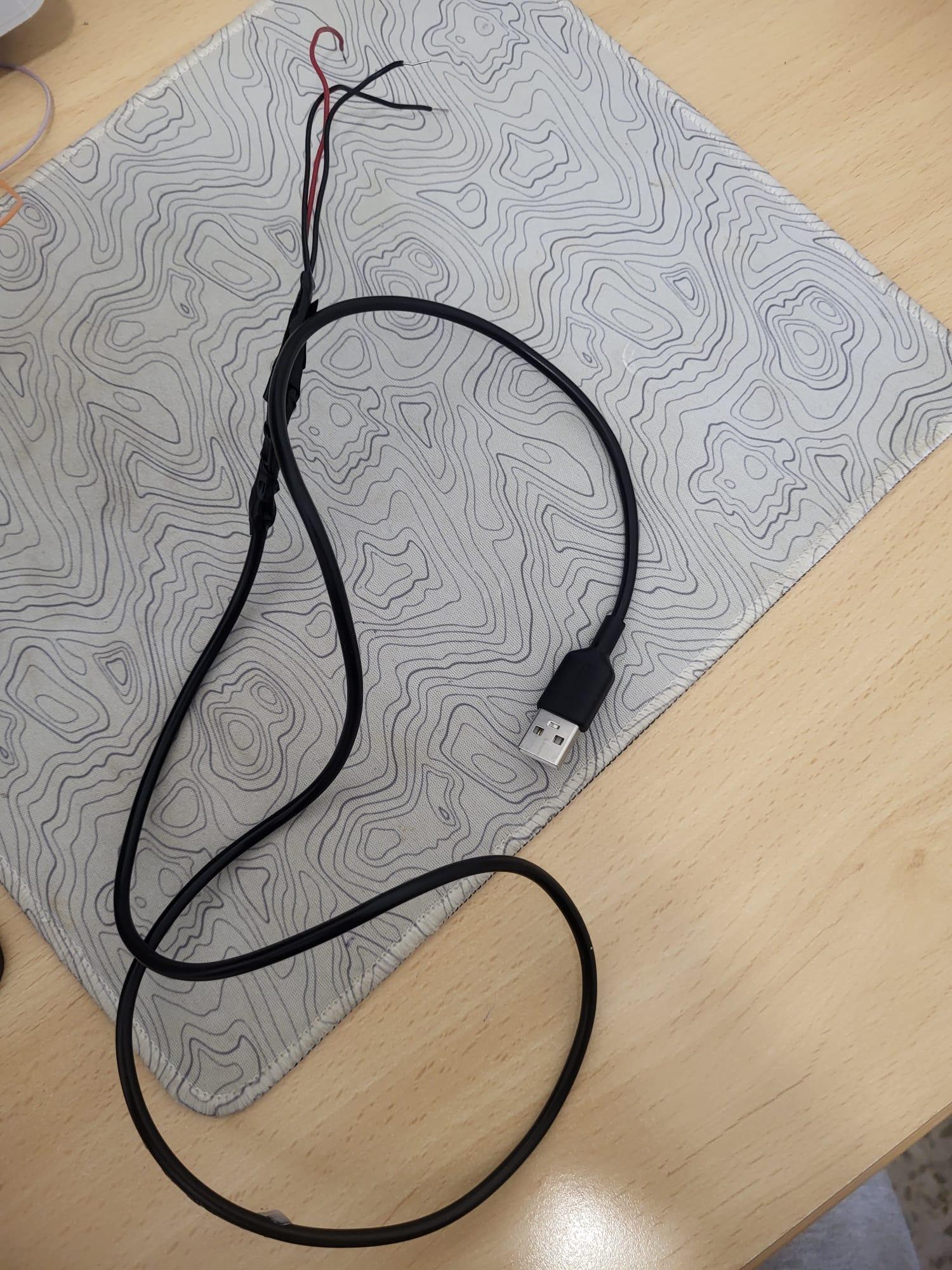
The MAX7219 32x8 LED Matrix draws significant current. The Save Maker I's 5V output is insufficient, so we use an external phone charger cable to power the system, preventing flickering and instability.
- Prepare the USB Cable:Cut the charging port end off a reliable USB cable (1m+ recommended). Isolate the red (+5V) and black (GND) wires.
- Solder +5V: Solder the USB's red wire to a single, robust wire that will connect to both the MAX7219 VCC.
- Solder the Split GND (Crucial Step): The USB's black wire (GND) must be soldered to two separate wires, creating a Y-junction. One connects to the MAX7219 GND, and the other connects to the arduino GND. Note: Both the matrix and the board must share a common ground with the external supply for proper data transmission.
- Isolation: Reinforce the splices with electrical tape or heat shrink tubing.
2.2 Assembling the Control Panel (Buttons, LED, Buzzer)
We use a small piece of PCB/perfboard for button mounting to create a structured and reliable control panel.
- PCB and Button Placement:Place the PCB on the inside of the front panel and solder the tactile buttons, using the 3D-printed holes for precise alignment.
- Shared Ground Line: Solder all GND pins of the buttons and the GND pin of the buzzer onto a single, common trace on the PCB. This efficient technique minimizes wiring and saves space.
- Button Feel: If using them, install the Silicone Conductive Rubber Pads over the button stems to improve the tactile response.
- Status LED (D7) as a Fixture: The Red Status LED (Digital Pin D7) is soldered last. Its pins pass through the holes of both the case and the PCB, helping to fix the button assembly in place. Warning: Ensure the LED is not pressing adjacent buttons permanently, which could lead to continuous button activation.
- Signal Wiring: Solder the individual signal wires from the PCB. You will need one wire for the common GND line, one for the buzzer signal, one for the LED VCC, and one for each button input (D3-D6).
2.3 Joystick Connection and Pinout
This project uses a repurposed PS4 Left Stick for a professional finish. This requires careful soldering to the internal pins. We rely on the Save Maker I's internal INPUT_PULLUP feature for all digital buttons (D2-D6), eliminating the need for external resistors.
PS4 Left Stick Pinouts (Advanced Method)
If you choose to use a standard Arduino joystick module (e.g., KY-023), simply connect its 5 pins (VCC, GND, VRx, VRy, SW) to the arduino I's corresponding pins (5V, GND, A0, A1, D2). For the PS4 stick, follow these connections:
2.4 Save Maker I Pinout List
The final connection map to the arduino is as follows:
Acknowledgement
This project wouldn't have become possible without the collaboration of Hamza and Andreea, our teachers Luis, Arcadio, and Paco. We are also grateful to the creators and developers of the libraries used. Thank you all and whoever has been involved in the development of this project.