Smart Arduino Hourglass

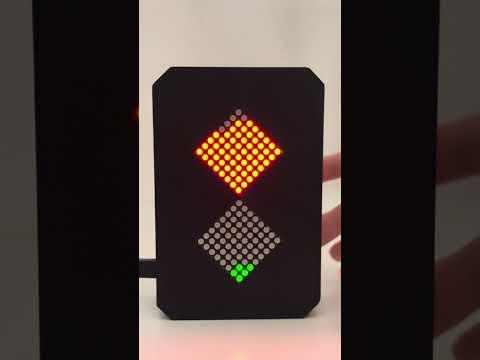
This project was developed as part of the course “Creative Electronics”,
Beng Electronics Engineering module at the University of Málaga, School of Telecommunications.
The project was designed and implemented by students Valeria Vladimirova Katovska Nikolova and Lidia López Ruiz.
This Smart Arduino Hourglass is an interactive digital reinterpretation of a traditional hourglass.
It simulates falling sand grains using two LED matrices synchronized with a real countdown timer.
The device reacts to orientation, includes sound feedback, and automatically starts after inactivity,
making it both functional and intuitive to use.
Supplies
Inspiration and Credits
This project is inspired by the Instructable “Arduino Hourglass”:
The original project presents a creative way to simulate an hourglass using LED matrices and an Arduino.
Our project builds upon this idea and significantly extends it by adding time synchronization,
orientation-based control, sound feedback, automatic start functionality, different LED colors,
and a redesigned physical structure.
Full credit goes to the original author for the initial concept and inspiration.
DIFERENCES FROM THE ORIGINAL PROJECT
Compared to the original Arduino Hourglass, this version introduces several improvements:
• Time-synchronized grain movement: the total countdown time is divided by 64 grains, ensuring the last grain falls exactly when the display reaches 00:00.
• 4-digit countdown display (MM:SS) using a TM1637 module.
• Orientation-based behavior using an accelerometer:
- Vertical position: running
- 90° / 270°: pause
- 180°: reset and restart
• Automatic start after 5 seconds of inactivity.
• Sound feedback on each falling grain and an alarm at the end of the countdown.
• Two LED matrices with different colors for better visual clarity.
• Redesigned physical shape inspired by a real hourglass.
• State-based software design (IDLE, RUNNING, PAUSED, FINISHED).
• Button-based time configuration and control (functionality described in Step 3).
HOW IT WORKS
The system is implemented using a state machine with four states:
IDLE, RUNNING, PAUSED, and FINISHED.
An accelerometer is used to detect the orientation of the hourglass and modify its behavior accordingly.
The falling grains are synchronized with the countdown timer, creating a realistic hourglass effect.
If no buttons are pressed for 5 seconds after setting the time, the countdown starts automatically.
This allows the hourglass to behave intuitively without requiring an explicit start button.
Orientation-Based Behavior:
The hourglass behavior is always evaluated relative to its initial starting position.
- When the device is in its initial vertical position (0°), the countdown runs normally.
- When the device is rotated approximately 90° or 270° relative to the initial position, the system enters a PAUSED state.
The countdown stops, and the remaining time is preserved.
- If the device is returned to its initial vertical position from a paused state, the countdown resumes from the same point.
- If the device is rotated 180° relative to the initial position, the system performs a full reset:
the countdown returns to 00:00, and the LED matrices are cleared.
Important note:
The system does not track cumulative 90° rotations.
All orientation changes are evaluated with respect to the initial starting position.
Button Functionality:
Button 1:
- Long press (> 3 seconds): switches between minutes and seconds configuration mode.
Button 2:
- Short press: increments minutes or seconds by 1 unit (depending on the active mode).
- Long press: performs a full reset of the system.
WIRING AND SCHEMATICS


Before connecting the modules to the Arduino, a small perforated prototyping board was used to prepare the power and signal distribution.
Some components, such as resistors and connectors, were first soldered onto the perfboard to ensure solid and reliable connections.
This step was completed before wiring everything to the Arduino, allowing the circuit to be tested and organized more easily.
Since there were not enough VCC and GND pins available on the Arduino board, several common power and ground points were created on the perfboard.
These points were interconnected using wire bridges, forming shared VCC and GND rails.
From these common rails, a single VCC and a single GND connection were then routed to the Arduino.
This approach simplifies the wiring, reduces clutter, and ensures that all modules share the same reference voltage and ground.
The LED matrices, accelerometer, display, buzzer, and buttons were then connected to the Arduino according to the pin configuration defined in the code.
For the push buttons, resistors were added to ensure stable readings and prevent floating inputs when the buttons are not pressed.
A resistor was also used in series with the buzzer to limit the current, protecting both the buzzer and the Arduino output pin from excessive current.
This modular wiring approach improves reliability, makes debugging easier, and helps keep the internal layout clean and compact.
PARTS OF 3D DESIGN


The enclosure of the hourglass was designed using Tinkercad and Prusa.
This allowed us to quickly prototype a custom shape inspired by a real hourglass.
The final design was then 3D printed and assembled with the electronic components.
Box base: contains the whole circuit inside.
Cover: thin part that contains the buttons and the display.
Downloads
Code
All the code and supporting files for this project are available in our GitHub repository: CODE