Raspberry Pish - "Affordable" Homemade Submersible
by hlindh12 in Circuits > Robots
435 Views, 7 Favorites, 0 Comments
Raspberry Pish - "Affordable" Homemade Submersible
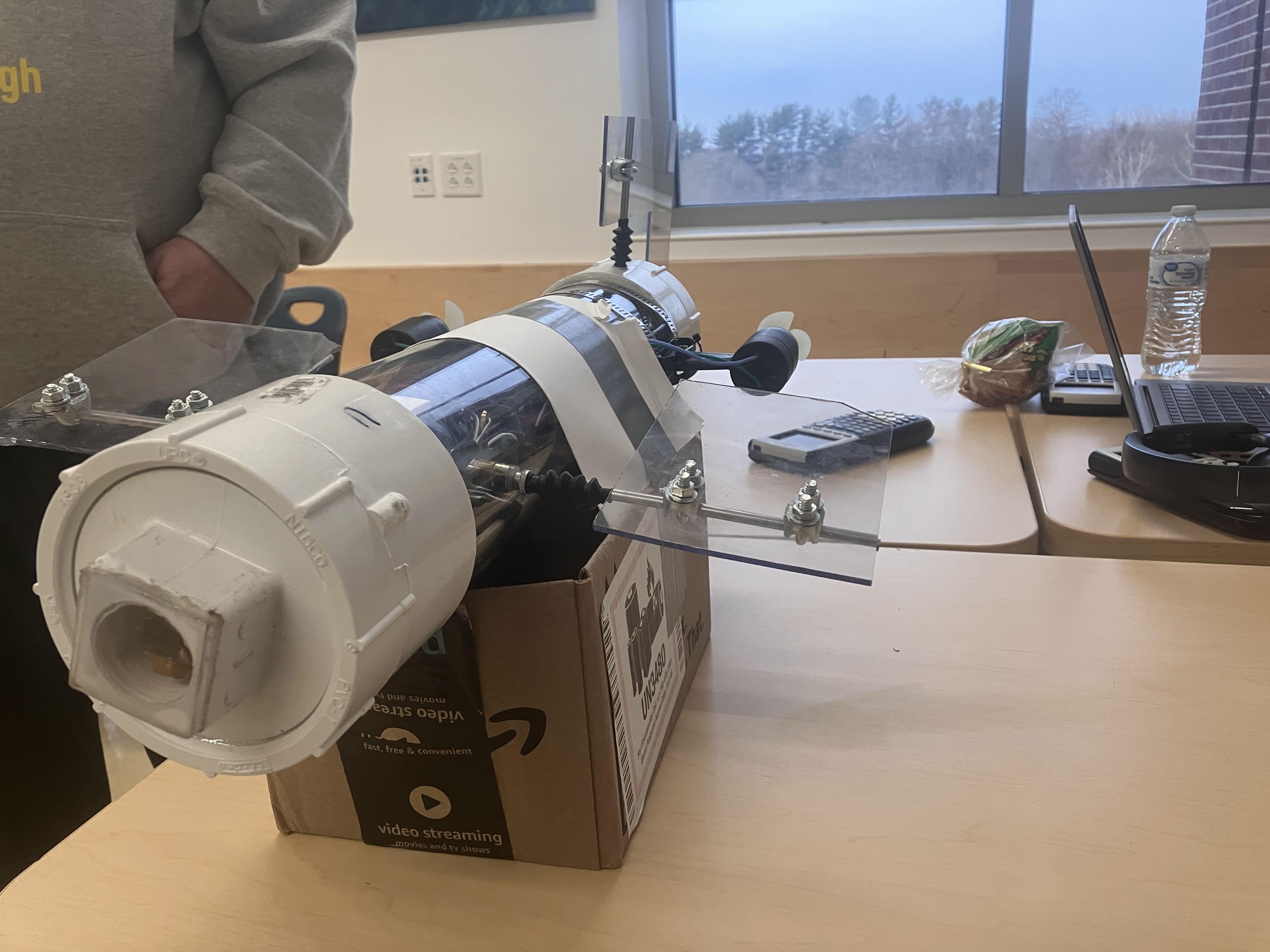
This is a submersible controlled by a Raspberry Pi Zero 2W, and many other relatively affordable components. It should have cost under $300, far below the standard Amazon prices for a similar ROV. Since prices fluctuate, this may actually go above $400. It may or may not work.
Supplies
Tools:
Soldering Iron / solder
Double sided tape
Duct tape
Electrical tape
Blue Loctite 242
Silicone Grease (super lube)
LINK: https://www.amazon.com/Super-Lube-92003-Lubricating-Translucent/dp/B0081JE0OO
PVC glue
Gorilla Glue (clear, or whatever color you want)
LINK: https://www.amazon.com/Gorilla-Clear-Glue-ounce-Bottle/dp/B06WD6R96X
Screwdrivers (small, medium flat/philips)
Allen wrench (1.5mm 2mm)
Angle grinder
Dremel
Drill
Drill bits (3/16")
Hole saw (1")
Silicone Sealer
LINK: https://www.homedepot.com/p/DAP-Ultra-Clear-5-oz-All-Purpose-Waterproof-Sealant-18387/306641586
Saw (to cut wood)
Really small hands (or large-ish tweezers/small pliers)
Physical Parts:
$22.75/2pk - 3.5"x16" clear tube (you can get a solid one for cheaper, but the clear is easier to work with)
LINK: https://www.amazon.com/dp/B0BYN14CD2
$7.67 each; $15.34 for 2 - 3" PVC ends
LINK: https://www.homedepot.com/p/Charlotte-Pipe-3-in-PVC-DWV-Female-Adapter-PVC001011200HD/203390840
$3.97 each; $7.94 for 2 - 3" PVC end caps
LINK: https://www.homedepot.com/p/Charlotte-Pipe-3-in-x-3-in-PVC-DWV-Cleanout-Plug-PVC001061000HD/203391577
$2.55 - Camera holder (metal/copper strap)
LINK: https://www.homedepot.com/p/Oatey-1-2-in-x-6-in-Milford-Pipe-Hanger-33504/301505452
$11.72 - Wood plank (4" x 4ft, cut to size 22deg long edge)
LINK: https://www.homedepot.com/p/Weaber-1-2-in-x-4-in-x-4-ft-S4S-Poplar-Board-27408/207058991
26.69/4lbs - Lead weight balls (2.5-3 lbs)
LINK: https://www.ebay.com/itm/236200112548
$12.48 - Clear Polycarbonate sheet 11x14"
LINK: https://www.homedepot.com/p/LEXAN-11-in-x-14-in-x-0-093-in-Clear-UV-Stable-Polycarbonate-Sheet-GE-34/205437907
$3.32/2pk, $9.96/6pk - 3/16" cable U-bolts (6)
LINK: https://www.homedepot.com/p/Everbilt-1-8-in-Zinc-Plated-Wire-Rope-Clamp-2-Pack-42594/205883055
$2.76 each, $5.52 for 2 - 4.5" hose clamps (2)
LINK: https://www.homedepot.com/p/Everbilt-3-in-to-4-in-Adjustable-Chrome-Plated-Worm-Clamp-MC34RHD/313684998
Zipties (large and small)
$12.99/2pk - Control rods (1.5mm) with stopper for servo (3)
LINK: https://www.amazon.com/dp/B0BHYRRBHP
$15.99/12pk - Metal rods 3/16" (4.8mm) (3)
LINK: https://www.amazon.com/dp/B0DMVJVFB8
$8.68/6pk - Blue metal shaft coupler 3/16" (4.8mm) (1)
LINK: https://www.amazon.com/dp/B07QQM472Q
$6.99/2pk, $13.98 for 4 - Metal Sleeves and Rubber flex boots: 3/16" each (4.8mm) (4)
LINK: https://www.amazon.com/dp/B0DL8YG7CD
$8.49/8pk - Shaft collars 3/16 (4.8mm) (5)
LINK: https://www.amazon.com/dp/B0DZ6L8P6C
$10.99/4pk - Control arms 3/16 (4.8mm) (3)
LINK: https://www.amazon.com/dp/B0C19H9NF9
$1.48/2pk; $4.44 for 6 - Nylon washers 3/16 (4.8mm) (6)
LINK: https://www.lowes.com/pd/Hillman-2-Count-x-7-16-in-Nylon-Standard-SAE-Flat-Washer/3013073
$2.74/4pk - Metal L-brackets/Servo corner brace (1") (2)
LINK: https://www.homedepot.com/p/Everbilt-4-Pack-1-in-Steel-Zinc-Plated-Corner-Brace-24590/327599496
$1.47 - #8 Metal Washers (12)
LINK: https://www.homedepot.com/p/Everbilt-7-16-in-Zinc-Flat-Washer-30-Pack-825181/317479516
$1.47/12pk - #6 5/8" Wood Screws (3)
LINK: https://www.homedepot.com/p/6-x-5-8-in-Zinc-Plated-Phillips-Flat-Head-Wood-Screw-12-Pack-825371/317479419
SERVO CONNECTION SCREWS: INPUT HERE
Electronic Parts:
$19.80 - Pi Zero 2 W (with header)
LINK: https://www.adafruit.com/product/6008
$14.95 - Pi Camera CSI (120 degrees)
LINK: https://www.adafruit.com/product/5389
$8.69 - Camera Extension
LINK: https://www.amazon.com/dp/B09T66F3LL
$9.95 - Micro SD card (8G or larger)
LINK: https://www.adafruit.com/product/1294
21.99 - 12 NiMH 2000mah battery
LINK: https://www.amazon.com/dp/B077Y9HNTF
$4.94 - Power switch (10a DC)
LINK: https://www.homedepot.com/p/Gardner-Bender-8-Amp-Single-Pole-Toggle-Switch-1-Pack-GSW-18/100141285
$6.64 Mini fuse holder/fuse (15 amps)
LINK: https://www.amazon.com/dp/B07C5J1T59
$8.99/6pk - Mini DC volt display (1)
LINK: https://www.amazon.com/dp/B0D6LF6CYD
Power wires 16ga (red+black) (estimated 10)
Servo control wire (2.54mm f-f, and pins) (estimated 10)
$18.97 each; 56.91 for 3 - Servos (waterproof 20kg) (3)
LINK: https://www.amazon.com/dp/B0DTP62L2Y
$23.99 - 12v NiMH charger
LINK: https://www.amazon.com/dp/B003MXMJX8
$9.99/4 pair - Charging connector (pigtail)
LINK: https://www.amazon.com/dp/B0CSG5KNX6
4.99/2pk - Pi power supply board (5v)
LINK: https://www.amazon.com/dp/B07SDB3CVX
$4.99 - Servo power supply board (7.4v, adjustable)
LINK: https://www.amazon.com/dp/B0DSJBBZ7W
$11.98 - Motor controller board (DC H-bridge, reversable)
LINK: https://www.amazon.com/dp/B0C41FQ7CD
$15.95/pair - DC motors underwater, with propellers (CC/CCW)
LINK: https://www.amazon.com/dp/B0FCBXPJDH
$4.49 - USB-Micro to USB-A power cable (pi)
LINK: https://www.amazon.com/dp/B0C14XP9PH
Software:
Raspberry Pi Imager
PuTTY
GPIO Zero
Camera software
Extras:
12V LED waterproof lights
4.5" hose clamp for lights
MOSFET (for lights)
gyro/direction board
Pi Zero Ethernet Hat
Ethernet cable (and ends)
Total Cost of Parts* (Without Extras): $425.17 (ouch!!)
*Not counting all the tools you'll need to build it
The Pi


You first want to start with the Raspberry Pi. The Zero 2w is quite versatile. Before you can use it, you must load an image onto the SD card that will plug into the Pi. This is so you can actually load and run programs on it.
Connect your SD card to your computer and open the Imager. Select your model of Pi (in this case, the Zero 2 W), the storage device (your SD card), and which operating system you want on it. You should look under the "Legacy" section and select the Debian Bookworm 64 bit ARM. It may be simply called the Legacy 64 bit version, or something similar.
Next, select the Customize option and set a hostname, a username, and a password. It cannot be root, so I set the username and my password as my own name. For WiFi, my computer auto filled the information, but if that doesn't happen you can set the SSID and password. Next, make sure to enable SSH. You do not need to enable Raspberry Pi Connect. Once done, confirm it and let it install; which may take a while. Once done, you are free to talk to your Raspberry Pi.
To talk to the Pi, you'll need its IP address. Usually it gets an automatic IP address from your router, so you'll need to find that address to log in. Once you have it, you can launch PuTTY and type in its IP address. This will bring you to the login, in which you can type your username and password.
You will need to launch PuTTY and login every time you need to access the Pi. Note that the wireless method works only over WiFi, so you'll either need to be on a network or connect to the Pi with an Ethernet cable, which is covered at the bottom.
Pins, the Pi, and You

Port selection (what servos go to what control pin) are decided in Step 8.
To fully take advantage of the features of the Raspberry Pi, you need to understand how it names the pins and what to install to control things. Once logged in, you need to install a few things. The first is GPIO Zero. This will allow you to control servos and motors from the pins. It includes a handy guide for pin numbering, as seen above.
When you write a program, it defaults to the smaller numbering system, known as BCM. Therefore, physical port 11 is actually GPIO17, which you would specify as 17 if you were writing the program. We'll get to which ports to wire to when you reach the setup section for the electronics. A much better explanation to this can be found here: https://gpiozero.readthedocs.io/en/stable/recipes.html
We also want to enable the pigpio library, which will solve servo twitching down the line. Connect to your Pi and run this command: systemctl enable pigpiod
This should stop the motors twitching with my code, which will be provided later.
If your Pi already has pins as listed in the parts list, ignore this step. If you don't have pins, you'll want to solder some in the circled ports.
For the software for the camera we'll install later, I used a repository normally reserved for 3D Printers, known as OctoPrint. You won't install the full program here, only what is necessary to access the live camera.
To start, access a file by typing into the terminal nano /boot/firmware/config.txt
At the bottom of this text file, add:
[all]
#enable raspicam
start_x=1
gpu_mem=128
That should all be at the bottom of the file.
Next, create a file by typing nano /etc/apt/sources.list.d/cam.list
Within that file, add these two lines:
deb https://apt.octoprint.org/debian bookworm rpi
Exit that file and run this command in the terminal to install the steaming camera package:
apt install camera-streamer-raspi
Edit another file by typing into the terminal nano /etc/systemd/system/camera-streamer-libcamera.service --http-listen=0.0.0.0 --http-port=${PORT} \
That was all one line. Make sure there is a space before each --http command, they are on the same line but are separate parameters.
Next, in the main terminal, type systemctl enable camera-streamer
This should enable the streamer and now you can reboot the Pi by typing reboot.
Hopefully, the camera software should be installed.
Electronics Base Plate


The first step is to get your electronics base plate. You won't be putting any electronics on yet, but it's important to have so you know how to organize parts. For this, I chose a plank of wood, which claims to be 4" by 4 feet. It's really a little under that, but I only need 3" by 16 inches. To fit in the curvature of the tube, it needs to be angled near the bottom too.
You may need a saw of some sort for this, I used a table saw for this. It was set to cut 22.5 inches, so I cut it down to 3 inches using the top of the wood as a reference - the WIDEST it goes must be 3 inches! It goes less than 3 inches near the bottom to fit in the tube. So test it and measure it first, to see what you are comfortable with. The 22 inch cut allows for some space in the bottom for ballast, but enough for most of the electronics.
Don't worry about the endcaps you see - you can put them on first without gluing them to make sure the plank of wood fits nicely.
The Hull


Note: I use a clear PVC pipe to make construction easier to follow. A regular solid PVC pipe is a much better choice and is also much cheaper.
Now onto the actual construction of the hull. Now, to access this submersible, I devised a system where you had two endcaps that you could screw on and off the sub. This made accessing the internals much easier, but first we need to get the threaded bits onto there. This is where PVC glue comes into play, because it melts the PVC together in what is hopefully pretty water-resistant.
Now, your 3" endcaps should fit onto normal schedule 40 PVC pipe, but on my clear pipe they didn't. I had to use power tools, such as sandpaper attached to a drill, to remove quite a bit of the interior of the endcap. Make sure your endcaps fit on the tube completely!
Hopefully the PVC glue you bought comes with a brush. Dip that brush in and spread it over the tube, over the area that the endcaps will cover. Put quite a bit on the inside of your endcaps too, and then slide them on. Twist the endcap continuously on the tube to ensure the PVC glue is distributed completely between the two, so it melts together in a perfect airtight seal. Some excess should squish out, you can clean that off after you feel you've applied enough. It didn't bond terribly well with my clear PVC tube, but it should work out just fine if you're using regular PVC.
With both endcaps squished on, let it sit for 10-15 minutes to ensure it fully cures. If you want to keep it even, do one endcap at a time and let it cure sitting on that endcap. With that, the hull should be pretty good.
Drilling and Rod Placement


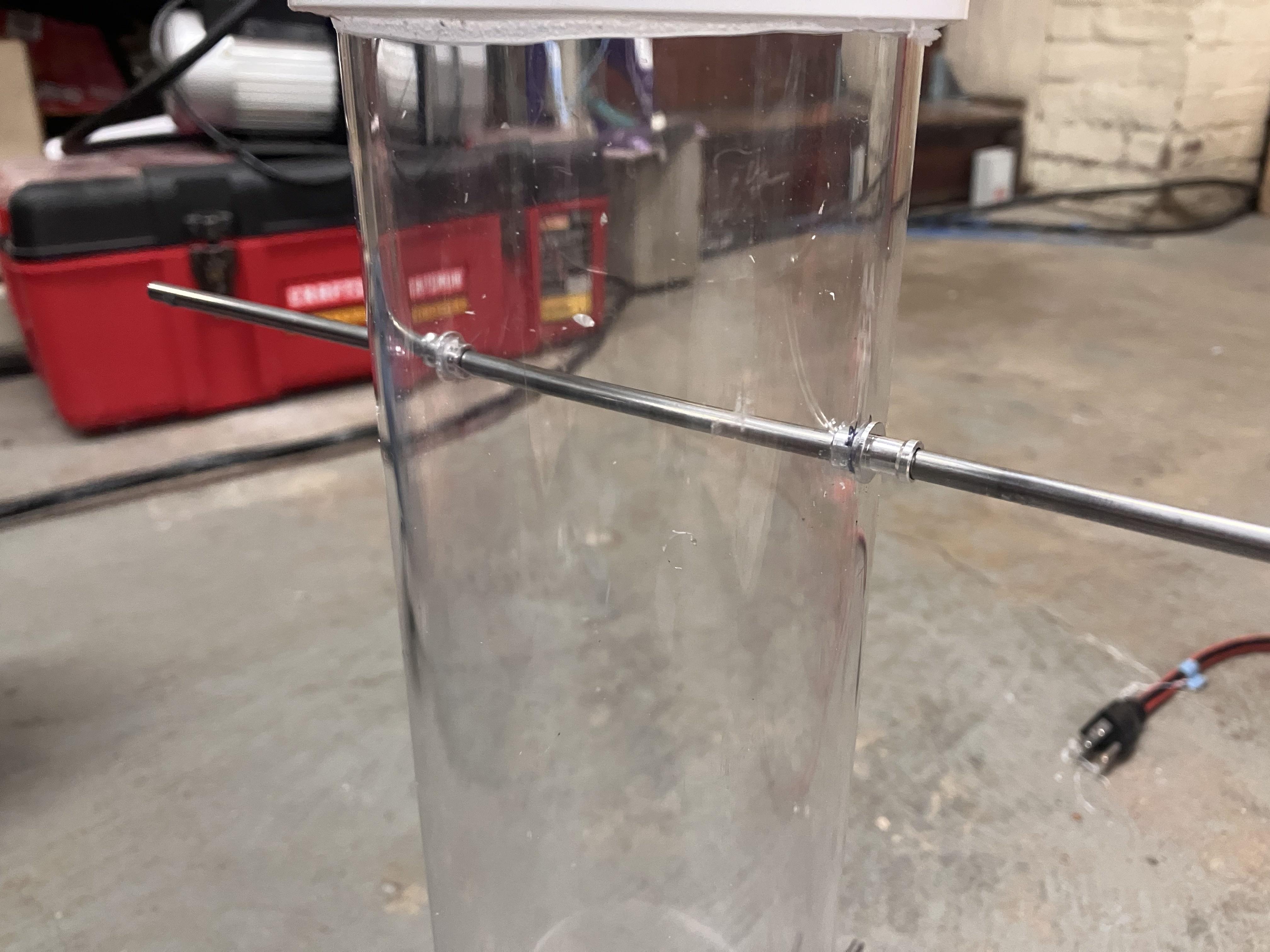


The image with the rod with parts is a reference image - don't worry about the new parts until step 7.
Now, to get the rods for your rudder and dive planes in, you'll need to do a little bit of drilling. The rods fit in a 3/16" hole, which is roughly 4.8mm. I suggest starting with deciding which ends your front and rear will be. Mark them with something, like a sharpie. Marking the ends helped me a lot.
With front and rear decided, you want to start with the rudder. Getting both holes to stick the rod through is rather difficult, so start by just drilling one hole where you think the top (or bottom) will be. I did this roughly 2 and a half to just under three inches from the end of the submersible, whichever looks closer to the middle of your endcap. With that hole drilled, I turned it sideways and stuck the 3/16" rod in, leveling it with the magnetic level.
This level kept the rod straight, and allowed to make a guesstimate mark on where the 2nd hole should be, all the way on the other end. Then I drilled into that and got it pretty much dead-on.
With the rudder drilled, stick a temporary 3/16" rod in it, so you have a frame of reference for what a 90 degree orientation is. Now, your plank of wood getting in the way ensures that you probably want your dive planes to be a little higher than centerline - I marked to what I thought was sufficient for the attachments to clear.
These attachments I'm talking about are the pieces that will connect to the servo arms to move the rods themselves - they're not very big and so you probably only want to elevate your dive plane drill point to be comfortable above that of the wood. Refer to the reference image with the new parts for sizing.
Now for how far back you want the dive planes to be, that's up to you. I did mine roughly 5.5 inches back from the endcap (without the screw-on bit - essentially from where the corner is to where I wanted the rod to be). Drill just one hole into where you want it to be with the 3/16" bit, and then try to level the rod again with the magnetic leveling strategy. This will allow you to mark the other side properly and to drill it out.
You're not out of the woods yet - now you need to get the little metal sleeve inserts and fit them into the holes. Now, if you're a "master" drill operator like me, the holes will probably be a little tilted and, when you put the inserts in and then put the rod in, the rod may not line up correctly. This is where the trusty power drill comes in.
Sacrifice a metal insert/sleave by having the drill clamp onto it, instead of putting a drill bit in. This will serve as your dummy sleave, all changes to the drill holes you make will let ALL sleaves fit into that hole. Now you stick the insert into the targeted hole, as straight as you can, and spin the drill. Start slow and go faster, which should use friction to grind the PVC into a new angle. Every so often, stop and check how straight it is by inserting a good sleave and then a rod. If it's mostly straight on one side and still won't go in the other, try doing this procedure on that hole on the other side. Eventually, the rods will be pretty straight.
Afterwards, glue the sleaves in with the Gorilla glue. Let this set overnight before you do anything more.
Motor Placement


To make the submersible go forwards and backwards, you'll need some motors. Instead of further drilling into the hull to secure them, I decided to just use hose clamps and zip-ties. Place your motors perpendicular to the rudder, inline with the dive planes. The motors should point backwards and rest against the endcap that juts out. This should keep them pointed mostly straight.
Before you actually attach them, you need to run the control wires through the hull. This requires drilling a 3/16" hole to fit the two wires through. You can drill wherever is close, but make sure the wires run through an area where they can stick out the back of the hull (where the endcap is) for easier construction later. This is because you'll be sticking these wires into a motor controller when you construct it.
Now, you want to use the two 3" hose clamps, one clamping down on the rear part of the motors' base, and one on the forward part of the motors' base. Tighten these until the motors are secure, but not too much because that may cause the motors to simply pop out before we secure the hose clamps.
Once they are sufficiently tightened, you'll want to run a few zip-ties holding the hose clamps inwards; and tighten them on equal sides until you are confident they won't slip off.
With the wires properly placed into the hull, apply a silicone sealant around these wires. be very thorough, and get between the two wires, because the silicone didn't stick to the wires very well when I did it. This should keep them mostly waterproof.
Dive Plane and Rudder Construction


The dive planes and rudder will be your main control surfaces for the submersible. You will want some rods that those will go on, though. These are the instruction on how to get them on, which you'll have to do numerous times. There will be an addition to the steps later on, in order to get them onto the servos.
In order to get your rod past the piece of wood that the electronics will go on, you'll need to drill a hole. Stick the rudder rod in as straight as you can, in order to figure out where you need to drill the wood. Once the wood is marked, drill a hole slightly larger than 3/16". This both helps align the wood every time, and keeps it from tilting too much if the sub rolls.
To make your dive planes, slide two rods into the areas for the dive planes. These should meet at equal distances in the middle. Then on each, slide on a washer that goes towards the outer hull. Then, slip a shaft collar onto each rod. These will ensure the rods don't fall out. Before you tighten them, put the blue metal shaft coupler and ensure both rods go into it equally. Now, only tighten one side of the blue shaft coupler. This will ensure it clamps on nicely to one shaft, and keeps the other one in-line and free to spin. If you tighten both sides, the dive planes will always move together and won't be good for rolling. Afterwards, tighten the shaft collars.
Next up, you'll want to decide how large your dive planes will be, and how large your rudder will be. For me, my dive planes were cut 3 inches wide by 5.5 inches long. The rudder was prototyped with a similar sized piece of cardboard. 3 inches was measured from the top of the cardboard to where it would hit the end piece, and was then marked. The same was done for the back and the bottom, and then a large square was cut out between these marks.
Note - this cutting was done first by a chop saw, which is NOT the right tool to do it! As can be seen, it chipped many of the pieces of the dive planes. An angle grinder was used for the rudder, which ended up being much cleaner. So, use an angle grinder.
Now you want to figure out where to place your dive planes. Don't place them too close to the sub, because the rubber boots will need to go on. Use the rubber boots as a distancer. Then, you want two U-bolts per control surface to hold them to the rod. Mark places in-line with the rod to drill holes roughly the size of the bolts, 4 per control surface. Then stick the U-bolts into the control surfaces. I couldn't accurately nail down the size, so I kept making the holes bigger until the U-bolts fit. Put your #8 washers between the polycarbonate and the nuts. Before you fully tighten them, however, slip them onto the rods and make sure they fit.
Once all the control surfaces are fitted, tighten everything down and mark the excess rod that pokes out of the control surfaces, that you should cut. An angle grinder should be used with these too.
Repeat these same processes for the rudder, except that there should be only 1 U-bolt for the top, and 1 for the bottom. Once done, you should have dive planes and rudders that are ready to be attached to servos.
Electronics


Wiring the electronics is the most annoying part of this project. It is more space efficient to solder the wires together, but if you do not want to do so you can use a wire nut.
Before you wire anything, you want to place everything onto your plank of wood. Your servos in the front should go in front of your dive planes, and should also be placed on top of each other, sideways. The arm of the bottom servo should point up and the arm of the top servo should point down. Do not secure the servo arms with a screw, just yet - these come off as part of the construction process. The Raspberry Pi should go behind these servos, off to the side so that the camera cable can reach the front of the sub. Be careful not to twist the camera cable or the extension to the camera cable - you could cause it to fail.
The battery should come next, the Raspberry Pi power supply (the little red board) should go to the side next to the battery, the servo power supply (blue board with the copper coil on it) should go next to the Pi, in front of the battery, and the motor power supply (the blue board with the four black holes on top) should go on top of the battery.
The third servo, for the rudder, should go behind the battery on its side, with the arm facing upwards. You can screw down this arm to the servo, though. The hole for the rudder in the wood must be behind this servo. The switch can go on top of the servo, or to the side if you prefer. I changed the switch during development, so the pictures don't reflect that. This new switch sits facing upwards.
With the components in place to your liking, use double-sided tape to stick everything to the wood but the servos. The camera can stay loose for the time being, it will have its own special mount.
For the rear servo, you should have some rubber mounts that will go in the holes on the sides. Line up your metal corner brackets with these rubber holes and mark the metal for drilling. You will want to drill two #6 wood screw-sized holes in line with the servo holes. This forms a mount for the servos, so you can screw those in and then screw the brackets down into the wood with the wood screws and the hole already in the other side of the bracket. This keeps your servo secure without tape. We can't do this with the front servos, though, because we need to be able to consistently remove them.
You also want to step down the servo controller to 7.4 volts as required by the servos. If you have different servos, look at what they say for the voltage required. Use a small screwdriver to adjust and a voltmeter to tell the voltage, and adjust it to the required voltage.
Now for the fun part - wiring. Wire everything as presented in the diagram I've included.
Yellow wires on the diagram are control wires; they'll connect to pins on the Pi as shown on the diagram.
Motors go to Ports 17 and 18, physically 11 and 12. (Top two circled).
Servo 1 (Dive plane) goes to Port 13, physically 33 (Bottom singular circled).
Servo 2 (Dive plane) goes to Port 6, physically 31 (Middle singular circled).
Servo 3 (Rudder) goes to Port 5, physically 29 (Top singular circled).
On the Pi power supply (the red board connecting to the Pi), the positive and negative terminals are marked on the BOTTOM. Make sure you get the right ones according to the diagram!
Where the wires all connect and form a star-like formation is where you can soldier them on together or use a wire nut to hold them together. Remember to strip the insulation off your wires before you connect ANYTHING together, whether it's wires to wires or wires to the boards.
Programming
Programming was done in Python 3. It calls the GPIO Zero library and a few default things. The first section of the code declares all the parts: the motors and servos. Motors 1 and 2 are the dive planes, and Motor 3 is the rudder. They are limited to 15 degrees either way.
The next section of codefigures out what key you're pressing, and activates the proper item accordingly. 'w' is programmed to move the servos in one direction, and 's' in the opposite. 'a' and 'd' do the same for the rudder. 'r' resets everything to zero, 'f' makes the motors go forwards at the tenth of the speed, 'v' reverses them, 'k' slows the motors down, and 'l' speeds them up by incriments of 0.1. Note - the speed of the motors are stored here as a float, 1.0 being the highest speed and 0.0 being the lowest. These are all configurable and can be changed.
The final sections deal with limiting the motors and servos, and what happens when it turns off. This ensures that the servos do not go past 15 degrees each way, and the motors do not attempt to exceed 100% speed. All servos and motors except for the rudder are set to reset to 0 after the machine turns off, so you can access the rear door.
Take a look at the code yourself and make modifications as necessary.
To load it into your Pi you might need a few steps: first, make sure you've highlighted and copied a text version of the code. Then, type vi YOURNAMEHERE.py into your terminal once you've connected to your Pi via PuTTY.
The name of the file can be anything you want. Afterwards, in the new editor it opens up, press 'i' (for insert), right click to paste your code, then hit escape. Your code should be there.
With your code pasted, hold shift and press the colon key (to type a colon), and type 'wq', which apparently means "write quit". This saves your code and quits.
To run your code, type python3 YOURNAMEHERE.py into an empty terminal line. This should launch your program. If you want to quit your program, I've written a quit command of ctrl+c.
Downloads
The Camera


Before you start using the camera, you will need to mount it. You'll also need a window. Let's start with that.
Use a 1" hole saw to cut a roughly 1" hole into the middle of the endcap. Then you'll want to use the remaining plexiglass (cut a square the size of the endcap square) and silicone seal it to the front. Let that sit for, say, a day or so.
To build your camera mount, you'll want to use the copper piece and one of its screw holes. You'll want to also drill a small hole in the front of the wood so that a wood screw can get into it. Bend the copper piece into a workable mount that will extend into the square cutout, where our window will be. Keep adjusting its height with a pair of pliers until it fits comfortably in the square cutout. Use electrical tape to secure the camera to the front of the mount, pointing straight up and using the red dot as a reference.
With the camera software installed, turn the Pi on and connect to the camera web server, go onto a web browser and access the camera by typing in http://(YOUR PI IP):8080/stream. You can bookmark this, because the link won't change. This should display a live camera feed. If you don't type /stream at the end, it'll bring you to a whole host of other options we don't need.
The web server can be accessed by either VLC or a web browser like Chrome or Firefox.
Ballast and Waterproof Testing


This is your chance to waterproof it. Take out all of the electronics and put on the axles and boots. This is where you stick it in, like, a bathtub or something.
Also, stick a piece of paper inside the sub. This paper will get wet and tell you where the leaks are coming from. When I tested it, I noticed water leaking in from both where the end caps screwed on, and where I glued the pieces on. As a result, I discovered I should use tools to screw the endcaps on and put some of the silicone sealant around the ends where I had previously applied the PVC glue.
Now you must get the weight for the ballast. What I did was allow the buoyancy of the sub to push an empty bottle up (with a hole in the bottle, to ensure there is no extra buoyancy) and to allow that bottle to push a scale into my hand, as demonstrated by an assistant. This returned a force of roughly 3 pounds.
This is where you want to be careful of loading the lead balls. Measure out, maybe, 2 and a half pounds of lead balls, and load them into bags. If you don't load them into bags, they'll escape whenever your sub tilts and cause serious problems. I made that mistake, but you can still refer to the pictures to see how much space was under the wood to load the lead balls into. I tried to use tape to seal my unsecured lead balls in, but that didn't work so well.
Now your submersible should be ready to work. In theory. First you probably want to properly construct it.
Construction Method


To construct the sub, this is the method:
Make sure the rudder is set aside and both endcaps are unscrewed. Also ensure the hose clamps are securing the motors to the side of the hull, and are zip tied together. Disconnect the front servos.
Build the rods, with the servos arms connected via the thinner rods to the arms that will go on the rods. Remember the washer goes towards the outside of the hull, then the endcaps, then the rod arms, then the blue collar. Try to place everything so the set screws are facing the shorter end, so you don't have to reach too far to screw everything in. Do this only for the dive planes, not for the rudder.
Slide the electronics board in partway, and then screw the motor control wires into the motor control board on top of the battery. The same colors should go on each side, because one wire is forwards and the other backwards for each motor; you wouldn't want to get them reversed or you'll end up going in circles. Slide the electronics in the rest of the way, ensuring the camera and servo control wires go under the dive plane rods. Line up the hole in the back of the wood with where the rudder will go. Stick the rudder rod in for now if you want to keep the wood in place.
Alternatively, you can construct the rudder by placing the rod steering piece (that the rod slips into) onto the small thin rod already connected to the servo arm and secured to the rear servo. Then you can put the rudder together, using one shaft collar and washer on top, on the bottom, and maybe on top of the wood. The steering piece should already be on it and all you should be able to do is tighten it, and get the rudder on. You can close the endcap on the back now, or apply some tape beneath the wood to stop any escaping lead that we'll pour later.
At this point, you can stick your lead ballast in. If you did it loosely like me, use a funnel to pour it. You'll have a much easier time if you put them in bags. Then you can connect the servos in front and slip them in. You should probably mark which way is forward and up for the servos, so you can put them in consistently. Stick a small piece of wood to wedge the front servos down, so that they can move without issue and you can still remove them. Next, screw in the front camera mount and tape the camera upright.
Afterwards, you can screw on the endcap and your sub should be good to go.
NOTE: you will need tools (pipe wrench, tie strap, screwdriver) to properly screw the endcaps and parts down. These tools should be used for every construction and deconstruction, unless you are extremely strong.
Failures Encountered
I encountered many failures you can avoid. These include:
The signal failed to penetrate the fish tank I tested it on. This was due to the fact I was running a wireless network instead of an Ethernet cable to my computer.
The lead balls escaped. They were tiny and the wood wasn't secured to the hull, so they entered in the main hull.
The wet lead might've shorted the Pi. Small leaks still occured through the endcaps, which made the lead balls wet. When they come into contact with the Pi, it might've shorted it.
Lead oxide from wet, oxidized lead also corroded the shaft collars.
Extra Additions to Make It Really Work
There are some more improvements to make the sub work its best.
Put an ethernet cable onto the Pi. Drill into the top of the hull and connect the Ethernet cable via an adapter attached to the Pi. This allows you to connect to a computer and connect to it via PuTTY.
Put on some aluminum dive planes instead of the polycarbonate - this make them easy to bend and cover the screws, to make it a little more hydrodynamic.
Stick some flashlights onto the outside of the hull with more hose clamps. I haven't yet figured out how to wire them, but you can stick on some waterproof flashlights easily.
Put motors ONTO the dive planes. Instead of fixed motors on the back, you can put motors on that tilt with the dive planes. This makes the submsersible much more maneuverable and would aid in areas where you need to stay still.