Pomodoro Timer Vase With Rising Mechanical Bloom: a Beautiful 3D-Printed Focus Timer
by jimmy17pjm in Design > 3D Design
682 Views, 8 Favorites, 0 Comments
Pomodoro Timer Vase With Rising Mechanical Bloom: a Beautiful 3D-Printed Focus Timer

A desk object aesthetically pleasing, and also keeps you focused.
This project turns a classic Pomodoro timer into a sculptural 3D-printed vase. Instead of a plastic kitchen timer or another phone app, you get a quiet mechanical bloom that slowly rises as your focus session progresses. When time is up, the bloom reaches full height and plays a soft chime.
The vase is designed as a minimal, geometric object: a faceted base and three stacked modular rings. Textured with vertical ribs that hide 3D-printing layer lines. At the center is a straight inner core column that drives the moving bloom at the top.
Functionally, it works as a 45-minute Pomodoro timer (you can change the duration in the code). When you plug it in, you can choose between:
Timer Mode (Focus Mode) – the bloom rises slowly over time as you focus.
Display Mode – the bloom extends fully and stays there as a decorative object.
When the timer ends, the vase chimes and the bloom stays fully extended. If you pick up the vase and put it down again, the timer automatically resets and starts a new session. A small mode toggle switch on the bottom switches between Timer and Display modes with different sound cues.
This build is meant for people who like beautiful, calming desk objects and want a Pomodoro timer that doesn’t look like a gadget. It uses a Nano ESP32, a simple geared mechanism, and a handful of common electronic parts.
- Difficulty: Intermediate
- Build Time: 1–2 days (depending on print time and experience)
- Skills: 3D printing, basic soldering, basic Arduino/ESP32 programming
Supplies


Electronics
- 1× Nano ESP32
- 1× small DC gear motor or stepper motor or continuous servo (Continuous Rotation Servo - FeeTech FS5103R)
- 1× piezo buzzer or small speaker (Piezo Buzzer - PS1240)
- 1× distance or position sensor (Ultrasonic Distance Sensor - 3V or 5V - HC-SR04 compatible
- - RCWL-1601)
- 1× mode toggle switch (Mini Panel Mount DPDT Toggle Switch)
- Assorted jumper wires (solid core recommended for inside the structure)
- Small perfboard or custom 3D-printed mounting plate for organizing components in the base
Power & Programming
- USB-C cable
- Computer with the Arduino IDE (or Arduino-compatible ESP32 support installed)
- Power source:
5 V wall adapter and USB cable, or
5 V battery pack / portable charger
3D-Printed Parts (Please see the attached files)
- Vase Base Shell – faceted lower part with vertical ribs
- Three Ribbed Rings – stacked to form the upper body of the vase
- Core Column – straight inner shaft that carries the bloom
- Bloom Module – the top “petal” form that rises out of the vase
- Internal Guides / Bushings – to keep the column aligned and sliding smoothly
- Motor Mount / Gearbox Housing
- Sensor and Switch Mounts (if you made dedicated holders)
- Bottom Cover with cable pass-through and screws/snaps to close the base
Tools
- Super glue or epoxy
- 3D printer (FDM printer with at least a 0.4 mm nozzle)
- Soldering iron + solder
- Flush cutters / wire strippers
3D Print the Vase Parts

Download the attached STL files and open them in any slicer.
3D print all of the parts (that make up the vase body, the inner mechanism, and the mounts for the electronics) in the order of file numbers.
Recommended print materials are listed in the file name, but any PLA or PETG material will work.
Recommend print setting: 7% Cubic or Gyroid infill across all. Auto tree support for all.
You can start assembly after the first two plates while the later plates are printing.
Downloads
Assembling the Vase Body & Moving Bloom


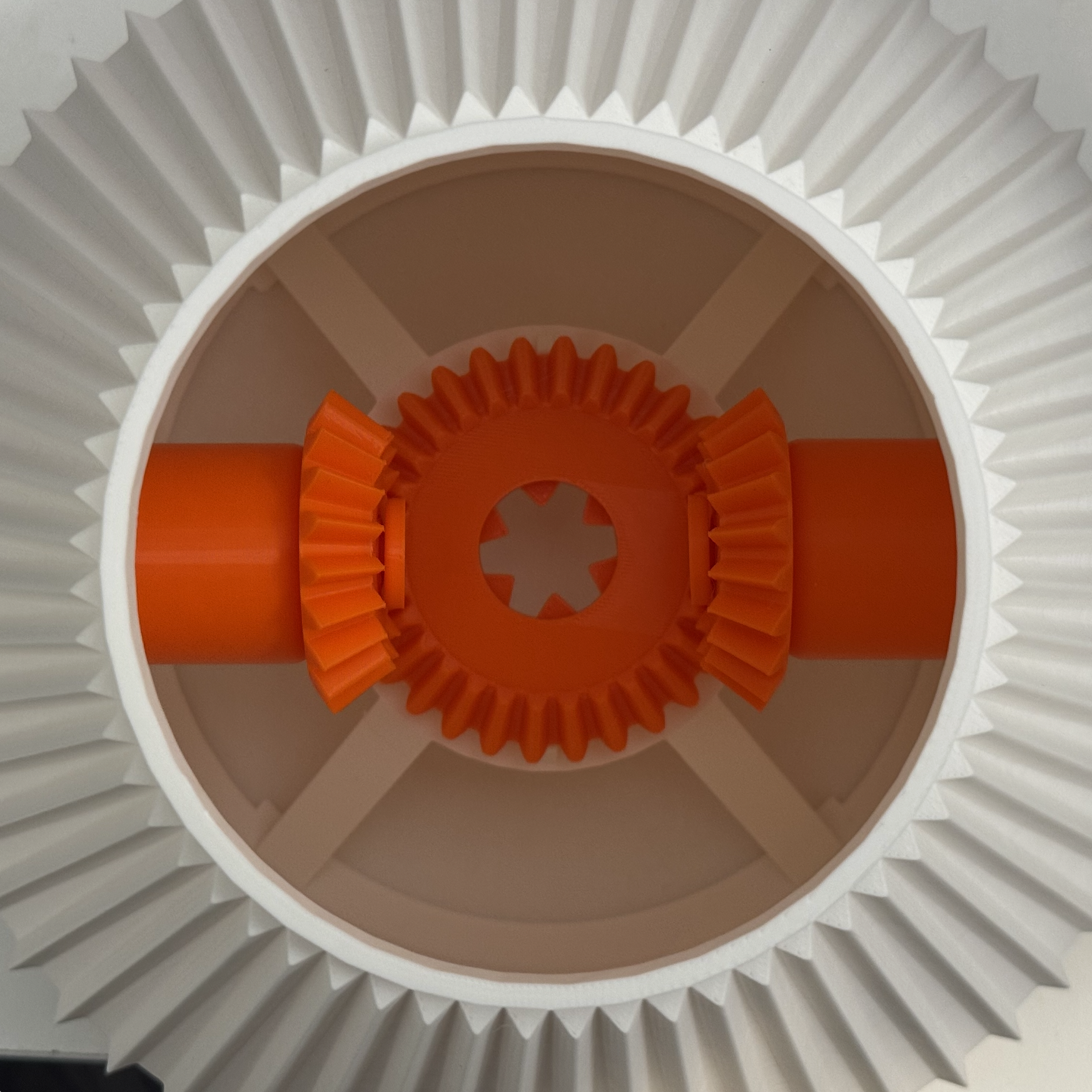


image 1-3: On the opposite side of the inside of the Bottom part of the vase (Plate 1), install two thick cylindrical parts (Plate 2) through the large hexagonal slots. Fit the two smaller bevel gears (Plate 2) through the extruded parts. Then push fit the small cap (Plate 2) to prevent the gears from sliding out.
image 4-5: Slide the larger bevel gear (Plate 2) from the side of the two gears following the arrow in image 4 to fit to the bottom as in image 5.
image 6-9: One by one, slide the two V-shape supports (Plate 3) into the position of image 6 into the bottom part of the vase and fit each of their two legs resting on the 4 extruded parts around the inner wall. The two parts will meet in the center and secure themselves as in images 8 & 9.
image 10-14: Assemble the flat disk part and bevel gear (Plate 4) together through the 4 rods (Plate 4) to achieve as image 12. Place the assembled part on top of the previously assembled parts in the bottom part of the vase. Secure its position with the two-part rod (Plate 5) at its round end through the hole created by the two V-shape supports.
image 15-17: Place the upper three parts of the vase ( Plate 6,7,8) in any order stacking up from the bottom part of the vase.
Circuit Making

## Components
1. **Arduino Nano ESP32** - The brain
2. **FeeTech FS5103R Continuous Rotation Servo** - 3 wires (Brown, Red, Orange)
3. **RCWL-1601 Ultrasonic Sensor** - 4 pins (VCC, TRIG, ECHO, GND)
4. **Mini DPDT Toggle Switch** - 6 pins (we use 2)
5. **Piezo Buzzer PS1240** - 2 legs
---
## Wiring Summary Table
| Component | Wire/Pin | → Arduino | Notes |
|-----------|----------|-----------|-------|
| **Servo** | Brown | GND rail | Ground |
| | Red | **VBUS** | 5V power |
| | Orange | **D9** | Control signal |
| **Ultrasonic** | VCC | 3V3 rail | 3.3V power |
| | TRIG | **D10** | Trigger |
| | ECHO | **D11** | Echo |
| | GND | GND rail | Ground |
| **Switch** | Pin 1 (top-left) | GND rail | Ground |
| | Pin 2 (top-middle) | **D7** | Signal |
| **Buzzer** | Leg 1 (either) | **D8** | Signal |
| | Leg 2 (other) | GND rail | Ground |
| **Power Rails** | 3V3 | Red (+) rail | For ultrasonic |
| | GND | Blue (-) rail | Common ground |
---
## FeeTech FS5103R Servo Details
This is a **continuous rotation servo** - it spins continuously instead of moving to a position.
**Wire Colors:**
```
┌─────────────────────────────────┐
│ BROWN = Ground (GND) │ → GND rail
│ RED = Power (5V) │ → VBUS pin
│ ORANGE = Signal │ → D9
└─────────────────────────────────┘
```
**Control Values:**
- `90` = STOP (motor doesn't move)
- `91-180` = Forward rotation (higher = faster)
- `89-0` = Backward rotation (lower = faster)
**Important:** If the flower moves the wrong direction, change `EXTEND_IS_FORWARD` in the code from `true` to `false`.
---
## Step-by-Step Wiring
### Step 1: Place Arduino on Breadboard
- Straddle the center gap
- USB-C port facing outward for easy access
### Step 2: Set Up Power Rails
- **3V3** → Red (+) power rail
- **GND** → Blue (-) power rail
### Step 3: Wire the Servo
```
Servo Connector:
┌───┬───┬───┐
│ B │ R │ O │ (looking at connector)
└───┴───┴───┘
│ │ │
│ │ └── Orange → D9
│ └────── Red → VBUS (5V)
└────────── Brown → GND rail
```
### Step 4: Wire the Ultrasonic Sensor
```
╭──────────────────╮
│ ◉ ◉ │ (two "eyes")
└──────────────────┘
│ │ │ │
VCC TRIG ECHO GND
│ │ │ │
│ │ │ └── → GND rail
│ │ └────── → D11
│ └────────── → D10
└───────────── → Red (+) rail (3.3V)
```
### Step 5: Wire the Toggle Switch
```
Looking at bottom of switch (6 pins):
Pin 1 Pin 2 Pin 3
○ ○ ○
│ │
│ └── → D7
└─────────── → GND rail
○ ○ ○
Pin 4 Pin 5 Pin 6
(not used)
```
### Step 6: Wire the Buzzer
```
╭───────╮
│ │
└───────┘
│ │
│ └── → GND rail
└────── → D8
(No polarity - either leg to either connection)
```
---
## Visual Wiring Diagram
```
BREADBOARD
Red (+) Rail: ════════════════════════════════════
← Arduino 3V3
← Ultrasonic VCC
Blue (-) Rail: ════════════════════════════════════
← Arduino GND
← Servo Brown
← Ultrasonic GND
← Switch Pin1
← Buzzer Leg2
┌─────────────────────────────────────────────────┐
│ │
│ [VBUS]──────────────→ Servo RED (5V) │
│ [3V3]───────────────→ Red Rail │
│ [GND]───────────────→ Blue Rail │
│ │
│ ARDUINO NANO ESP32 │
│ │
│ [D7]────────────────→ Switch Pin2 │
│ [D8]────────────────→ Buzzer Leg1 │
│ [D9]────────────────→ Servo ORANGE │
│ [D10]───────────────→ Ultrasonic TRIG │
│ [D11]───────────────→ Ultrasonic ECHO │
│ │
└─────────────────────────────────────────────────┘