Polarized Art: Hidden Colors in Motion
by xX_christopher_Xx in Design > Art
81 Views, 4 Favorites, 0 Comments
Polarized Art: Hidden Colors in Motion


 rotate)

I recently experimented with polarized film by arranging clear tape in a random pattern on a transparent plastic sheet and sandwiching it between two sheets of polarizing film. When I slowly rotate one of the sheets, striking color patterns emerge—even though the tape itself is seemingly clear and colorless.
The colors become visible because polarized light travels through clear tape at different speeds in different directions. The tape changes the light’s polarization by splitting it into two parts that fall out of sync and then recombine. Different colors are affected by different amounts. When a second polarizer is rotated, it passes different colors at different angles, creating the shifting color patterns.
More about this experiment and detailed explanation can be found here:
https://www.exploratorium.edu/snacks/polarized-light-mosaic
I attempted to use this special optical effect to create artwork that could be displayed on my desk.
Supplies

For the display:
- 11"x8" Polarized Film Sheet (x2)
- 8" Acrylic round clear acrylic discs (x5, or more)
- Nylon Pulley U-Groove Ball Bearing 8x30x10mm (x6)
- M3 bolt and nuts
- Chicago Binding Screws sets
- 12mm spacer
- Self-adhesive LED strip light with USB power adapter
- Rice paper (the craft kind, not the edible kind) or tracing paper
- Clear tape/plastic packaging tape
- Glue/Glue dots
- release liner/backing paper (I have some from used self-adhesive wall paper)
For the frame:
3D printer with filament or cardboard.
Polarized Discs


1] Front (rotating) layer: one polarized film sheet and two acrylic discs.
- Cut an 8" circle from the polarizing film (you can trace the acrylic disc).
- Glue or tape an acrylic circle to each side of the polarizing film to protect it from scratches.
2] Back LED light layer: one piece of rice paper, one polarized film sheet, and two acrylic discs.
- Cut an 8" circle from the polarizing film (you can trace the acrylic disc).
- Cut an 8" circle from the rice paper.
- Place a round acrylic sheet down first.
- Lay the rice paper circle on top of the acrylic sheet.
- Place the polarizing film on top of the rice paper.
- Cover with another round acrylic sheet.
- Glue or tape all layers together.
Proof of concept
To test the idea, I applied clear tape randomly to a plastic strip and placed it between the two layers. Rotating the front layer reveals the color effects.
Display Stand


Print the components:
- Stand_Layer x 3
- Stand_LEDSupport x 1
- Stand-LEDRing x 2
- Stand-CircleHanger x2
- Stand_OptionalCover: optional
Assembly
Assemble the parts as shown. The three smaller holes are for M3 nuts and spacers. The two larger holes are for ball bearings and Chicago screws. The ball bearings allow the display discs to rotate freely.
Stack the three Stand_Layers with spacers and ball bearings between them. Next, connect the two LED rings (join the halves as shown) and install them into the LED Support layer. Combine this assembly with the stand. If desired, place everything inside the optional stand cover.
Add the LED strip light as shown.
Tip
Because the display disc is relatively light, ball bearings may not be necessary.
Notes
- If you do not have access to a 3D printer, cardboard can be used as an alternative. I built a larger cardboard stand to provide sufficient stability as shown.
- Stand_OptionalCover is a remix of Voronoi Tea Light Shade – 1535835 from https://www.thingiverse.com/.
Display Discs-2D: Simple Shapes-Diamond
.jpg)
.jpg)


Print the templates, making two copies of each. Keep the margins small so the printed circle is 8 inches in diameter.
Apply strips of tape vertically and in parallel onto the release paper, as shown. Using release paper makes it easier to handle and cut the tape without it sticking to everything.
Cut the shapes from one copy of the template. Use these pieces as guides to cut the corresponding shapes from the taped release paper. Place the acrylic circle on top of the second copy of the template so you know exactly where to position each tape shape.
Apply multiple layers of tape as desired. After completing one template, repeat the process with the other template.
Tip: Start with larger shapes first. You can always cut smaller shapes later, but starting with small shapes may require printing extra templates if you later decide to use larger ones.
Display-2D: More Complicated Art


To make the design more interesting, we are not limiting ourselves to geometric shapes. Instead, I used a coloring page based on Marc Chagall – I and the Village, available at:
https://www.thecolor.com/Coloring/marc-chagall-i-and-the-village.aspx
Print two copies of the coloring page. Prepare the tape by applying it in parallel strips onto release paper.
Place one copy of the coloring page beneath the acrylic circle as a placement guide. Cut shapes of various sizes and irregular forms by following the coloring lines. Then cut the corresponding shapes from the taped release paper and apply them to the acrylic circle.
This approach allows for more organic and expressive patterns.
Display-3D


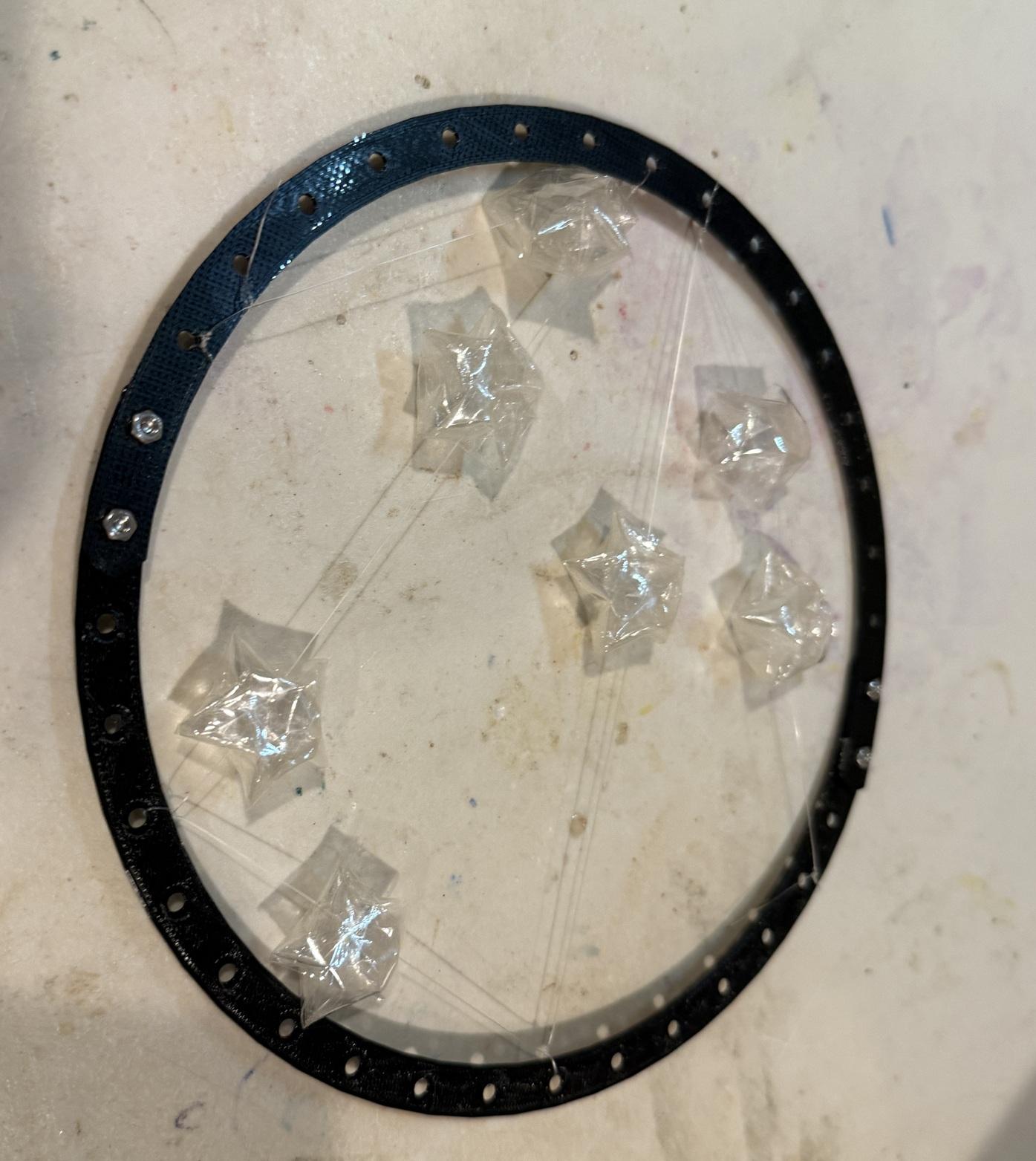

Now, we move into 3D. There are many tutorials on making lucky stars, such as this one:
https://www.youtube.com/watch?v=gavY1UJ1j5s
The process is the same, except we use tape instead of paper. To prevent the tape from sticking to itself, first fold the tape onto itself and secure it, creating a non-sticky strip. This prepared strip can then be used to make a lucky star.
Repeat the process to make several stars. Attach the finished stars to the circle hangers that were printed earlier.
You can create other interesting 3D polarized art with different 3D shapes! I made a flower arrangement.
What Happen If--One More Layer of Polarized Film Sheet?


Finally, what happens if you add one more layer of polarizing film between the two existing layers? With careful planning, you can create a very special effect—the morphing Taichi.
Leave a comment if you have an idea how this effect is achieved ;)