Pet Feeder Instructions
by emmakilpatrick0907 in Circuits > Arduino
23 Views, 0 Favorites, 0 Comments
Pet Feeder Instructions


Project summary: Following the instructions below, your high school 4H robotics team will be able to create a functioning pet food dispenser.
Supplies
Items needed:
- Sparkfun kit (Amazon)
- Cardboard
- Food container (to hold dispensed food)
- Arduino Software
- Tape
- USB Cable
- Ultrasonic Distance Sensor
- Servo
Setting Up the Board
Set Up of the Sparkfun Kit:
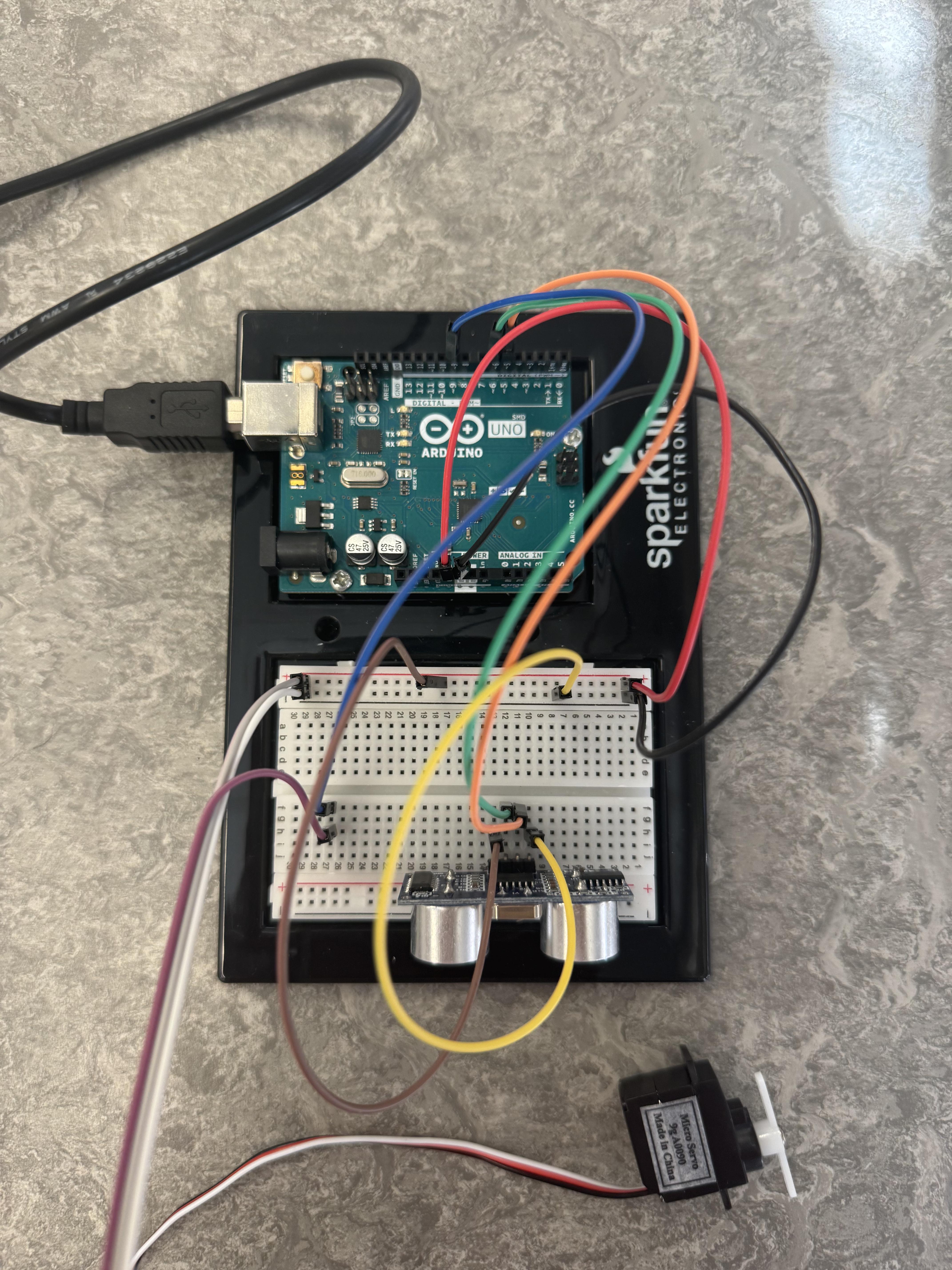
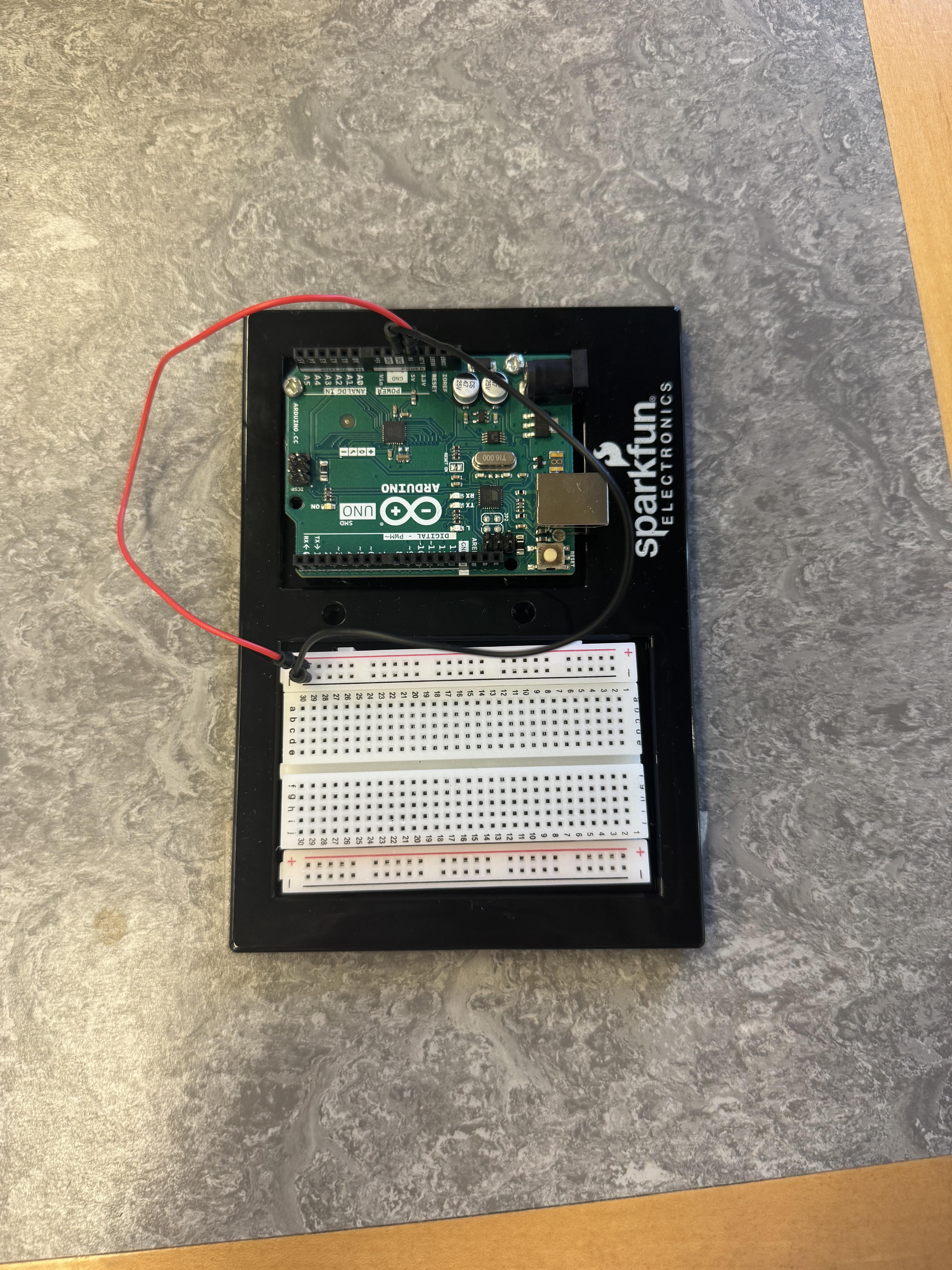
Use the black base given in the kit and connect the breadboard and the Arduino Uno to it. Then connect a red wire in the kit to 5v to the positive row on the bread board and a black wire to ground and to the negative row on the breadboard (Seen in Image 1).
Set Up the Distance Sensor:
Put the distance sensor on the breadboard. Use wire from the kit to wire as following.
- VCC: Power
- TRIG: Pin 5
- ECHO: Pin 6
- GND: Ground
Set Up the Servo:
Place the servo on the breadboard.
Red wire servo: Power
Black wire servo: Ground
White wire servo: Breadboard, Then wire to Pin 9 on the Arduino Uno
Writing the Code

Set Up Initial Variables:
Like all Arduino code, begin by establishing initial variables. To use a servo you must include the servo library "#include <Servo.h>". This library is necessary to control the servo's angle. Then define the pin numbers for each component:
servopin – the digital pin that controls the servo
trigPin – the trigger pin of the ultrasonic distance sensor
echoPin – the echo pin of the ultrasonic sensor
The final step before the void setup in ensuring the distance value is stored as a float. This is very important because the distance returned will very likely have a decimal and float allows for that reading to be more accurate and not rounded.
Void Setup:
Use the setup function to configure the pins and initialize their mode.
- The ultrasonic distance sensor pins:
- trigPin: OUTPUT
- echoPin: INPUT
- Attach and intilaize the servo motor:
- "myservo.attach(servopin); " assigns the servo to the digital pin
- "myservo.write(0);" sets servo to the starting position of 0 degrees
- Start serial communication:
- "Serial.begin(9600);"
Void Loop:
This is the main body of the code that repeats checking for inputs and outputs. in this code it continually operates where if something is within 100 inches of the distance sensor the servo will turn 180 degrees and hold that position for 5 seconds. After that the servo will return to the initial position.
Completed Code:
Building the Skeleton


Materials Needed
- Cardboard sheets
- Tape and/or hot glue
- Arduino board
- Jumper wires
- Ultrasonic distance sensor
- Servomotor with horn attachment
- Scissors or box cutter
- Ruler and pencil
Construction Steps
1. Build the Main Box:
- Start with a single piece of cardboard and measure out a rectangle that can be folded into a 2.5 in × 2.5 in × 6 in rectangular tube.
- Score the cardboard lightly along the fold lines so it bends cleanly.
- Fold the piece into a long rectangular box with both ends left open, and secure the seams using tape or hot glue.
This outer box acts as the main body of the dispenser.
2. Create the Inner Tube (Food Holder):
- Cut a second piece of cardboard and form it into a slightly smaller rectangular tube—small enough to slide inside the first box without rubbing, but large enough to hold the food
- On one of the long sides of the smaller tube, cut out a hinged flap.
- The flap should be about halfway down the tube.
- Leave the top edge uncut so it can bend like a door.
- This flap is what the servo will open and close to dispense food.
3. Insert the Inner Tube:
- Slide the smaller tube into the center of the larger box.
- Position it so that the flap lines up with where the food will drop out later.
4. Cut the Front Opening:
- At the front end of the large box, cut a 2.5-inch-tall rectangular opening.
- This is where the food will come out when the flap opens.
5. Add the Food Ramp:
- Cut a small piece of cardboard and fold it to make a sloped ramp.
- Glue or tape this ramp at the bottom of the front opening so that it angles outward.
- The ramp helps guide the dropped food out of the dispenser cleanly.
6. Mount the Servo Motor:
- On the side of the large box, directly next to the flap you cut in the inner tube, draw a small square slightly larger than the servo shaft.
- Carefully cut out this hole.
- Slide the servo into the hole so that the rotating servo horn sits directly underneath the flap inside the tube.
- Tape or glue the servo housing gently but securely so it doesn’t wiggle.
- Attach the servo horn to the flap if needed, or position it so that when the servo rotates:
- Rotating upwards pushes the flap closed.
- Rotating downward pulls or allows the flap to open.
Some troubleshooting might need to be done for the servo position to optimize the functionality of the flap. Ideally, the servo needs to be placed at an angle so that the flap opens and closes properly.