NRF24L01+ Module Interfacing With Arduino
by Rachana Jain in Circuits > Arduino
11 Views, 0 Favorites, 0 Comments
NRF24L01+ Module Interfacing With Arduino

Wireless communication between microcontrollers opens up a wide range of exciting possibilities—from remote sensor monitoring and wireless data logging to smart home automation and robotics. Instead of relying on wired connections, you can allow multiple Arduino boards to communicate seamlessly over the air.
One of the most popular and cost-effective ways to add wireless capability to Arduino projects is by using the nRF24L01+ wireless transceiver module. Known for its low power consumption, decent range, and reliable performance, this module is widely used by hobbyists, students, and developers alike.
In this tutorial, you’ll learn how the nRF24L01+ module works and how to interface it with Arduino step by step. We will begin with basic two-way communication between two Arduino boards. After that, we’ll explore a more advanced setup where multiple transmitters send data to a single receiver using the module’s built-in multiceiver capability.
Supplies
What Is the NRF24L01+ Module?
The nRF24L01+ is a low-cost 2.4 GHz wireless transceiver capable of both transmitting and receiving data. It operates in the globally available 2.4 GHz ISM band, making it suitable for license-free wireless applications.
The module operates at a voltage range of 1.9V to 3.6V, with 3.3V being the recommended supply voltage. Its logic pins are not 5V tolerant, so when interfacing with 5V microcontrollers like Arduino Uno, proper power regulation and careful wiring are essential.
One of the biggest advantages of the nRF24L01+ is its low power consumption. Because of this, it is an excellent choice for battery-powered and low-power wireless projects.
Wireless Range and Antenna Options
The standard nRF24L01+ module comes with a PCB trace antenna, which provides a communication range of approximately 50–100 meters in open space. Indoors, the range may reduce due to walls, furniture, and other sources of interference. For applications that require longer range, enhanced versions of the module are available with:
- External antennas
- Power Amplifier (PA)
- Low-Noise Amplifier (LNA)
Technical Specifications of the nRF24L01+ Module
Frequency Range: 2.4 – 2.5 GHz ISM band
Data Rates: 250 kbps / 1 Mbps / 2 Mbps
Operating Voltage: 1.9 – 3.6 V
Maximum Operating Current: 13.5 mA
Standby Current: ~26 µA
For deeper technical details, always refer to the official datasheet.
How Does the NRF24L01+ Module Work?


The nRF24L01+ operates in the 2.4 GHz ISM band, specifically from 2.400 GHz to 2.525 GHz. This frequency range is divided into 126 channels, numbered from 0 to 125.
Each channel occupies 1 MHz of bandwidth when operating at a data rate of 1 Mbps.
Channel-Based Communication
For two or more nRF24L01+ modules to communicate successfully:
- All modules must be configured to use the same RF channel
- They must share matching addresses
For example, if a transmitter is configured to operate on channel 100 (2.500 GHz), the receiver must also be set to channel 100. If the receiver is tuned to a different channel, it will not receive any data.
This channel-based approach allows multiple wireless networks to operate in the same area without interference, as long as they use different channels.
Multiceiver Feature of nRF24L01+
One of the most powerful features of the nRF24L01+ is its Multiceiver capability.
This feature allows:
- One receiver
- To listen to up to six different transmitters
- On the same RF channel
Each transmitter communicates through a unique data pipe address. Although the receiver can monitor six pipes, it can only receive one data packet at a time.
This makes the nRF24L01+ ideal for applications such as:
- Sensor networks
- Wireless control systems
- Multiple input nodes reporting to a central controller
Enhanced ShockBurst Protocol
The nRF24L01+ includes a built-in hardware protocol called Enhanced ShockBurst, which significantly simplifies wireless communication.
Key Features of Enhanced ShockBurst
- Automatic Packet Assembly: The module automatically adds preamble, address, and CRC to transmitted data.
- Packet Validation: The receiver checks data integrity using CRC.
- Automatic Packet Disassembly: Valid packets are placed into the RX FIFO buffer.
- Auto Acknowledgment (ACK): The receiver automatically sends an acknowledgment after receiving valid data.
- Automatic Retransmission: If no ACK is received, the transmitter retries automatically.
nRF24L01+ Module Variants
The nRF24L01+ is available in three main hardware variants. All versions use the same core chip and are fully compatible with each other.
1. nRF24L01+ with PCB Antenna
- Compact and lightweight
- Built-in PCB trace antenna
- Typical range: up to 100 meters (open space)
- Best for short-range, low-power applications
2. nRF24L01+ with SMA Connector and External Antenna
- Supports detachable external antennas
- Improved range and signal stability
- Suitable for environments with obstacles or interference
3. nRF24L01+ with PA + LNA and External Antenna
- Includes Power Amplifier (PA) and Low-Noise Amplifier (LNA)
- Uses an external range-extender IC
- Communication range up to 1 km (open space)
- Ideal for long-range wireless projects
You can replace one variant with another without changing your code, making upgrades easy.
NRF24L01+ Module Pinout Explanation


GND: Ground reference pin (usually marked with a square pad).
VCC: Power supply pin (1.9V–3.6V, recommended 3.3V).
CE (Chip Enable): Controls active and standby modes.
HIGH → Active mode
LOW → Standby mode
CSN (Chip Select Not): Active-LOW SPI chip select pin.
SCK (Serial Clock): SPI clock signal from the microcontroller.
MOSI (Master Out Slave In): SPI data line from Arduino to module.
MISO (Master In Slave Out): SPI data line from module to Arduino.
IRQ (Interrupt Request): Optional active-LOW interrupt pin used to notify data events.
Two Way Communication Between NRF24L01+ Modules
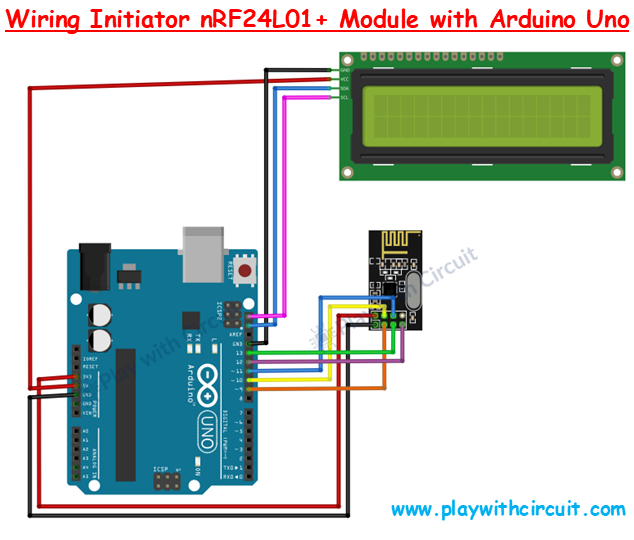


In this project, there are two separate wiring setups: one for the Initiator module and another for the Responder module. The main difference between the two is that the Initiator Arduino is connected to an I2C LCD to display the received data, whereas the Responder Arduino sends its data only through the serial monitor. The nRF24L01+ connections remain the same in both cases.
In the initiator wiring, the nRF24L01+ module is interfaced with the Arduino using the SPI communication bus. The SPI interface consists of the MISO, MOSI, SCK (clock), and CSN pins. In addition to the SPI pins, the module also requires connections for Chip Enable (CE), VCC, and GND.
The VCC pin of the nRF24L01+ module must be supplied with 3.3V, as the module does not support 5V operation. The GND pin is connected to the Arduino’s ground. The CE pin is connected to digital pin 9 of the Arduino, and the CSN pin is connected to digital pin 10. The SPI pins are connected as follows: SCK to digital pin 13, MOSI to digital pin 11, and MISO to digital pin 12. The IRQ pin of the nRF24L01+ module is not connected in this setup.
If a base or adapter board is used for the nRF24L01+ module, which internally converts 5V to 3.3V, then the power pin of the base can be connected directly to the 5V pin of the Arduino. This adapter ensures stable voltage regulation for the RF module.
However, if the nRF24L01+ module is used without a base, the VCC pin of the module must be connected directly to the 3.3V pin of the Arduino, as shown in the wiring diagram.
Although the Arduino operates at 5V logic levels and the nRF24L01+ operates at 3.3V logic, this voltage mismatch does not immediately damage the module. However, it can affect the module’s reliability and lifespan over time. For simplicity, a voltage level shifter is not used in this project, but for industrial or long-term applications, using a proper level shifter is recommended.
The I2C LCD wiring with the Arduino is straightforward. The VCC and GND pins of the I2C LCD are connected to the VCC and GND pins of the Arduino. The SCL (clock) and SDA (data) pins of the I2C LCD are connected to the SCL and SDA pins of the Arduino, respectively.
On the Arduino Uno, the SCL and SDA pins are internally connected to analog pins A5 and A4, respectively. Therefore, the LCD can also be connected directly to A5 (SCL) and A4 (SDA). In the wiring diagram, these connections are shown using pink and blue wires.
When using the I2C LCD, it is important to ensure that the A0, A1, and A2 address jumpers on the LCD back panel are not shorted. In this project, the I2C address used in the code is 0x27, which is valid only when these address jumpers are left open.
Now, coming to the Responder module wiring, the connections for the nRF24L01+ module are exactly the same as those used in the Initiator module. The RF module is connected to the Arduino using the same SPI pins, CE, CSN, VCC, and GND connections.
The only difference is that the Responder setup does not include an I2C LCD, which results in fewer connections. The Responder transmits and receives data via the serial port, making the wiring simpler compared to the Initiator module.
Arduino Code for Initiator Module
Arduino Code for Responder Module
To learn how to setup Communication between Multiple nRF24L01+ Transmitters to a Single Receiver checkout full article: nRF24L01+ Module with Arduino