Michael Jordan Face Animatronic
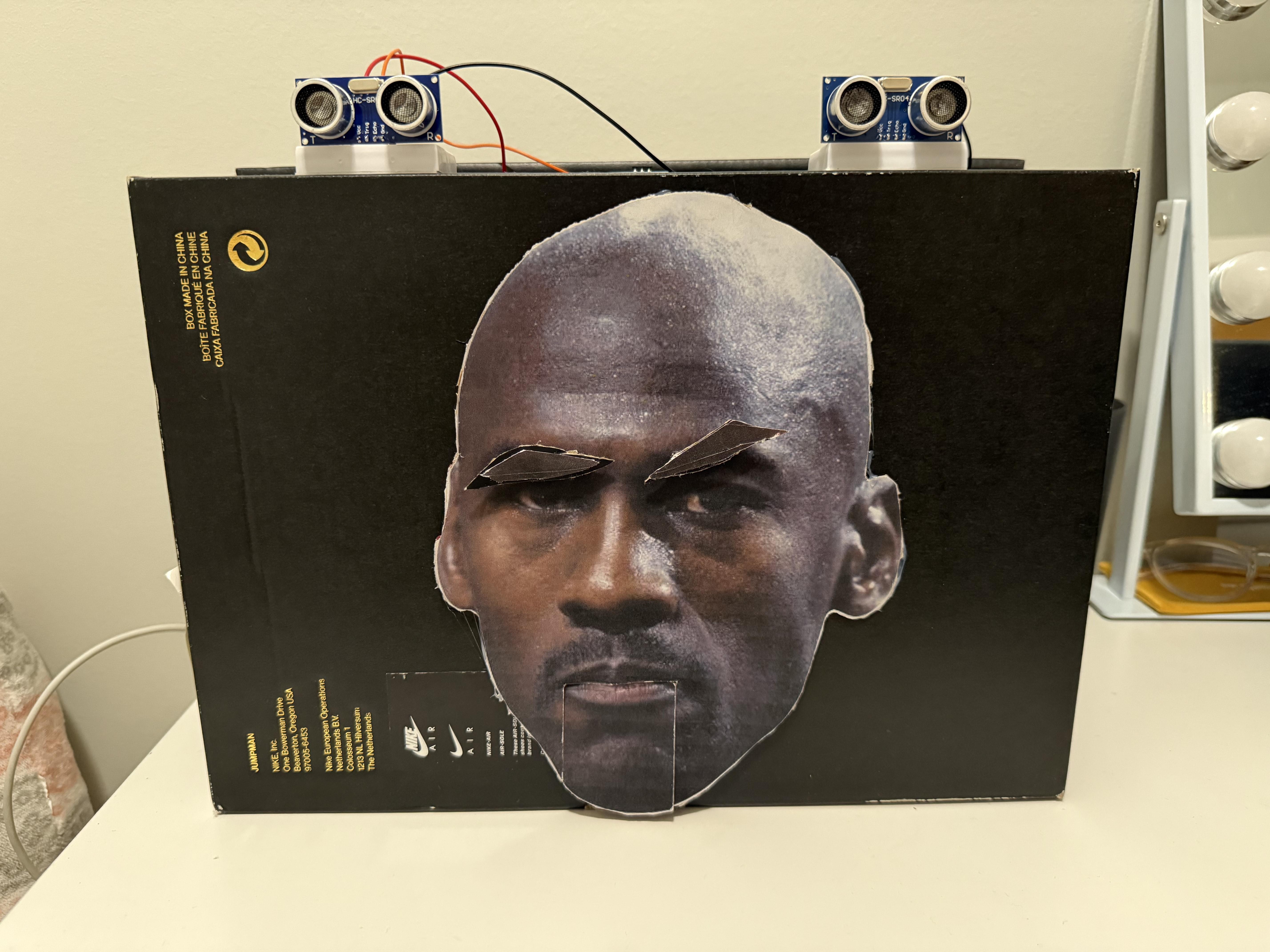
This animatronic project creates the face of Michael Jordan, one of the most iconic athletes of all time, using an Arduino-based mechatronic system. The animatronic interacts with users through sensor-activated eyebrow movements and a servo-driven talking mouth synced to famous Michael Jordan quotes. The system uses ultrasonic sensors, a touch sensor, and micro servos to simulate realistic expressions. The structure is built from lightweight cardboard and a shoebox housing, with a custom 3D-printed bracket used for the servo motor housing. The final build showcases how simple materials can be transformed into an expressive, interactive animatronic figure.
Supporting Structure


The supporting structure of the animatronic was built using a Jordan Brand shoebox, though any sturdy box would work. The bottom of the shoebox served as the front panel, where a printed image of Michael Jordan’s face was glued onto a cardboard piece and then hot glued in place. Inside the box, a small cardboard shelf was added to hold the eyebrow servos at the proper height. Holes were cut in the inner bottom surface for the eyebrow servo horns to pass through, along with a larger cutout for the moving mouth section. This simple structure provided a stable base for mounting the servos, sensors, and facial components.
Joint Design


The joint design used simple cardboard mechanisms for both the mouth and eyebrows. The lower jaw moved up and down using a popsicle stick that was glued to the servo horn, with the jaw piece glued to the end so the servo could open and close it smoothly. A 3D-printed bracket held the jaw servo in place behind the face. For the eyebrows, each cardboard eyebrow was mounted directly onto the servo horns of two SG90 servos sitting on an internal shelf, with small slots cut in the front panel for the horns to pass through. This lightweight setup provided clean, reliable movement with minimal materials.
Actuators
The animatronic uses three SG90 micro servos—one for the jaw and two for the eyebrows. Each servo was positioned inside the shoebox structure so that it aligned with its corresponding facial feature. The jaw servo was placed behind the mouth area using a stable mounting point, while the eyebrow servos were installed on the internal cardboard shelf added earlier. All servos were powered using an external 5V supply to ensure consistent torque and prevent Arduino resets. This layout kept the wiring organized and ensured the servos operated smoothly without interfering with each other.
Sensors

The animatronic incorporates three sensors to enable interactive responses: two ultrasonic sensors and one touch sensor. The ultrasonic sensors were mounted on the top of the box—one to the left and another to the right—to detect when a user approaches, which triggers the jaw movement and audio playback. The touch sensor was placed in between the ultrasonic sensors, a direct input for raising the eyebrows. Each sensor was wired to its own digital input pin on the Arduino, allowing the system to process interactions independently. This sensor setup created a responsive and intuitive user experience without requiring complex hardware.
Programming

The programming focused on creating two clear interaction modes—one triggered by distance sensing, and one triggered by touch. For the mouth interaction, the Arduino continuously reads the ultrasonic sensor values, and when a user is detected within a set range of 10cm, the jaw servo follows a timed movement pattern while an audio clip of Michael Jordan plays from the laptop. For the eyebrow interaction, the Arduino monitors the touch sensor; when pressed, both eyebrow servos lift briefly to create an expressive reaction before returning to a neutral position.
Downloads
The Final Product

.jpeg)
Lessons Learnt
During the build, several lessons became clear. The servos required a stable external power supply, as powering them directly from the Arduino caused resets and inconsistent motion. The cardboard structure also needed reinforcement to prevent flexing that affected alignment, and sensor placement proved important for reliable detection. For future improvements, the animatronic could use stronger or metal-gear servos for smoother movement, 3D-printed parts to replace cardboard joints, and a more advanced audio-mouth syncing method to create more realistic speech motion.