How to Make a 3D Printed Bust Statue From a Phone Scan
by lukaszlatuszekk in Workshop > 3D Printing
258 Views, 2 Favorites, 0 Comments
How to Make a 3D Printed Bust Statue From a Phone Scan
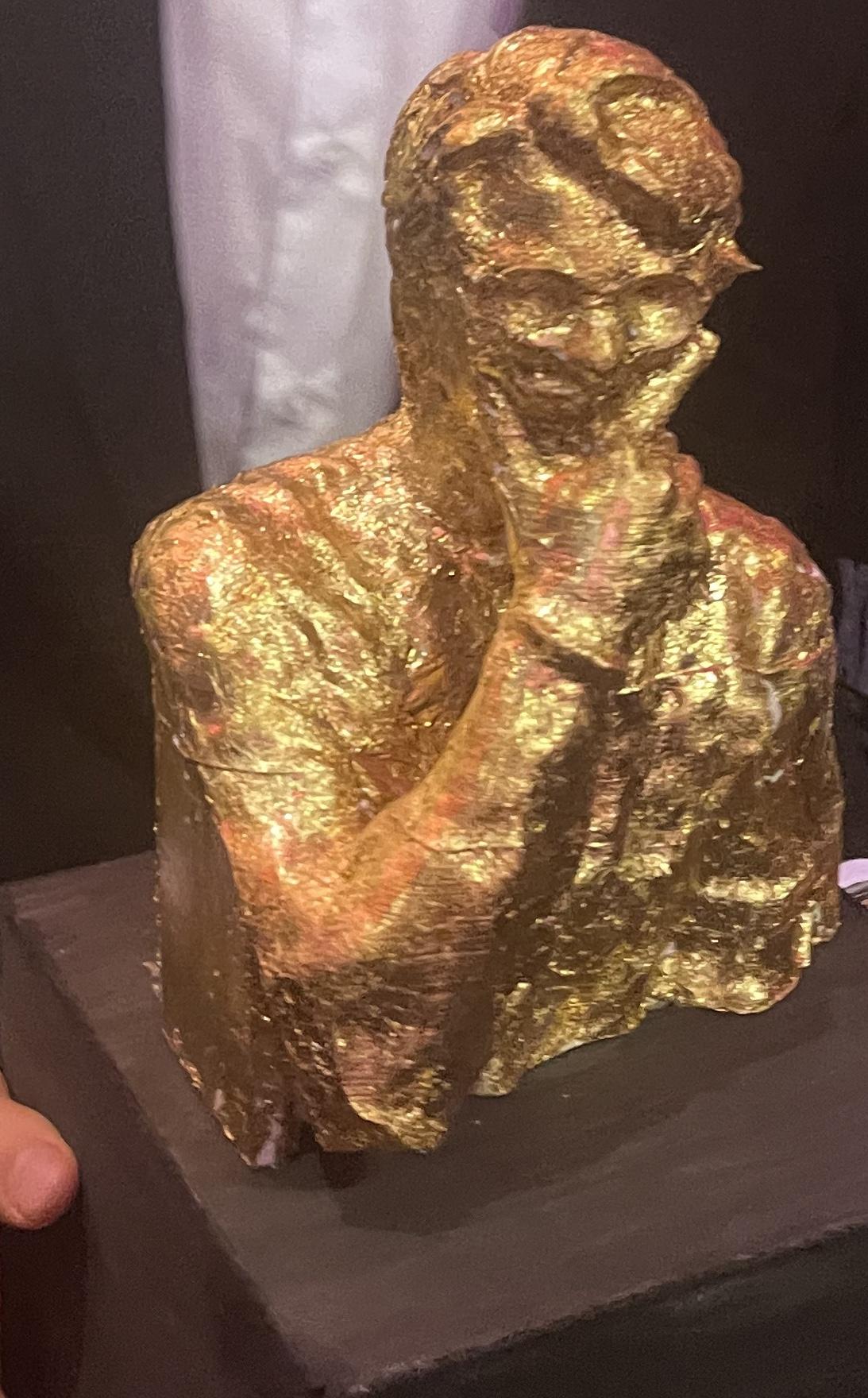
As a surprise gift for my friend, I decided to make a gold plated statue of his head. With the following steps, so can you! As I will describe my process with photos, and share my experience/advice if someone wanted to repeat this, because there are so many things I would do differently.
This was made in the following Process:
- Scanning
- Editing
- Printing
- Sanding
- Gold Leaf Plating/Finishing
Supplies
Video Camera
Phone camera is more than enough
3D Scanning Software
I used Polycam Free Trial License with an online file converter and I can recommend it
3D Editing Software
I used Rhino as Im familiar with it, but if you have cropping and mesh repair functions this is enough
3D Printer
I use an Artillery X2 printer
Sanding tools
I used sandpaper and a dremel but with some patience just the sandpaper should be enough
Coating/Finishing
I used tacky glue and brass leaf plating (I don't recommend), but you can make it look however you want!
Scanning

The first thing you need is a scan of whatever you want to print. In my case I was printing the head of my friend, so I needed to get a scan of his head
Note that if you want this to be a surprise gift, you must make the scanning seem like a normal/logical/fun thing to do for no reason as to not raise suspicion.
If youre making a scan with the Polycam app, this can be done directly in the app on your phone, or you can upload a video of what you want to scan into the app on your phone or computer. Be sure to scan slowly, not too close, not too far, and get the whole range of the head from under the chin to top of the head. Any unscanned areas will be blank in the model and will need to be fixed with your editing. Also try be sure that the subject of your scan is not moving or else there will be lots of noise in your model. In the end you should have a 3d model like the one shown in the image above.
For printing you need an STL file, however the free version of polycam does not support this. Instead you can export it for free in the format of a GLTF, and use a online file converter such as this converter here. With this STL you can for sure edit the model in almost any software.
Editing
I did my editing in Rhino, but probably almost any tool works as long as you have mesh editing features. Its important you know how you want the finished model to look before you start editing. I knew I wanted the print to have a flat back and bottom so that its easier to print, quicker to print, and more robust. You might also want the back to follow the front in a sort of plate like fashion, but if you're printing very large this will be very unstable when the printer moves and might also take up more material (because edges are heavy, infill is light).
The first step in editing that I took was removing any floating meshes, the scan might have seen something which was not the intended scan or some movement of your subject could have caused this too.
Next I looked for unnaturally extruding bits of mesh, I cropped these out or deleted the mesh cells.
Once the model surface looks how I want it, I repair the mesh to close up any holes made in cropping or unscanned bits. This fills the small holes but still leaves us with a flat mesh instead of a 3d object.
After this, finally I take the edge line of the mesh and project it down on the ground plane level to the bottom of the model. A mesh can be made between the edge line and the projected line to make the flat back of the statue. Another mesh is made inside the projected line as a base. When all meshes are combined, this is the final file.
Printing

The 3d printing is the most time consuming part of the process, fortunately its also the easiest (if everything goes right). In theory all you need to do is throw it in a slicer, hit print on your printer, and come back in many many hours. Unfortunately for me, things didn't go so smooth.
For the slicer I used Ultimaker Cura for no particular reason except that it was the first option that popped up when I searched for a slicer.
I used a 10% gyroid infill because I like the way the pattern looks, and 10% seemed to 'look right' in the slicer.
If everything goes right, in about 2 days, you should end up with a 3D printed bust statue!
In the image you see me printing half the statue, since it did go wrong for me with a layer line shift, so I had to start halfway and glue the 2 halves together.
Sanding
For a nice finish, sanding is great to get rid of layer lines or layer shift seams. This takes a lot of time and is not 100% necessary but its for sure worth it if you want a great finish. Don't go too crazy on the sanding though or else you might sand through the whole surface and expose the infill! We wouldn't want that after all that time printing...
Finishing Layer


The finishing layer for me used brass flake (was cheaper than gold) but unless this is a work method you're familiar with, I don't recommend it. This is difficult because the glue under the gold flake needs to dry, but with plastic on one side and metal on the other, theres no air for it to dry with. If you use superglue or some chemical based glue rather than water based, maybe this would work better.
If I was to do this again or if you would like to do this, I would most definitely recommend using gold spray paint, it would probably be equally as metallic looking while taking significantly less time and probably looking a lot better.
A plinth is a must have for a statue. I made this one with thin wood and painted it black, definitely not the prettiest solution, but we were in a rush to get it done that day. It would also be possible to 3d print the Plinth, to make it out of a solid piece of wood, or if you're feeling really fancy, you can put it on a rock which will also nicely lower the centre of gravity of the whole statue.
Done!
