ESP32 Turret: Face Tracking + Live Wi-Fi Stream
by gcorica in Circuits > Cameras
173 Views, 2 Favorites, 0 Comments
ESP32 Turret: Face Tracking + Live Wi-Fi Stream
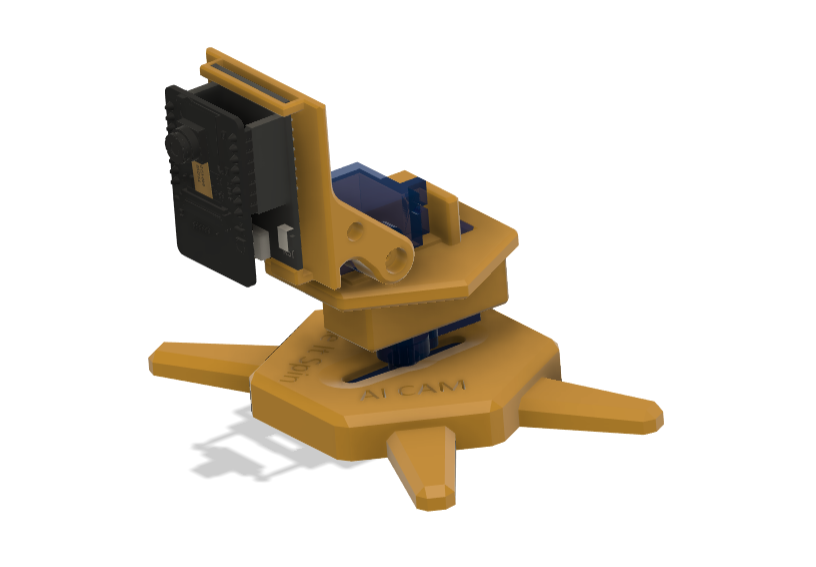

I built a tiny 3D-printed pan-tilt “robot eye” that can stream live video over Wi-Fi and (optionally) track a face by rotating to keep the target centered. It’s powered by two SG90 micro-servos (pan+tilt), an ESP32-CAM for video+detection, and an ESP32 dev board that drives the motion smoothly.
It’s part security camera, part robotics demo, and part why is my desk staring at me? For the web server screenshots, I’m Rick-rolling myself instead of showing my face… because privacy is cool and Rick Astley is eternal.
Make It Spin? The turret’s entire job is spinning, smoothly sweeping left/right while streaming video like a tiny Wi-Fi periscope.
Supplies


Parts
- 1x ESP32-CAM (AI Thinker) + MB programmer board
- 1x ESP32 dev board (ESP32-WROOM)
- 2x SG90 9g micro servos
- I used the screws that came with the servos
- 2x Micro USB cables
- 8x Jumper wires
Tools
- Arduino IDE
- 3D printer (I used my school’s FlashForge)
- Cura (Ultimaker Cura slicer)
- PLA filament
3D CAD+Printing the Turret


I designed the turret as a modular pan-tilt mount that:
- Mounts the double horn of a standard SG90 servo inthe base for pan
- A second SG90 mounted on the pan platform
- A camera mount, mounted on the single horn of the second servo
- camera mount sized for the ESP32-CAM module to slide in with no screws
- Everything is designed to be a majority press fit with as little extra hardware as possible
CAD workflow
- CAD software: Autodesk Fusion 360
- I pulled the servo + ESP32-CAM reference CAD models from Autodesk’s library/community resources (huge time saver and helps the fit be correct).
- Then I designed the bracket system around those models (clearances, screw holes, horn alignment).
Printing
- Material: PLA
- Printer: FlashForge (school printer)
- Slicer: Ultimaker Cura
- Recommended settings:
- 0.2 mm layer height
- 15–25% infill
- supports only where needed (I used three supports)
Designing around real CAD models makes the build repeatable. Anyone following this can print it and have the electronics fit without hot glue engineering, unless you want the hot glue aesthetic. No judgment, we've all been there.
Mechanical Assembly
- Install the pan SG90 onto the base mount
- Attach the pan platform to the pan SG90
- Install the tilt SG90 into the tilt bracket
- Attach the camera mount to the single horn of the tilt SG90
- Mount the ESP32-CAM to the camera mount
- Make sure the camera has clearance to tilt without hitting the frame
- Pass the wires behind to the breadboard
- Tip: You can use some tape to secure the wires and have them out of the way
Tip: Before powering anything, gently rotate through the full range to make sure it doesn’t bind.
Wiring (Do This or Servos Will Gaslight You)


Power rules
- SG90 servos need 5V power
- ESP32 logic is 3.3V
- The #1 rule: all grounds must be common
Wiring
Servo power
- Servo red --> 5V supply
- Servo brown/black --> GND supply
Servo signals ESP32-WROOM
- Pan signal --> GPIO 25
- Tilt signal --> GPIO 26
ESP32-CAM
- Powered via the MB board or 5V input
- Used for streaming video + optional detection
Code a - ESP32-CAM
What this code does
- Connects the ESP32-CAM to your Wifi.
- Starts a simple MJPEG video stream you can open in any browser.
- Open with "http://<your ip address>"
- Captures frames at QQVGA (160×120) for maximum speed.
- Runs face detection a few times per second.
- Computes the face center error:
- ex = faceX − centerX
- ey = faceY − centerY
- Applies a small deadband to reduce jitter (ignores tiny motion).
- Sends ex/ey/found to the turret over ESP-NOW at a steady update rate.
ESP32-CAM code (Upload using Espressif ESP32 board manager version 1.0.6)
- Board Name: AI Thinker ESP32-CAM.
- Edits to make: ssid, password, MAC address.
Downloads
Code B: ESP32 WROOM
What this code does:
- Connects the ESP32-WROOM to the same wifi as the ESP32-CAM.
- Attaches two SG90 servos using hardware.
- Listens for ESP-NOW packets containing ex/ey/found from the ESP32-CAM.
- Uses a proportional control loop:
- panTarget = pan − Kp*ex (mirrored, because you’re facing each other)
- tiltTarget = tilt − Kp*ey (can toggle if inverted)
- Applies smoothing so motion looks robotic, not twitchy.
ESP32-WROOM code (Upload using Espressif ESP32 board manager version 3.x)
- Board Name: your ESP32-WROOM dev board
- Important: Servos must have 5V power and a common ground with the ESP32.
- Edits to make: ssid, password.
Downloads
First Boot
.png)
Open:
- http://<IP>/ to see video + status
- http://<IP>/status to see just the tracking values (great for debugging)
For the screenshot, I pointed the camera at a Rick Astley video instead of my face.
- Keeping my privacy :)
- Excuse to rickroll my instructable
What to do on first boot:
- Power the servos from 5V, not from the ESP32.
- Tie servo GND to ESP32 GND (common ground).
- Upload Code A to the ESP32-CAM (version 1.0.6).
- Upload Code B to the ESP32-WROOM (version 3.x).
- Put both devices on the same 2.4GHz hotspot (this keeps ESP-NOW on the same channel).
- Open the Serial Monitor for the ESP32-CAM and copy the IP address.
- Go to the IP in your browser and confirm the stream loads.
Expected outcomes:
- ESP32-CAM Serial Monitor prints:
- IP: ...
- Wi-Fi Channel: ...
- The browser shows the live stream page
- /status updates and shows found, ex, ey
Troubleshooting
The turret won’t move at all
- Check servo power: SG90s need real 5V current
- Check common ground (servo GND and ESP32 GND must connect)
- Confirm both boards are on the same hotspot (channel match)
Stream works, but it stays 0
- Increase lighting
- Move closer to the camera
- Reduce JPEG quality number (fewer compression artifacts):
- try JPEG_QUALITY_NUM = 18
- Ensure mtmn_config.min_face = 40; is set (important at QQVGA)
It tracks but jitters
- Increase deadband to 10
- Reduce Kp to 0.04
- Increase smooth to 0.45
Results and Improvements

Results:
- Fully 3D-printed pan-tilt camera turret
- Live Wi-Fi video streaming to a browser
- Face-centered tracking using ESP32-CAM detection + ESP-NOW control
- Mirrored the pan so it behaves correctly when facing you
Improvements / Next Version Ideas:
- Add “search mode” (scan until face found)
- Add a battery for fully wireless operation
- Add cable routing
- Upgrade control to PID for smoother motion
- Add a “privacy mode” switch