Designing an Antweight Battlebot Using Autodesk Fusion!
by JoshuaJ1710 in Workshop > 3D Printing
472 Views, 6 Favorites, 0 Comments
Designing an Antweight Battlebot Using Autodesk Fusion!

Hey there! My name is Joshua, and I'm an undergraduate at the University of Kansas, where I’m currently pursuing a Bachelor of Science in Aerospace Engineering. I'm extremely excited to share this project with all of you! I’ve always been passionate about designing and building things, especially when it comes to tackling real-world engineering challenges and pushing the limits of creativity.
That passion really took shape during my four years in FIRST Robotics Competition (FRC). Being part of a team taught me how to approach complex problems with collaboration, precision, and innovation. From designing mechanisms to manufacturing parts, FRC provided me with hands-on experience in mechanical design under the intense pressure of competition deadlines. It was an incredible foundation that continues to inspire the way I approach engineering projects today.
Alongside robotics, I’ve also spent a couple of years working with 3D printing as a hobby. I love how it allows users to transform their own ideas into tangible parts, whether it’s prototyping mechanisms or creating custom components for personal projects. That experience has made me comfortable with CAD modeling, slicing software, and optimizing designs for easy and efficient printing.
This project, an antweight battlebot, is the culmination of those experiences. It’s lightweight, compact, and optimized for 3D printing and simple assembly. Each component was modeled to balance durability with ease of construction, so anyone can replicate or customize it without needing specialized tools or crazy skills with CAD software.
Combat robots can often be expensive and intimidating to build, especially for beginners. Professional-grade bots require advanced machining and costly materials, which can put them out of reach for many aspiring makers. That’s why I wanted to create something approachable, fun to build, affordable, and competitive enough to hold its own in matches.
I hope this Instructable helps fellow makers and enthusiasts dive into the exciting world of combat robotics. Thanks for checking it out, and I hope you enjoy building, battling, and experimenting with this design as much as I did!
Supplies

Materials Needed:
- Laptop/Computer
- CAD Software (Would highly recommend Autodesk Fusion for beginners and professionals! It's quite easy to learn, and the interface is extremely user-friendly!)
- Experience with CAD isn't required; however, it's extremely helpful!
- Autodesk Account
- A 3D Printer (I used an Ender 3 V2; it's a great starting printer, however, there are definitely better options on the market)
- PLA/ABS Filament (1x Roll)
- TPU Filament (1x Roll)
- Allen Key Set
- Adjustable Wrench
- Soldering Iron
- Electrical Tape
- Epoxy
- M2 2.5mm Heat Inserts (x15)
- M2 4mm Socket-Head Bolts (x15)
- M2 8mm Socket-Head Bolts (x4)
- M3 20mm Socket-Head Bolts (x3)
- M3 Shoulder Bolt (x1)
- M3 Nuts (x3)
- N20 Motors (x3)
- EMAX ECO 1404 3700KV Brushless Motor (x1)
- MALENKI Dual ESC and Receiver (x1)
- 20A Brushless ESC (x1)
- 2S 250mAh Lipo Battery (x1)
- FingerTech Lightweight Twist Hubs (x2)
- FingerTech Foam Wheels- 1" x 0.5" Thin (x2)
Optional Materials:
- CNC Machine
- 3mm Sheet of Selected Metal
- 4mm Sheet of Selected Metal
Link to Model:
Background

What is Battlebots:
BattleBots is a competitive robot combat event where teams design and build custom machines to fight in an arena. Each robot is equipped with unique weapons, armor, and drive systems, and matches are won by disabling the opponent or impressing the judges with control, aggression, and damage. Since its debut in 2000, BattleBots has become a global showcase of engineering creativity, blending mechanical design, electronics, and strategy into thrilling competitions that inspire makers and engineers around the world
What is the Antweight Class:
In the United States, the antweight class refers to combat robots weighing up to 1 pound (454 g). This makes them larger and more powerful than Europe's 150 g antweights, while still being small enough to remain affordable and beginner‑friendly. Antweights are often the entry point for new builders, since they allow for creative designs, 3D‑printed components, and accessible electronics without the high costs of heavier classes. Despite their size, these bots can deliver fast and exciting matches, serving as a great introduction to the world of combat robotics.
Inspiration


The inspiration for my robot came from a weapon style known as the hammersaw. Unlike traditional spinners or lifters, a hammersaw combines the downward striking motion of a hammer with the cutting action of a saw, creating a unique blend of impact and sustained damage. I first discovered this design through a YouTube video, and it immediately caught my attention because of how creative and effective it looked in battle. Watching the way the hammersaw could both smash into opponents and tear through their armor sparked the idea to adapt the concept into my own design.
Planning/Initial Design


Before getting into detailed modeling, I started this project the same way I approached early concepts during my four years in FRC: with Crayon CAD. This approach is all about quickly blocking out shapes, proportions, and relative lengths without worrying about fine details or exact dimensions. In Fusion, I sketched the general silhouette of the robot, the rough size of each major component, and how the hammersaw arm would sit within the frame. This loose, exploratory stage helped me lock in the overall layout and made the transition into fully‑defined CAD features much smoother.
Main Body


The main body was designed to house all the electrical components and serve as the structural backbone for the rest of the robot. I began by modeling the primary weapon arm mount, placing it slightly offset from the center to compensate for the motor and weapon that would be attached to one side of the arm. The mount includes an M3 thru hole for the shoulder bolt, which supports the dead axle setup and allows the weapon arm to pivot freely. I also added a small amount of clearance around the pivot area to ensure the arm could fall smoothly into place, accounting for the imperfections and variability of 3D printing tolerances. To reinforce the pivot point, I included extra offset and material around the shoulder bolt hole to improve strength and reduce the risk of cracking during impacts. Next, I added mounting towers along the inner walls to support future top cover attachments. I then designed the front fork mounts, which sit on either side of each fork and include M3 thru holes to allow bolts to pass through cleanly. Two of the forks are mounted symmetrically at the edges of the body, while the third is offset from the center to leave clearance for the weapon. I added a small gap in the rear wall to allow the weapon to rest in its starting position (lower). I integrated additional mounting holes into the upper edges of the walls to provide the top covers with more attachment points. For the left cover, I included four mounting locations, each sized appropriately for M2 heat inserts, with an extra 0.5 mm depth added to each hole to ensure proper seating. After that, I calculated the correct wheel height for 1″ wheels to maintain ground contact and added cutouts in the side walls to allow the N20 motors to pass through. I also added mounting holes in the rear wall for threaded inserts to secure the side armor. Using a gear center‑to‑center calculator, I determined the ideal location for the weapon motor, setting its height to 8 mm from the base to allow for clearance. I then added motor mounts for all three N20s, each consisting of a rectangular gearbox pocket and a slightly filleted rectangle for the motor body. A small lip on the rear side helps seat the motor securely and prevents movement. Beneath each motor, I incorporated zip tie holes, with fillets on the upper lip to help the ties wrap smoothly and sit flush. Lastly, I added sidewall extensions to cover the openings left by the side armor and fully encase the wheels, completing the enclosure and reinforcing the drivetrain protection.
Side Armor


The side armor was designed to provide robust protection for the robot’s wheels, which are essential for mobility and often a vulnerable target in combat. Many BattleBots include armor specifically to shield their wheels, since a direct hit from a spinning weapon, especially on foam tires, can be catastrophic. This armor mounts securely to the chassis at four distinct points. At the front, a single bolt fastens the leading edge of the armor and also serves as the mounting point for the front fork assembly. Along the side, two M2 x 4 mm bolts thread directly into heat‑set inserts embedded in the main body, creating a strong connection. A final M2 x 4 mm bolt secures the rear of the armor to the back of the chassis, again using heat inserts for durability. The geometry also includes a top cover over the wheel to block vertical strikes from overhead weapons. To give the part a clean, refined look, I incorporated multiple chamfers throughout the design, which soften edges and enhance the overall aesthetic. For the final version, this part is intended to be printed out of TPU, which is an excellent material for armor because it absorbs impacts, flexes instead of cracking, and helps dissipate energy from large hits, which is perfect for protecting delicate components like wheels. Altogether, the side armor forms a flexible yet durable shield that protects the drivetrain from multiple angles without interfering with movement or clearance.
Top Left Cover


The left cover was designed as a flat, functional panel to protect the internal components while still allowing easy access during assembly and maintenance. It includes four mounting holes near the corners that align with heat‑set inserts in the chassis, letting it bolt cleanly into place with M2 x 4mm bolts. Along one edge, a rectangular cutout provides clearance for wiring to pass through from the inside of the robot, and it also allows an Allen key to reach the shoulder bolt that secures the weapon assembly. The part was modeled to match the contour of the main body, ensuring a clean fit and consistent alignment with the rest of the robot’s shell.
Top Right Cover


The right cover was designed to mirror the left in overall shape and mounting strategy, serving as a protective panel for the opposite side of the robot’s main body. It features five mounting holes positioned to align with heat-set inserts in the chassis, allowing it to be secured with M2 x 4mm bolts for a consistent and reliable fit. A rectangular cutout along one edge provides clearance for wiring access, along with space to fit a wrench for the M3 nut, similar to the left cover, and helps maintain symmetry across the design. The part was also modeled to follow the contour of the main body, ensuring clean alignment and a flush fit with the surrounding components.
Weapon Arm


The weapon arm was designed to tie together the motor, geartrain, and weapon axle in a compact and reliable assembly. One side of the arm includes a thru hole for the shoulder bolt, since the weapon uses a dead‑axle setup, allowing the weapon to spin freely around a fixed bolt. The opposite side contains the mounting pattern for the EMAX ECO 1404 3700KV Brushless Motor, with a slight extrusion to give the M2 x 8 mm bolts enough clearance. The effective length from the pivot point to the motor mount is 71.25 mm, which helped determine the overall geometry and leverage of the weapon system. On the thru‑hole side, I needed to integrate a gear. Instead of using a typical spur gear, I chose a herringbone profile because it provides smoother meshing and eliminates axial thrust, which is ideal for a compact, high‑torque system. I generated the gear using an extension I found for Fusion on the Autodesk App Store. In terms of settings for the gear, it was created using the Sunderland gear standard, with a 4 mm thickness per side, a 0.75 mm module, and 32 teeth. The 32‑tooth count was chosen specifically to achieve a 2:1 gear ratio, since the smallest reliable driving gear I could generate without print or strength issues was 16 teeth. To create the full double‑sided herringbone shape, the gear was simply mirrored. I also added a small resting lip on the arm so the weapon has a stable point to sit against when it swings downward to strike an opponent. During this phase of designing, I also committed to the KU theme, so I added small stylistic details along the arm that subtly mimic the head of the Jayhawk, integrating the aesthetic directly into the design.
Weapon Gear


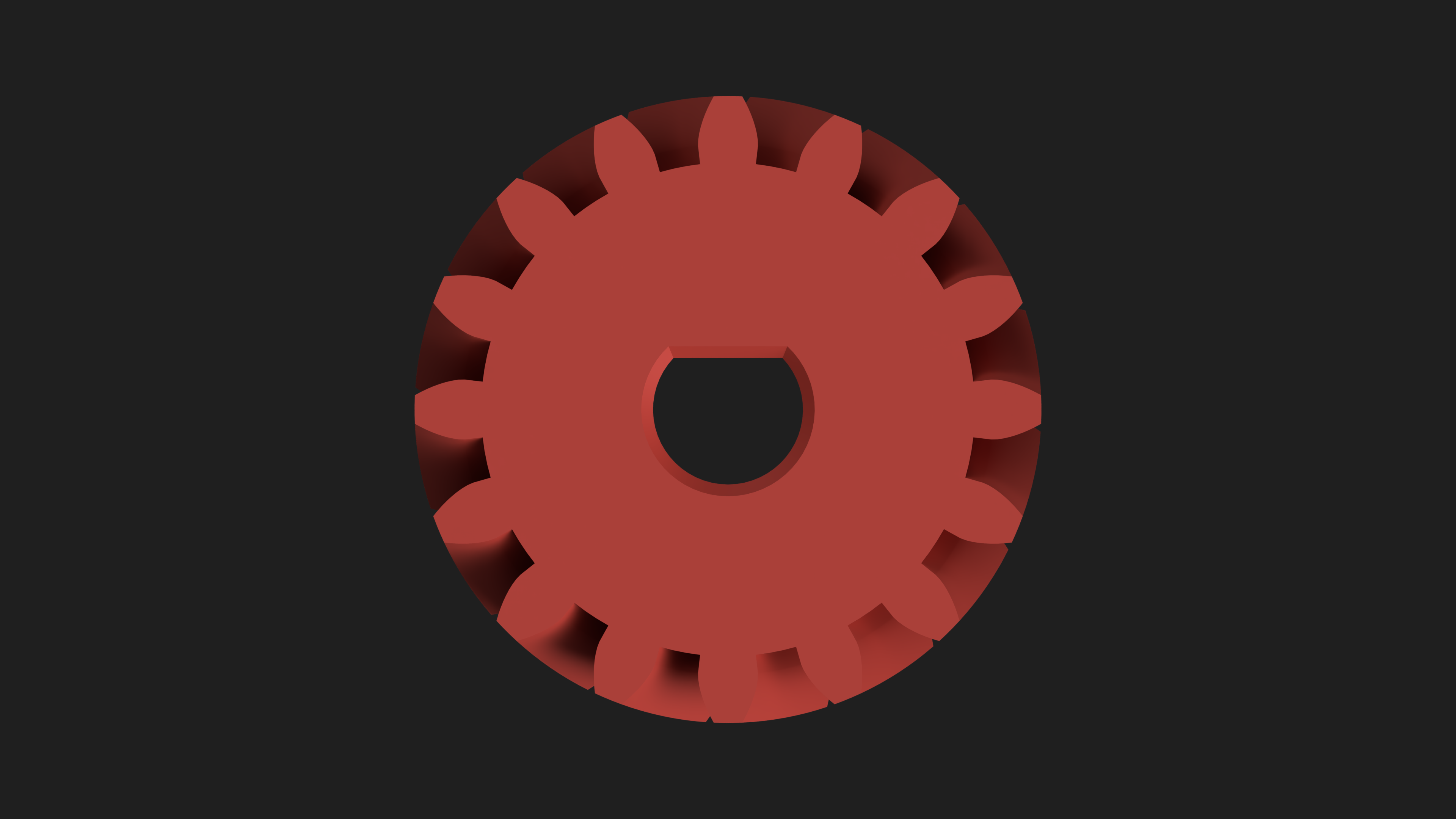
The weapon gear was designed to mount press-fit directly onto the N20 motor shaft, serving as the driving gear for the weapon geartrain. It features a 3 mm bore sized for the motor’s D-shaft, with a slight chamfer at the opening to make installation easier and reduce the chance of binding. The gear was generated using the Sunderland gear standard, with a 4 mm thickness per side, a 0.75 mm module, and 16 teeth, which was chosen specifically to achieve a 2:1 gear ratio when paired with the 32-tooth gear on the weapon arm. Like the arm gear, it uses a herringbone profile, and the final geometry was created using the same Fusion extension. Similarly, to create the full double‑sided herringbone shape, the gear was simply mirrored to achieve a total width of 8mm.
Weapon


The weapon went through several iterations as I explored different shapes commonly used in combat robotics. Builders often experiment with forms like pendulum‑style blades that swing a heavy mass outward for high‑impact hits, buckle shapes that create a broad striking face, S‑hook profiles that snag or redirect opponents, and reaper‑style blades with sweeping, aggressive curves. Each shape has its own distinct characteristics related to bite, durability, and spin‑up behavior. For this robot, I chose an asymmetrical shape, which is popular because it reduces vibration and allows more mass to be focused into one dominant striking surface. The final design is 3 mm thick, giving it enough rigidity for solid hits while keeping the weight within the antweight limit. Since I usually care a lot about aesthetics in my projects, I didn’t want the weapon to look like a generic bar. Once I decided on the Jayhawk theme to represent KU, the idea came naturally: shaping it to resemble the Jayhawk’s beak. The weapon is one of the most unique parts of any BattleBot, and designing it was probably the most fun part of this entire project.
Forks


The forks at the front of the robot were designed to improve control during engagement by helping catch and guide opposing bots into the weapon. Their primary purpose is to extend the robot’s reach and create a physical barrier that can wedge under or deflect incoming opponents. Front forks are also a common feature in many hammersaw‑style designs, since they help stabilize the opponent and keep them in the ideal position for a clean weapon strike. Each fork is 60 mm long with a 4 mm‑thick profile, giving it a sturdy, reliable shape, and the pointed tips help slide underneath other robots or bite into exposed edges. The center fork is intentionally offset from the middle to leave clearance for the weapon when it inevitably swings downward during a hit. All three forks are mounted on a single bolt, allowing them to pivot slightly on impact. This intentional flexibility helps reduce the load transferred to the chassis during hard collisions. Because the chassis sits at a slight angle due to the wheel geometry, the forks were modeled to remain flat relative to the floor, ensuring consistent ground contact and better control. While they can be 3D printed, it’s preferred to make them from a durable metal like titanium or steel so they can withstand repeated impacts and maintain their shape during matches.
Renders


I created all of the robot’s renders using Autodesk Fusion’s built‑in cloud rendering feature, which makes the process extremely simple. Rendering in the cloud let me view the robot in a more realistic environment with accurate lighting, shadows, and materials, giving me a clear sense of how the final design would look before moving on to printing and assembly.
Materials Used (Render Workspace):
Aluminum - Anodized Rough (Blue): Twist Hubs
Aluminum - Satin: Nuts
Brass - Matte: Heat Inserts
Coating- Black Oxide: Bolts
Plastic - Matte (Blue): Main Body, Side Armor, Top Covers
Plastic - Matte (Red): Weapon Arm
Polyurethane: Fingertech Foam Wheels
Powder Coat (Yellow): Forks, Weapon
Manufacturing

.png)
.png)
.png)
.png)
.png)

Most of this robot is designed to be easily manufactured using 3D printing, including the main body, weapon arm, side armor, top covers, and weapon gear. These parts can be printed in PLA for prototyping, but for the final version, it’s recommended to use ABS for better impact resistance and heat tolerance. The side armor is designed to be printed in TPU to provide flexibility and shock absorption, but my Ender 3 V2 can’t reliably print TPU or ABS, so those final parts will be printed later at my university. In the meantime, I’m using PLA prints (pictured above) at home to test fit, tolerances, and functionality while I wait for access to the machine shop during the second semester, when the final version of the robot will be completed. For the metal components, the primary weapon will be made from AR500 steel, while the forks will be cut from titanium. AR500 is significantly tougher and more impact‑resistant than titanium, which makes it ideal for a high‑energy weapon that needs to survive repeated hits. Titanium, on the other hand, is lighter and ideal for structural pieces like forks, but it can bend under the extreme shock loads that AR500 can withstand. That said, these parts don’t have to be made from premium metals. Aluminum or mild steel can work for testing or budget builds; however, if you have access to AR500 or titanium, I highly recommend using them for durability. There are also plenty of online machining services that can manufacture these parts if you don’t have tools available locally.
My Print Settings (This is a test print with PLA, so not the recommended settings for the final version):
- Nozzle: 0.4mm
- Layer Height: 0.2mm
- Infill: 5%
- Infill Type: Grid
- Top Shell Layers: 4
- Bottom Shell Layers: 3
- Perimeters: 3.
- Supports: No
- Brim: No
Electronics


.jpg)


The robot uses a simple, lightweight electronics setup built around three N20 gearmotors. Two 900 RPM N20 motors power the drivetrain, providing the bot with a good balance of speed and control. The third N20 motor, a 460 RPM version, drives the weapon arm, providing the slower, more controlled motion needed for the hammersaw mechanism. All three motors are connected to the MALENKI dual ESC and receiver, which handles both brushed motor control and radio input in one compact board. The weapon itself is powered separately by an EMAX ECO 1404 3700KV brushless motor paired with a 20A brushless ESC to spin the saw at high speed. Everything runs off a 2S 250 mAh LiPo battery, which supplies enough current for both the drive and weapon systems while keeping the robot within the 1‑lb antweight limit.
Assembly


.png)
The assembly for this robot is designed to be simple and reliable, with most of the structure coming together using standard hardware. The chassis includes integrated 3D‑printed motor mounts, and the N20 motors are secured using zip ties threaded through dedicated slots, which keeps them firmly in place while keeping the weight low. The rest of the robot is assembled using M2 bolts, with heat‑set inserts installed in the corresponding holes to provide strong, reusable threads in the printed parts. The weapon arm is secured using a shoulder bolt, and the AR500 blade is press‑fit onto the weapon motor shaft and then secured with epoxy to ensure it stays locked in place during impacts. For the drivetrain, I used FingerTech’s foam wheels paired with their matching hubs. The hubs slide onto the motor shafts, and the foam wheels press onto the hubs for a secure fit. Since FingerTech already provides a clear walkthrough of the wheel and hub assembly process, I’ve included a link to their video in this step so you can follow along with their official instructions. Once the main body is together, the side armor and top covers attach cleanly around the frame, and the titanium forks are the last parts to be added onto the main body using M3 bolts and nuts. I also created a Fusion 360 assembly animation to verify clearances and fit before building. Final assembly will happen during the second semester when I have access to my university’s machine shop and tools, but for now, I’m test‑fitting everything using 3D‑printed parts at home to confirm tolerances and ensure everything works as planned.
Reflection


Even though the robot isn’t fully built yet, the design process has already been a meaningful learning experience. Developing the CAD model, planning the electronics layout, and thinking through the manufacturing steps has helped me understand how each design choice affects the final robot. Working within the antweight weight limit pushed me to be intentional about materials, structure, and simplicity, and creating the assembly animation in Fusion gave me confidence that the design will come together smoothly once machining begins. As I continue 3D printing test parts at home and prepare to finish the build next semester, when I have access to my university’s machine shop, I’m excited to see the project move from a digital model to a fully functional robot.
I’ve also been working on another Fusion project alongside this one! It's a vehicle inspired by the movie Oblivion, and if you've seen the movie, you'll be able to recognize it instantly. The ship is already fully designed and is just waiting for its own instructable once this build is complete. If you haven’t seen Oblivion, it’s a fantastic sci‑fi film and well worth watching.
That's all for now! Thanks for reading, and I hope you have a great day!