Animatronic of Yoda

This project is an interactive animatronic figure of the famous character from star wars, Yoda. It features a moving mouth synchronized with his voice and hand that moves in response to user interaction. When a user walks close to a sensor, Yoda greets them and asks for an input, in this case, to press a button then his hand moves and the lightsaber attached to his hand lights up. The system is built around a single arduino uno and uses two servo motors, an ultrasonic sensor and 3d printed part for the lightsaber.
Supplies
To build this Yoda animatronic figure, you will need the following items:
- Elegoo starter kit - quantity: 1, unit price: $43
- Servo motor - quantity: 1, unit price: $1.90
- 2x4 wood - quantity: 1 ft, unit price: $3
- Total: $47.90
Note: the Elegoo starter kit comes with one servo so if you are working alone, you will buy one extra servo. The 2x4 price is for an 8-foot-long board.
Structure
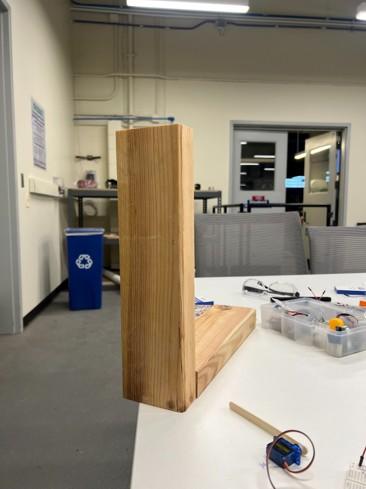
We used two small pieces of 2x4 lumber connected in an “L” shape to support the animatronic.We found scraps and cut them to an appropriate size of our Yoda. Then we predrilled holes at the edge of the 2x4s and connected the two pieces together with 2” construction screws. Two holes are then drilled into the structure to house the servo motors.
Choosing Character Appearance


We looked up an image of Yoda online and printed it. We overlay the picture we find onto the structure by gluing it. We tried to find a portrait where Yoda’s pose is not so complex. This is to make overlaying easier and avoid the need to modify the existing structure. Additionally, we thought it would be a fun idea to 3D print a light saber that would be held by Yoda.
Movement


This animatronic uses two interactive movements triggered by two different sensors:
A Greeting Movement (Ultrasonic Sensor + Mouth Servo + MATLAB/Arduino)
- The ultrasonic sensor detects a person within 1 ft.
- Arduino sends “play” over serial to MATLAB.
- MATLAB plays an AI-generated .mp3 audio created with www.fish.audio (‘Ready for battle, are you? Then press the button. May the force be with you”).
- During the audio, the mouth servo cycles between two angles to simulate a speech.
This forms the “first stage” of interaction, inviting the guest to the next interaction.
Lightsaber Movement (Button + Servo + LED + Buzzer)
- A pushbutton triggers a programmed animation.
- The light saber moves from 0° to 90°.
- The LED inside the lightsaber stays on.
- A buzzer plays a simulation of a lightsaber hitting an object, while the LED flickers with each “hit”.
- The lightsaber retracts, and the LED/Buzzer turns off.
- Animation resets for the next person.
Programming
Ultrasonic Greeting Logic
- Send a trigger pulse → measure echo time → calculate distance.
- If the distance is between 1 ft and not previously triggered:
- Send “PLAY” over serial.
- MATLAB listen for “PLAY” to play the audio
- Loop mouth servo between open/closed for the duration of the audio.
- Reset trigger when user leaves the range.
Lightsaber Logic
- Read button using INPUT_PULLUP
- If button pressed:
- Play buzzer noise and turn on the LED.
- Move the lightsaber back and forth
- Retract saber back to initial position
- Turn off
- Reset and wait for next press
Assembling and Final Product


After getting the preferred movement and the program ready, we assemble the system. The circuits are placed behind the structure. We place the ultrasonic sensor and button above the structure for easy access. The hand servo is placed in the hole to house the servo, and the mouth servo is placed behind the other hole which is linked to the mouth through the hole using a popsicle stick.
Lesson Learned/mistakes
The lesson we learned was to test the parts separately then combine together for the final product. This made it easier to make changes when there’s an error. One of the mistakes we made when assembling the final product was the mouth servo placement. We planned to place the mouth servo in the hole and not behind the hole but we found out that the mouth moves in a strange angle that is not intended and we tried to fix the code but the issue was not fixed so we placed it behind the hole and our problem was solved. Another mistake we made was we did not plan ahead where to place the button for easy access. We had to solder some long wires to the button so we can place it above the structure.
Suggestions for Improvement
One of the ways to improve this animatronic is to perfectly sync the mouth movement to the audio frequency. A more rigid tube can be used inside the lightsaber for better results, along with an LED strip to diffuse the light evenly. More dialogue and interactions can also be added.