AUTOMATIC PET FOOD DISPENSER
by GillesDM in Circuits > Raspberry Pi
1235 Views, 3 Favorites, 0 Comments
AUTOMATIC PET FOOD DISPENSER

Ever felt like wasting too much time feeding your pet? Ever had to call someone to feed your pets while you were on a holiday? I have tried to fix both these issues with my current school project: Petfeed!
Supplies
Raspberry Pi 3b
Bar Load Cell (10kg)
HX711 Load Cell Amplifier
Waterlevel Sensor (https://www.dfrobot.com/product-1493.html)
Ultrasonic Proximity Sensor
LCD 16-pins
2x stepper motor 28byj-48
2x stepper motor driver ULN2003
Wiring
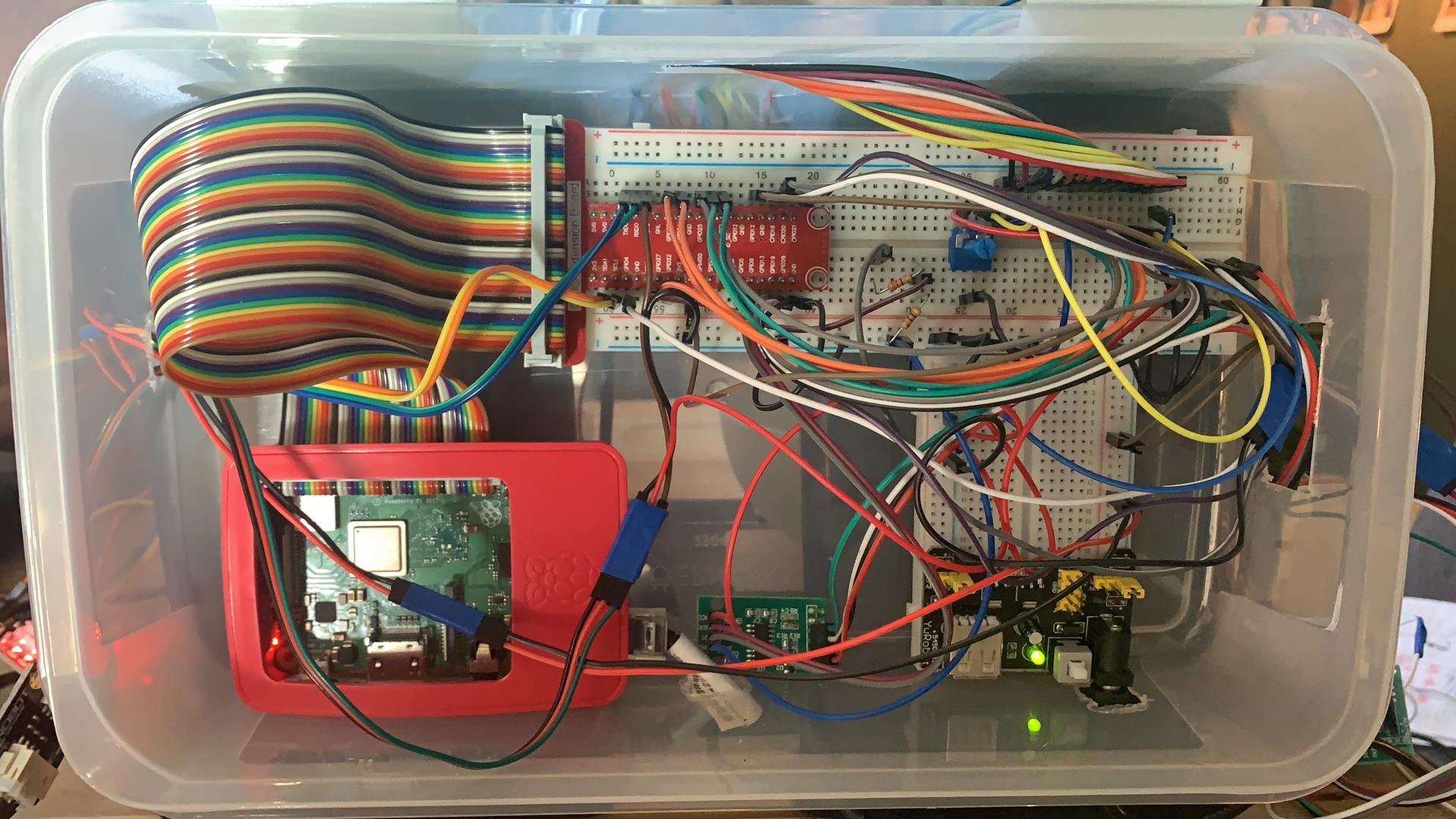
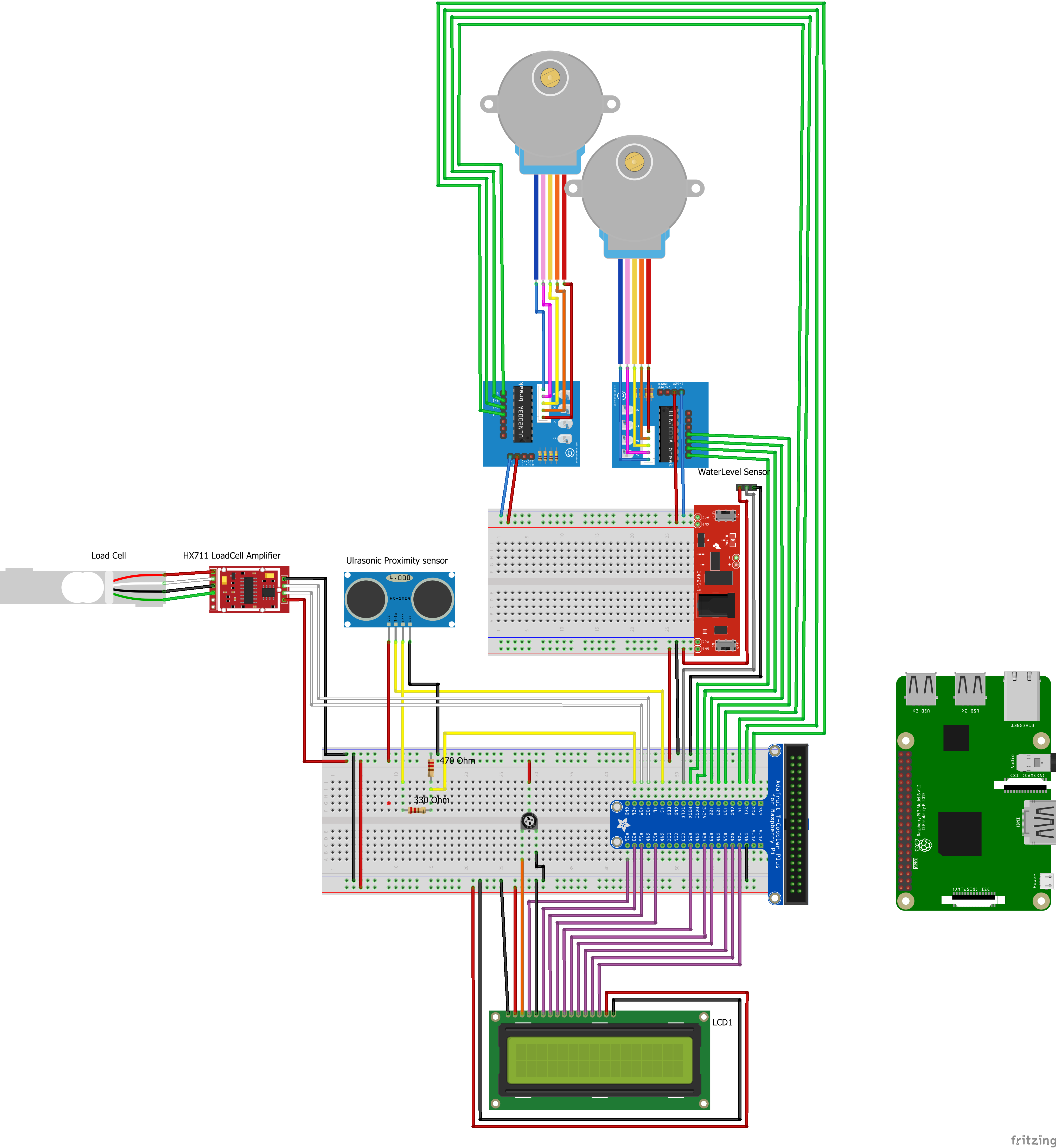
lots of cabling here. Get out your jumper cables and start pinning!
Make Your Load Cell Usable
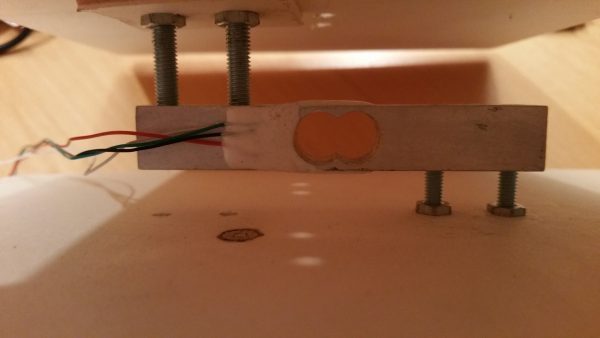
to use the load cell, we first need to attach it to two plates: a bottom plate, and a plate on which we will weigh our food.
The screws you need are a pair of M4 screws with matching bolts and a pair of M5 screws with matching bolts. I used a small drill to make the holes.
(pic: https://tutorials-raspberrypi.com/digital-raspberry-pi-scale-weight-sensor-hx711/)
Normalised Database
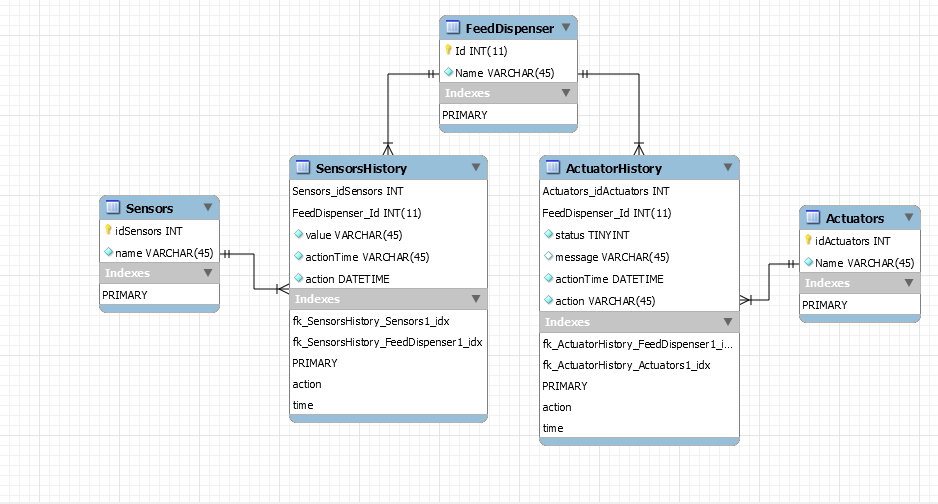
data from our sensors has to be saved in a database. For the python files to connect to the database: see below.
then you also need a config file:
[connector_python]<br>user = *yourusername*
host = 127.0.0.1 #if local
port = 3306
password = *yourpassword*
database = *yourdb*

[application_config]
driver = 'SQL Server'
Coding the Load Cell
import RPi.GPIO as GPIO<br>import threading
import time

from hx711 import HX711
from helpers.stepperFood import StepperFood
from helpers.LCDWrite import LCDWrite
from repositories.DataRepository import DataRepository <br>
After importing all of our libraries (note, we're using the HX711 Library to drive the load cell) we can start writing our actual code
TARRA_CONSTANT = 80600
GRAM_CONSTANT = 101
For finding out our constants, first set TARRA_CONSTANT = 0 and GRAM_CONSTANT = 1.
Next we need to find out the value our load cell reads when theres nothing being weighed. This value will be TARRA_CONSTANT.
As for GRAM_CONSTANT, simply take an object you know the weight of (i used a pack of spaghetti's), weigh it and divide the load cell readout with the actual weight of the object. For me this was 101.
class LoadCell(threading.Thread):
    def __init__(self, socket, lcd):
        threading.Thread.__init__(self)
        self.hx711 = HX711(
            dout_pin=5,
            pd_sck_pin=6,
            channel='A',
            gain=64
        )
        self.socket = socket
        self.lcd = lcd
here we initialize the LoadCell class and map the pins.
    def run(self):
        try:
            while True:
                self.hx711.reset()   # Before we start, reset the HX711 (not obligate)
                measures_avg = sum(self.hx711.get_raw_data()) / 5
                weight = round(
                    (measures_avg - TARRA_CONSTANT) / GRAM_CONSTANT, 0)
                print("weight: {0}".format(weight))
                DataRepository.insert_weight(weight)
                data_weight = DataRepository.get_data_sensor(3)
                historyId = data_weight["SensorsHistory"]
                db_weight = data_weight["value"]
                actionTime = data_weight["actionTime"]
                self.socket.emit('data_weight', {
                    "id": historyId, "Weight": db_weight, "Time": DataRepository.serializeDateTime(actionTime)})
                print("zou moeten emitten")
                writeWeight = "weight: " + str(db_weight)
                msg = "PETFEED"
                LCDWrite.message()
                if int(db_weight[:-2]) <= 100:
                    StepperFood.run()
		time.sleep(20)


        except Exception as e:
            print("Error with weighing" + str(e))
Coding the Water Sensor
import time<br>import threading
from repositories.DataRepository import DataRepository
from RPi import GPIOGPIO.setmode(GPIO.BCM)
GPIO.setwarnings(False)

GPIO_Water = 18
GPIO.setup(GPIO_Water, GPIO.IN)

class WaterSensor(threading.Thread):
    def __init__(self, socket):
        threading.Thread.__init__(self)
        self.socket = socket
        self.vorige_status = 0

def run(self):
        try:
            while True:
                water = self.is_water()
                print(water)
                status = water["status"]
                action = water["action"]
                DataRepository.insert_water(str(status), action)
                data_water = DataRepository.get_data_sensor(2)
                historyId = data_water["SensorsHistory"]
                value = data_water["value"]
                if value == "0":
                    value = "te weinig water"
                else:
                    value = "genoeg water"
                actionTime = data_water["actionTime"]
                self.socket.emit('data_water', {
                    "id": historyId, "value": value, "Time": DataRepository.serializeDateTime(actionTime), "action": action})
                time.sleep(5)

	except Exception as ex:
            print(ex)
            print('error bij watersensor')

    def is_water(self):
        status = GPIO.input(GPIO_Water)


        if self.vorige_status == 0 and status == 1:
            print('water gedetecteerd')
            sensorData = {"status": status, "action": "water gedetecteerd"}
            self.vorige_status = status
            status = GPIO.input(GPIO_Water)

        if self.vorige_status == 1 and status == 1:
            print('water aanwezig')
            sensorData = {"status": status, "action": "water aanwezig"}
            status = GPIO.input(GPIO_Water)

        if self.vorige_status == 1 and status == 0:
            print('water weg')
            sensorData = {"status": status, "action": "water weg"}
            self.vorige_status = status
            status = GPIO.input(GPIO_Water)

        if self.vorige_status == 0 and status == 0:
            print('startpositie')
            status = GPIO.input(GPIO_Water)
            sensorData = {"status": status, "action": "startpositie"}
        return sensorData
Coding the Proximity Sensor
import time<br>import threading
from repositories.DataRepository import DataRepository
from RPi import GPIO

GPIO.setmode(GPIO.BCM)
GPIO.setwarnings(False)

GPIO_Trig = 4
GPIO_Echo = 17

GPIO.setup(GPIO_Trig, GPIO.OUT)
GPIO.setup(GPIO_Echo, GPIO.IN)

def current_milli_time(): return int(round(time.time() * 1000))

class UltrasonicSensor(threading.Thread):
    def __init__(self, socket):
        threading.Thread.__init__(self)
        self.socket = socket

    def run(self):
        try:
            last_reading = 0
            interval = 5000
            while True:
                if current_milli_time() > last_reading + interval:
                    dist = self.distance()
                    print("Measured Distance = %.1f cm" % dist)
                    DataRepository.insert_proximity(dist)
                    data_prox = DataRepository.get_data_sensor(1)
                    historyId = data_prox["SensorsHistory"]
                    prox = data_prox["value"]
                    actionTime = data_prox["actionTime"]
                    self.socket.emit('data_proximity', {
                        "id": historyId, "Proximity": prox, "Time": DataRepository.serializeDateTime(actionTime)})
                    last_reading = current_milli_time()

        except Exception as ex:
            print(ex)

    def distance(self):
        # set Trigger to HIGH
        GPIO.output(GPIO_Trig, True)

        # set Trigger after 0.01ms to LOW
        time.sleep(0.00001)
        GPIO.output(GPIO_Trig, False)

        StartTime = time.time()
        StopTime = time.time()

        # save StartTime
        while GPIO.input(GPIO_Echo) == 0:
            StartTime = time.time()

        # save time of arrival
        while GPIO.input(GPIO_Echo) == 1:
            StopTime = time.time()

        # time difference between start and arrival
        TimeElapsed = StopTime - StartTime
        # multiply with the sonic speed (34300 cm/s)
        # and divide by 2, because there and back
        distance = (TimeElapsed * 34300) / 2

        return distance
Coding the Stepper Motors
import RPi.GPIO as GPIO<br>import time
import threading

GPIO.setmode(GPIO.BCM)
GPIO.setwarnings(False)

control_pins = [12, 16, 20, 21]

for pin in control_pins:
    GPIO.setup(pin, GPIO.OUT)
    GPIO.output(pin, 0)

halfstep_seq = [
    [1, 0, 0, 0],
    [1, 1, 0, 0],
    [0, 1, 0, 0],
    [0, 1, 1, 0],
    [0, 0, 1, 0],
    [0, 0, 1, 1],
    [0, 0, 0, 1],
    [1, 0, 0, 1]
]

class StepperFood:
    # 512 is 1 keer rond

    def run():
        for i in range(512):
            for halfstep in range(8):
                for pin in range(4):
                    GPIO.output(control_pins[pin], halfstep_seq[halfstep][pin])
                time.sleep(0.001)

        for pin in range(4):
            GPIO.output(control_pins[pin], 0)
This code is reusable for the other stepper motor, just set the control pin numbers to their repective pins and rename the class to StepperWater:
Coding the LCD
Lots of code, but we're almost done.
The LCD class is included as file LCD.py
from helpers.LCD import LCD

E = 26
RS = 25

D0 = 19
D1 = 13
D2 = 24
D3 = 22
D4 = 23
D5 = 8
D6 = 7
D7 = 10

lcd = LCD(E, RS, [D0, D1, D2, D3, D4, D5, D6, D7])

class LCDWrite:

    def message(msg):
        try:
            print("try")
            lcd.init_LCD()
            lcd.send_instruction(12)
            lcd.clear_display()
            lcd.write_message(msg, '1')
        except:
            print("error LCDWrite")
Downloads
The End
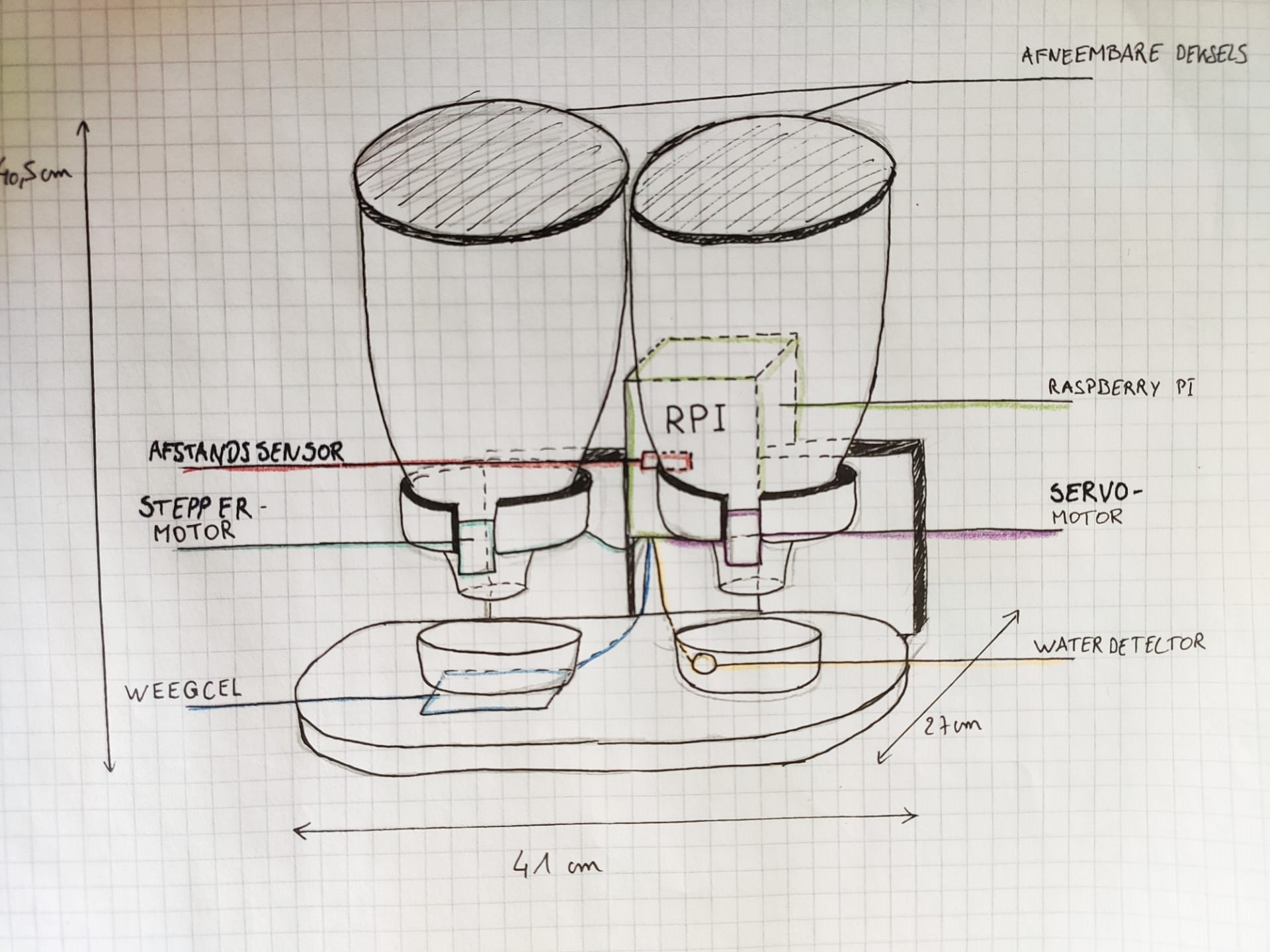
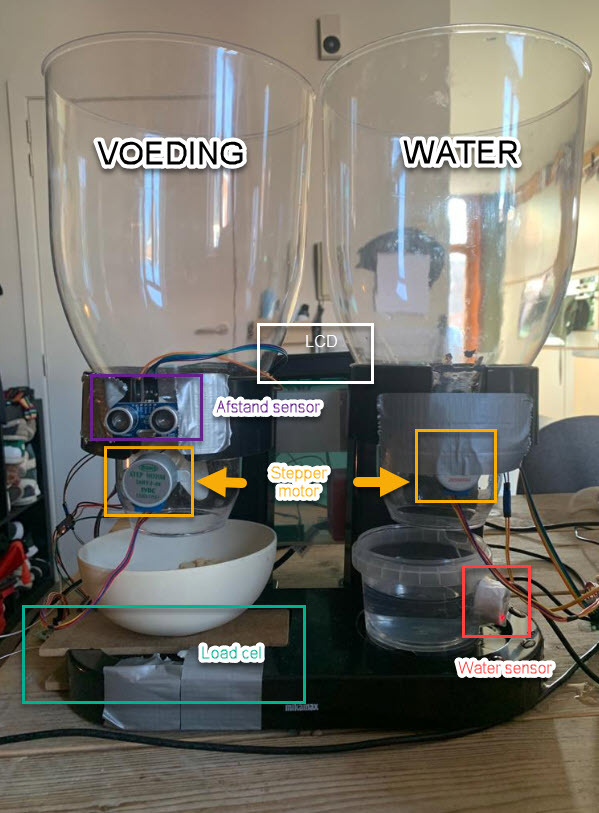
final result: how we drew it up vs. how it ended up.